
An AI receptionist for a small business answers the calls your team can’t get to, using the same information your staff would give: services, opening hours, the prices you publish, and your booking rules. It captures each caller’s details, books within your calendar settings, and flags anything that needs a person.
This guide covers which calls to hand over first, how to set up routing and keep your number, what to track in the first weeks, and what it costs. Details about InsertChat’s AI receptionist are current as of October 2026.
What does a small business need from call answering?
A small business needs every caller to leave with an answer, a booked time, or a clear next step. It also needs a written record of each call, so nothing depends on someone’s memory, and a fast path to a person for urgent or sensitive calls.
Calls rarely arrive at a convenient moment. The owner is with a client, a technician is under a sink, the front desk is checking someone in, or the office closed an hour ago. An AI receptionist covers those moments by doing five jobs:
- Answer accurately: hours, location, service area, services, and published prices, given the same way on every call.
- Capture details once: the caller’s name, number, and reason for calling, so nobody has to call back just to ask what the caller wanted.
- Book within your rules: open times from your real calendar, with the buffers and notice your work needs.
- Route the hard calls: emergencies, complaints, and custom quotes, flagged for your team with the context attached.
- Leave a record: a transcript and a short summary of each call, so the next morning starts with a list you can work through.
In InsertChat, every call lands in the shared inbox with its transcript and AI summary, attached to the caller’s contact record. The same assistant can answer website chat, text messages, email, and WhatsApp from the same knowledge, which helps when a customer calls on Monday and texts on Tuesday.
Which calls should you automate first?
Automate the calls that are frequent, predictable, and answerable from written information: questions about hours and services, new bookings, and calls that arrive after hours or while everyone is busy. Keep calls that need judgment, negotiation, or professional advice with a person.
To find them, look back over a couple of weeks of call notes or your phone log and write down why each person called. Then sort the reasons:
| Call type | Example | Where to start |
|---|---|---|
| Questions with a written answer | “Are you open Saturday?” | The AI answers from your knowledge |
| New bookings | “Do you have anything Thursday afternoon?” | The AI offers open times and books within your rules |
| Changes to its own bookings | “Can I move my appointment to next week?” | The AI reschedules or cancels appointments it booked |
| After-hours and overflow calls | A caller at 8 p.m., or one nobody could pick up | The AI answers, collects details, and your team follows up |
| Price questions | “What do you charge for a brake inspection?” | The AI gives published prices; custom quotes go to a person |
| Urgent problems | “Water is coming through the ceiling.” | The AI reads your safety steps and flags the call |
| Complaints, disputes, and advice | A billing dispute or a question for a professional | A person, through your handoff rules |
Start with one or two rows, often after-hours calls and routine questions, and add booking once your test calls sound right. That order lets you check the assistant’s knowledge before it can change your calendar.
The sort looks different in every trade. Industry pages walk through it for plumbing, HVAC, salons, auto repair, and law firms, and the industries overview lists the rest.
How do you set up an AI receptionist for a small business?
Set it up in seven steps: add your knowledge, choose a voice and greeting, pick a routing mode, decide which callers it answers, set booking rules, write handoff rules, then connect your number and test. Knowledge comes first because the assistant can only answer as well as the information behind it.
- Add your knowledge. Include your website pages, service menu, published price list, service area, opening hours, and policies for cancellations and deposits. InsertChat reads website pages, PDFs, Word files, spreadsheets, scanned images, audio and video files, plain text, and question-and-answer pairs. Write your emergency safety steps too, such as “leave the building and call 911.” The knowledge guide covers what to include.
- Choose a voice and greeting. Pick one of 10 voices and write a greeting of up to 200 characters that names the business and says what the caller can do, for example: “Thanks for calling Bramblewood Auto. I’m the shop’s AI assistant. I can answer questions, book a service visit, or pass a message to the team.” The assistant answers in the language the caller speaks.
- Pick a routing mode. Decide when the AI answers: always, after hours, or when your team doesn’t pick up. The next section helps you choose.
- Choose which callers it answers. Pick everyone, only callers who aren’t saved contacts, or only saved contacts. Calls outside your choice go to the team number in your call routing; with no team number set, they end without an AI answer.
- Set booking rules. Connect the built-in calendar, Google Calendar, Outlook, Calendly, or Cal.com in scheduling. Then set appointment length (15 to 120 minutes), buffers, minimum notice of up to 48 hours, a booking window of up to 90 days, and how many times to offer, from two to five. Customers can get reminders by text or email 72 and 24 hours before.
- Write handoff rules. Keep the five default rules, add topics like emergencies, custom quotes, and billing disputes, and choose which teammates get emailed. The human handoff guide explains each setting.
- Connect your number and test. Forward your existing number or use an InsertChat number, as described below, and place test calls before any customer reaches the assistant.
For the test calls, act like your customers. Ask something routine, ask something your knowledge doesn’t cover, book a time and move it, ask for a person, and describe an emergency. Then open the inbox and check each summary, the contact details, and which calls were marked needs-you.
Which routing mode fits a small business?
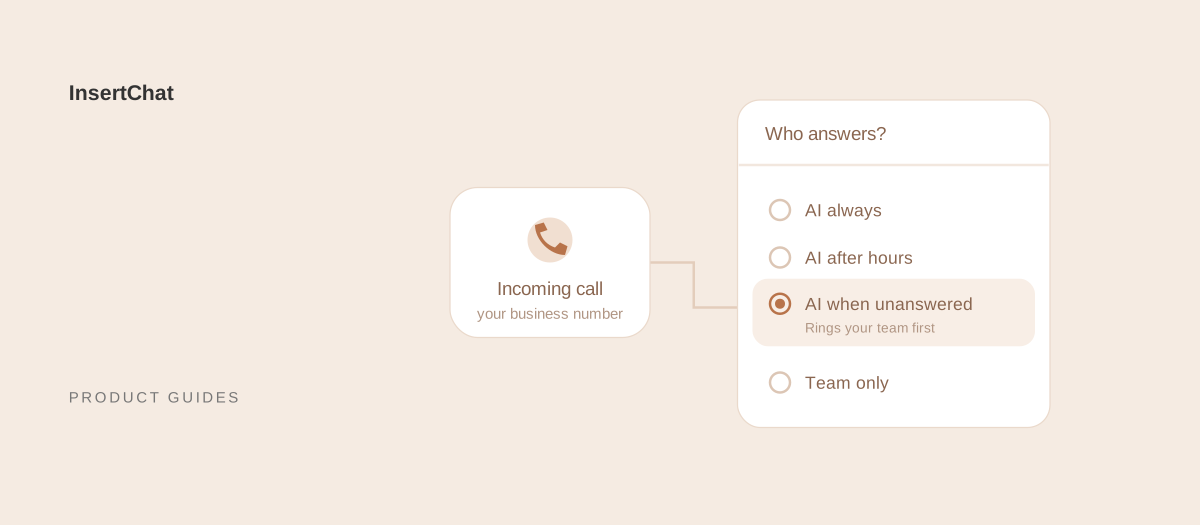
Choose “AI when unanswered” if your team answers most calls today and you want help only with the ones that slip through. Choose “AI after hours” if daytime calls are covered but evenings and weekends aren’t. Choose “AI always” if nobody can reliably pick up, such as a one-person business that works on site.
Here is what each mode does in InsertChat:
- AI always: the assistant answers every call to the number.
- AI after hours: you set weekly opening hours and a time zone, including overnight shifts. During those hours, calls ring your team’s number; outside them, the AI answers.
- AI when unanswered: calls ring your team’s number for 5 to 60 seconds, then the AI picks up. If a call reaches a staff voicemail box, it goes back to the assistant.
- Team only: calls go to your team’s number, and the AI doesn’t answer.
Two settings deserve their own test call. Keep the ring time shorter than the delay before your own voicemail picks up, so callers don’t hear a mailbox greeting first. And ring a mobile or direct line rather than the business number you forward to InsertChat, or the call can loop back. When your phone rings this way, the caller ID shows your InsertChat number, so save it under a name your team will recognize.
Caller scope works on top of any mode. A business with many regulars can let the AI answer only callers who aren’t saved contacts, so known customers go to the team number. Test with one phone that is saved as a contact and one that isn’t. The after-hours answering page covers hours-based routing in more detail.
How do you keep your business number?
In the US and Canada, keep your business number and forward calls to InsertChat. Elsewhere, use a local or toll-free InsertChat number where one is available. Number porting is not offered.
Forwarding runs through your phone provider. During setup, InsertChat gives you a private routing number. You forward your business line to it with your provider’s dial code or portal setting, and InsertChat places a verification call to confirm that calls arrive. Keep the routing number private, because customers should keep dialing the number on your website, listings, and signs.
Depending on your provider, you can forward every call, or only the calls nobody answers and the calls that arrive while the line is busy. The second option keeps your desk phone ringing as it does today and sends only the missed calls to InsertChat. The call forwarding guides list the steps for common US and Canadian providers.
Each paid plan includes one phone number. A second number, for a new location or a campaign line, costs $10 per month. Your phone provider may also count forwarded calls against your plan, so check with them before you switch.
What should you measure in the first weeks?
In the first weeks, read the calls and track a few counts you can compare week to week: how many calls the AI answered and when, how many it marked needs-you and why, which questions it couldn’t answer, which bookings needed fixing, and how quickly your team followed up. Your own first weeks become the baseline, so compare against yourself rather than outside benchmarks.
- When calls arrive: if the AI picks up many calls during opening hours, revisit the ring time or who is on the phones.
- Why calls were handed off: frequent requests for a person suggest the greeting or the first answer isn’t working, while uncertain answers point to missing knowledge.
- Unanswered questions: add the missing information, wait for processing, and ask the same question again in a test call.
- Bookings: check that each appointment has the right day, length, and location, plus the details your team needs.
- Follow-up time: the assistant tells callers your team will follow up, so measure how long that takes against the timeframe you wrote in its knowledge.
- Early hang-ups: read the transcripts of calls that ended right after the greeting or where callers repeated themselves.
Every plan includes the Today view, which shows daily metrics, what the assistant handled, upcoming appointments and tasks, and a needs-you queue with handoffs, missed calls, and items waiting for approval. Scale and Enterprise add conversation analytics and reports that group conversations by topic. If you publish a separate number on an ad or a flyer, each contact shows the number called as its lead source.
When should a person take over?
A person should take over when the caller asks for one, the assistant isn’t sure of the answer, it can’t resolve the request after repeated attempts, the caller is upset, or the request involves a sensitive action. Add your own topics on top, such as emergencies, custom quotes, complaints, billing disputes, and anything that needs medical, legal, or financial advice.
InsertChat does not transfer live calls. When a call needs your team, the assistant collects the details, marks the conversation needs-you, emails the teammates you chose, and tells the caller your team will follow up. A caller who asks for a callback gets a confirmation by text or email after the call. For emergencies, it reads the safety steps you wrote and raises an urgent alert.
If your callers expect a person first, use “AI when unanswered” so your phone rings before the assistant does. Write a follow-up promise your team can keep, such as “We return calls by 10 a.m. the next business day,” and put it in the assistant’s knowledge.
Bring people back in when the pattern shifts, too. If more and more calls end in needs-you, the assistant is taking calls it isn’t equipped for, so move those call types to your team or improve the knowledge behind them. A new service, a price change, or a busy season is a good moment to review its answers with the staff who know them.
How much does an AI receptionist cost a small business?
InsertChat’s Pro plan is $98 per month and includes one phone number, 5,000 monthly credits, three AI assistants, and three team seats. Calls use credits and round up to whole minutes with a one-minute minimum, so your usage depends on how many calls the AI answers and how long they run.
A few other details shape the bill:
- Extra numbers: $10 per month each, beyond the one included.
- Messaging: SMS, WhatsApp, and other connected services can carry their own charges.
- Annual billing: a year paid upfront costs ten monthly payments.
- Larger plans: Growth is $198 per month with 10,000 credits, Scale is $498 with 25,000 credits and conversation analytics, and Enterprise starts at $998 with 50,000 credits. Enterprise is the plan that can sign a Business Associate Agreement (BAA), which matters if calls involve protected health information.
The AI receptionist cost guide compares pricing models across the market and walks through an estimate you can redo with your own numbers. To estimate your own usage, open the usage estimator on the pricing page.
To see calls, bookings, and handoffs before you set anything up, try the InsertChat demo, which uses a fictional business and sample data.