
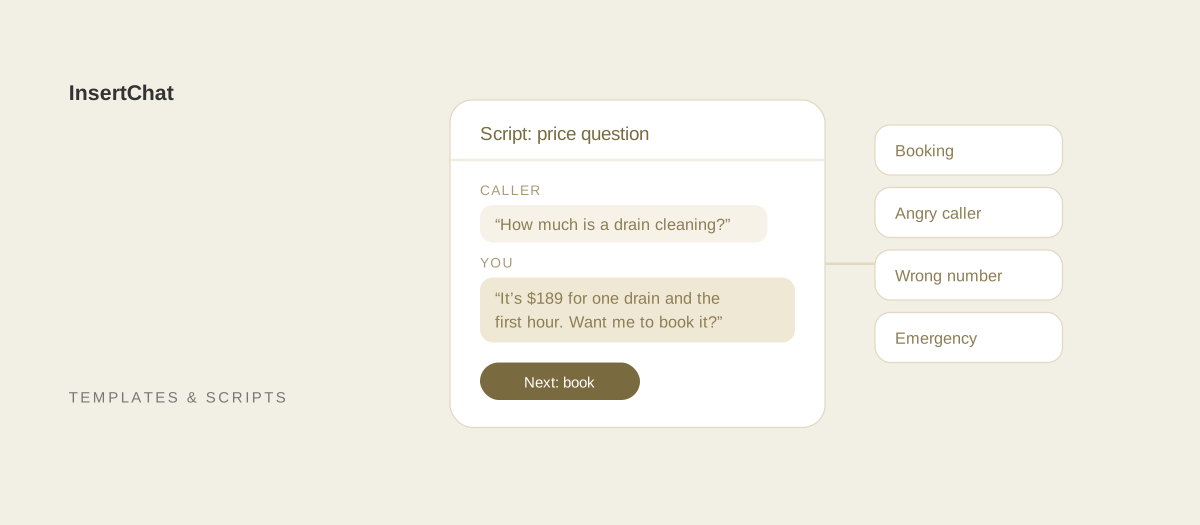
A receptionist phone script is a short set of tested lines for the calls your front desk gets every day: bookings, price questions, messages, upset callers, wrong numbers, and emergencies. Good scripts give the receptionist a goal for each call, the exact words for the tricky moments, and a clear next step, while leaving room to sound like a person.
This guide has scripts for 16 common calls. Each one shows the lines to say, why they work, and what an AI receptionist does in the same moment. Replace anything in brackets with your own details.
What makes a good receptionist phone script?
A good receptionist phone script covers a predictable moment in a call with the goal, the details to collect, the lines to say, and the boundary the receptionist shouldn’t cross. It’s a guide for the moment, so the receptionist can adapt the words and still reach the same outcome on every call.
Every call should end with the same core details written down, whoever answers:
- The caller’s full name, spelled if it’s unusual.
- A callback number, read back digit by digit.
- The reason for the call, in the caller’s own words.
- Whether they’re a new or existing customer.
- How urgent it is, and the address for anything on site.
- The next step and when it will happen.
Keep each script short enough to fit on one card next to the phone. If a script needs more than five or six lines, it’s probably two scripts.
Scripts for opening the call
The opening sets the tone and collects the caller’s name early. The two scripts below cover the greeting and the moment a caller launches straight into their problem.
1. Answering and getting the caller’s name
Use this on every call. Asking for the name early lets you use it through the call and find the caller’s record while they talk.
- Receptionist: “Thank you for calling [Business Name], this is [Your Name]. How can I help you today?”
- Caller: “Hi, I’m calling about getting my furnace looked at.”
- Receptionist: “I can help with that. Can I start with your name?”
- Caller: “It’s Dana Price.”
- Receptionist: “Thanks, Dana. Have you used us before, or is this your first time?”
Why it works: the caller hears who they reached and gets to speak right away. The new-or-existing question tells you whether to look up a record or explain how you work. The greeting examples guide has 52 openings for different businesses.
2. When the caller starts with a long story
Some callers explain everything before you can ask a question. Let them finish, then summarize, so they know you heard it.
- Receptionist: “Thanks for walking me through that. So the kitchen sink is draining slowly, it started on Monday, and there’s no water on the floor. Is that right?”
- Caller: “Yes, exactly.”
- Receptionist: “Got it. Let me get a few details, and then I’ll find you a time.”
Why it works: a short summary proves you listened and catches anything you misheard before you act on it.
Scripts for booking and scheduling
Booking calls should end with a confirmed time, repeated back, and a confirmation sent. Offer two specific times instead of asking “When works for you?”, which tends to start a long back-and-forth.
3. Booking a new appointment
- Receptionist: “I have Tuesday at 10 a.m. or Wednesday at 2 p.m. Does either of those work?”
- Caller: “Wednesday at 2 is good.”
- Receptionist: “Great. That’s Wednesday, [Date], at 2 p.m. for a [Service] at [Address]. What’s the best number to reach you?”
- Caller: “555-0142.”
- Receptionist: “That’s 5-5-5, 0-1-4-2. You’ll get a confirmation by text, and we’ll remind you before the visit. Anything we should know before we arrive?”
Why it works: two choices make the decision easy, and repeating the date, time, service, and address catches mistakes while the caller is still on the line.
With an AI receptionist: InsertChat offers open times from your connected calendar, books after the caller confirms, and follows your rules for appointment length, buffers, notice, and how far ahead people can book. Customers can get reminders by text or email 72 and 24 hours before. See scheduling.
4. Rescheduling or canceling
Make changing an appointment easy. A caller who finds it hard to reschedule often just doesn’t show up.
- Caller: “I need to move my appointment on Thursday.”
- Receptionist: “No problem. Can I have your name? Thanks, [Name]. I see you’re booked Thursday at 9. I can move you to Friday at 9 or Monday at 1. Which is better?”
- Caller: “Monday at 1.”
- Receptionist: “Done. You’re now booked for Monday, [Date], at 1 p.m. Your Thursday time is canceled, and you’ll get an updated confirmation.”
If they want to cancel outright: “I’ve canceled Thursday at 9 for you. Would you like me to find a new time now, so you don’t lose your spot in the schedule?”
Why it works: the offer to rebook comes before the call ends, which is when it’s most likely to be accepted. The no-show guide covers the rest of the process.
Scripts for questions about prices and services
Price questions are often the first thing a new caller asks. Answer what you can, explain what changes the price, and move the call toward a booking.
5. When you publish the price
- Caller: “How much do you charge for a drain cleaning?”
- Receptionist: “Our standard drain cleaning is [Price], which covers one drain and the first hour. If we find a bigger problem, the technician explains the options and price before doing any extra work. Would you like to book a time?”
Why it works: a straight number builds trust, and the second sentence sets expectations about extra costs before the visit.
6. When the price depends on the job
- Caller: “What does a new roof cost?”
- Receptionist: “It depends on the size of the roof, the material, and what’s underneath, so we don’t quote it over the phone. We do a free inspection and give you a written price within [Timeframe]. Can I book that for you this week?”
Why it works: the caller hears why there’s no number yet and gets a concrete next step that leads to one.
With an AI receptionist: InsertChat gives the prices you add to its knowledge and can be told never to estimate anything else. Requests for custom quotes go to your team through your handoff rules.
7. When you don’t offer the service
- Caller: “Do you install solar panels?”
- Receptionist: “We don’t do solar, I’m sorry. We do handle the electrical panel work that often goes with it. If you’d like, I can take your details for that. For the panels themselves, [Referral Partner] is a good local option.”
Why it works: a clear “no” saves everyone time, and a referral or related service leaves a good impression.
8. When you don’t know the answer
- Receptionist: “That’s a good question, and I want to give you the right answer. Let me check with [Name or Team] and call you back by [Time]. What’s the best number for you?”
Why it works: it avoids guessing and replaces “I don’t know” with a promise and a time. Keep the promise.
Scripts for messages, holds, and transfers
Messages, holds, and transfers are where callers most often feel forgotten. Each script below tells the caller what is about to happen and for how long.
9. Taking a message
- Receptionist: “[Name] is with a client until about 3. I’d be glad to take a message. Can I get your full name and the best number to reach you?”
- Caller: “Sam Ortiz, 555-0187.”
- Receptionist: “Thanks, Sam. That’s 5-5-5, 0-1-8-7. What’s the call about, so [Name] can be ready when they call back?”
- Receptionist: “Is there a best time to reach you this afternoon? I’ll make sure [Name] gets this, and you can expect a call by [Time].”
Why it works: reading the number back prevents the most common message mistake, and the reason for the call means the callback starts with an answer instead of a question.
10. Putting a caller on hold
- Receptionist: “I need to check the schedule for that. Is it all right if I put you on hold for about a minute?”
- Caller: “Sure.”
- Receptionist (back on the line): “Thanks for waiting. Here’s what I found.”
If it’s taking longer: “I’m still checking. Would you rather keep holding, or should I call you back within 15 minutes?”
Why it works: asking first and naming a time makes the wait feel shorter, and offering a callback respects the caller’s time.
11. Transferring a call
- Receptionist: “The best person for that is [Name], our [Role]. I’m going to transfer you now and let them know what you need, so you won’t have to start over. If the call drops, they’ll call you back at [Number].”
Why it works: the caller knows who they’re going to and why, and hears that the context goes with them.
With an AI receptionist: InsertChat doesn’t transfer live calls. When a caller needs a person, the assistant collects the details, marks the conversation needs-you, emails the teammates you chose, and tells the caller your team will follow up. If you want people to answer first, the “AI when unanswered” routing mode rings your team for 5 to 60 seconds before the AI picks up.
12. When the caller asks for someone who isn’t available
- Caller: “Can I talk to the owner?”
- Receptionist: “[Owner Name] is out on a job this afternoon. I can take a detailed message and make sure they see it today, or I may be able to help you myself. What’s it about?”
Why it works: it’s honest about availability, offers two paths, and often reveals that the receptionist can solve the problem directly.
Scripts for difficult calls
Difficult calls go better with a plan. These four scripts cover an upset customer, an emergency, a wrong number, and a sales pitch.
13. An angry or upset caller
Let the caller finish. Interrupting an upset person usually makes the call longer.
- Caller: “Your technician was supposed to come yesterday and never showed up. I took the day off work.”
- Receptionist: “I’m really sorry. You took a day off and nobody came, and that shouldn’t have happened. Let me look at what went wrong.”
- Receptionist: “I see the visit was moved without anyone calling you. I can get a technician to you tomorrow at 8 a.m., first appointment of the day, and I’ll let [Manager Name] know about this today. Would tomorrow at 8 work?”
If you can’t fix it on the call: “I don’t want to guess at an answer. I’m passing this to [Manager Name] right now, and they’ll call you by [Time] today.”
Why it works: naming the specific problem shows you understood it, and the apology doesn’t argue about blame. Ending with a concrete fix and a time gives the caller something to hold you to.
With an AI receptionist: InsertChat’s default handoff rules flag upset callers, callers who ask for a person, and requests it can’t resolve, so your team sees them in the needs-you queue with the transcript.
14. An emergency call
Write your emergency script with your team and keep it short. For trades, decide which situations count as emergencies and what the caller should do while they wait.
- Caller: “There’s water pouring through my ceiling.”
- Receptionist: “Okay, let’s get you help. If you can do it safely, turn off the main water valve. It’s usually where the water line enters the house. What’s the address?”
- Receptionist: “I’m sending this to our on-call technician now. They’ll call you within [Timeframe]. If water is near outlets or light fixtures, stay out of that room.”
For a gas smell: “Please leave the building now, and once you’re outside, call 911 or your gas company. Don’t switch lights on or off on your way out.”
For medical and dental offices: “If this is a medical emergency, please hang up and call 911.”
Why it works: safety steps come first, then the information the on-call person needs, then a timeframe.
With an AI receptionist: you write the safety steps and the emergency number into the assistant’s knowledge. When a caller describes an emergency, InsertChat reads those steps and raises an urgent alert for your team. Keep a separate emergency number if you need someone to pick up live.
15. A wrong number
- Receptionist: “I think you may have the wrong number. This is [Business Name], a [Type of Business] in [City]. Who were you trying to reach?”
- Caller: “Oh, sorry, I was calling the pharmacy.”
- Receptionist: “No problem at all. Have a good day.”
Why it works: saying what the business is lets the caller know quickly, and a polite close leaves a good impression. Sometimes a “wrong number” turns out to be a customer who needs your service.
16. A sales or solicitation call
- Receptionist: “Thanks for calling. We don’t take sales calls by phone, but you’re welcome to email [Email Address], and the right person will reply if it’s a fit. Have a good day.”
Why it works: it’s polite, it’s final, and it keeps the line free for customers.
How do you close a receptionist call?
Close every call by summarizing what was agreed, confirming the next step and when it happens, and thanking the caller by name. A clear close prevents follow-up calls that only ask “So what happens now?”
- Receptionist: “So you’re booked for Wednesday at 2 p.m., and you’ll get a text confirmation in the next few minutes. Is there anything else I can help with today?”
- Caller: “No, that’s it.”
- Receptionist: “Thanks for calling, Dana. We’ll see you Wednesday.”
How do you turn scripts into a team call guide?
Turn scripts into a call guide by writing one page per call type with the goal, the details to collect, the lines, and the handoff rule, then practicing them out loud. Review the guide whenever prices, hours, or services change, and after any call that went badly.
- List your call reasons. Go through a couple of weeks of calls and write down why people called.
- Write one script per common reason. Start with bookings, price questions, and messages.
- Add your boundaries. Note what the receptionist must never promise, such as same-day service, exact prices for custom work, or medical advice.
- Practice with role play. Have one person play the caller, including the difficult versions.
- Review monthly. Update scripts when something changes, and retire lines nobody uses.
The guide on how to answer a business phone professionally covers tone, pace, and phone etiquette for the whole team.
Let InsertChat handle the scripted calls for you
The calls in this guide that follow a script, such as greetings, bookings, rescheduling, published prices, messages, and wrong numbers, are the ones an AI receptionist answers the same way every time. InsertChat’s AI receptionist does them from your knowledge and rules: it books on your calendar, takes complete messages, reads your emergency steps, and passes upset callers and custom requests to your team with the whole conversation in the shared inbox.
Your script becomes its setup. Add your answers to knowledge, write rules for what it should always do, never do, and hand to a person, and set your greeting. The AI receptionist prompt examples show how to write those rules.
Plans start at $98 per month with one phone number, and new customers can try Pro free for 7 days with 500 credits (a card is required). Start your free trial, or explore the demo to see scripted calls handled in a sample workspace.