
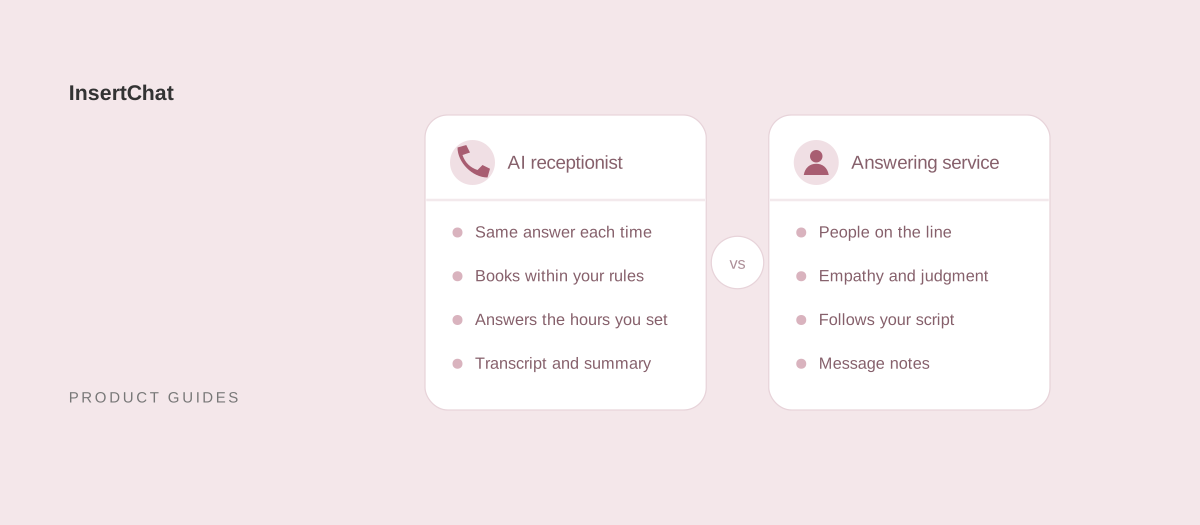
An AI receptionist is software that answers calls from your business knowledge and acts within rules you set, such as booking on your calendar. An answering service uses people, usually remote operators working from your script, who take messages and, depending on the service, book appointments or put calls through to your staff. AI suits routine, rules-based calls at any hour you choose; people suit calls that need empathy, judgment, or a live transfer.
The two also work together. This guide compares the options, including an in-house receptionist, and explains how to combine them or switch. Details about InsertChat’s AI receptionist are current as of October 2026.
What is the difference between an AI receptionist, an answering service, and a virtual receptionist?
The difference is who answers the phone. An answering service and most virtual receptionist services use people working remotely, an in-house receptionist is your employee, and an AI receptionist is software that holds the conversation itself.
- Answering service: a team of operators answers your line, often for many businesses at once. They follow the script you provide, take messages, and depending on the service, book appointments or patch urgent calls through to whoever is on call.
- Virtual receptionist: usually a remote human receptionist service that works more closely with your business, for example by transferring calls to staff or managing a calendar. Some AI products use the same label, so check whether a person or software answers.
- In-house receptionist: a human receptionist on your staff who answers phones alongside in-person work, such as greeting visitors, handling paperwork, and taking payments at the desk.
- AI receptionist: software that answers in a natural voice, works from your knowledge base, and acts only within the permissions you give it.
How do AI receptionists and answering services compare?
Each option balances judgment, coverage, consistency, and cost differently. The table shows the typical pattern. Individual providers vary, so check the terms of any service you compare.
| AI receptionist | Answering service or virtual receptionist | In-house receptionist | |
|---|---|---|---|
| Who answers | Software, from your knowledge and rules | Remote operators following your script | Your employee |
| Hours | The hours you route to it | The hours your plan covers | Their working hours |
| Routine questions | The same approved answer each time | Depends on the script and the operator | Depends on training and experience |
| Booking | Books within your calendar rules | Depends on the service and your calendar access | Books with your tools |
| Live transfer | Varies by product; InsertChat does not live-transfer calls | Often available, depending on the plan | Yes |
| Empathy and judgment | Follows rules and hands sensitive calls to a person | A strength | A strength, plus knowing your regulars |
| Record of each call | Transcript and summary in InsertChat’s shared inbox | Message notes from the operator | Whatever gets written down |
| Other channels | InsertChat also answers website chat, SMS, email, and WhatsApp | Some services add live chat | Email and walk-ins, as time allows |
| Cost model | Monthly plan, often with usage by minute, call, or caller | Usually per minute or per call, often in monthly bundles | Salary and benefits, plus cover for time off |
What does a human answering service do well?
A human answering service does well with calls that need a person’s judgment: an upset caller, an unusual request that doesn’t fit the script, a decision about whether something is truly urgent, and a live transfer to someone on call. People can also adjust mid-call when a caller is confused or the situation changes.
Those strengths matter most where calls are emotional or high-stakes, such as a tenant locked out late at night or a caller reporting a burst pipe, and where the right next step depends on reading the situation.
The limits are practical. Answers vary with the operator and how closely the script is followed, and a service may take a message where you hoped for a booking. Booking depends on whether the service can work in your calendar, and both coverage and price follow the minutes or calls in your plan.
What does an AI receptionist do well?
An AI receptionist does well with calls that follow written rules: questions with a known answer, bookings and changes within your calendar settings, and intake that collects the same details every time. It gives the approved answer the same way on every call, whenever you route calls to it.
In InsertChat, that covers:
- Consistent answers: it answers from your website pages, documents, and questions and answers. When you update a source and it finishes processing, callers get the new answer.
- Booking within rules: it offers open times, books after the caller confirms, and reschedules or cancels appointments it booked. You set lengths, buffers, notice, and how far ahead callers can book in scheduling.
- Every channel from one knowledge base: the same assistant answers website chat, SMS, email, and WhatsApp, so a caller who texts later gets the same answer.
- A written record: each call has a transcript and an AI summary in the shared inbox, attached to the caller’s contact.
- Callers’ languages: it answers in the language the caller speaks.
Its limits mirror a person’s strengths. It follows rules instead of reading the room, so emotional or unusual calls should go to a person, and it shouldn’t give medical, legal, or financial advice. InsertChat does not live-transfer calls. When a caller needs someone, the assistant collects the details, marks the conversation needs-you, emails your team, and tells the caller your team will follow up.
How do the costs differ?
Answering services usually charge for operator time, by the minute or by the call, often in monthly bundles with overage. AI receptionists charge a monthly plan with usage measured in minutes, calls, unique callers, or credits. An in-house receptionist costs a salary and benefits, plus cover for breaks, vacations, and sick days.
Three differences follow from those models:
- What drives the bill: with operators, talk time is the main cost, so long calls cost more under per-minute plans. With AI, the unit depends on the vendor; InsertChat calls use credits by the minute, rounded up per call.
- Hours: ask any provider whether nights, weekends, and holidays cost extra or need a different plan.
- Fixed costs: an AI receptionist needs a phone number, and texting can carry its own charges. InsertChat includes one number per paid plan, with additional numbers at $10 per month. Ask answering services about setup fees and monthly minimums.
InsertChat plans start at $98 per month with one phone number and 5,000 monthly credits. The AI receptionist cost guide explains each pricing model with dated vendor examples and walks through an estimate in minutes.
Can you combine an AI receptionist with people?
Yes. A simple hybrid rings your team first and lets the AI answer when nobody picks up. You can also split calls by time of day, by caller, or by phone line, so people keep the calls that need them and the AI takes the rest.
- Team first, AI when unanswered: with the “AI when unanswered” mode, calls ring your team’s number for 5 to 60 seconds, then the assistant answers. Your staff still take every call they can reach.
- Team by day, AI after hours: with the “AI after hours” mode, calls ring your team during the weekly opening hours you set, in your time zone, and the AI answers outside them. Opening hours can include overnight shifts.
- AI for new callers, team for regulars: caller scope can limit the AI to callers who aren’t saved contacts, so calls from known customers go to your team number.
- A separate line for emergencies: if you keep an answering service or an on-call phone for emergencies, publish that number separately and add it to the assistant’s safety steps. When a caller describes an emergency, the assistant reads the steps you wrote, including that number.
Whatever the split, decide who follows up on needs-you conversations and how fast, and write that promise into the assistant’s knowledge so callers hear a realistic next step. The after-hours answering page covers hours-based routing in detail.
How do you decide between an AI receptionist and an answering service?
Decide by sorting a few weeks of calls by what each caller needed. If most needed a known answer or a booking, start with an AI receptionist. If most needed judgment, reassurance, or a live transfer, keep people on them. If it’s a mix, combine both.
Lean toward people if:
- Callers often need a live transfer to someone on call.
- Many calls are emotional, unusual, or high-stakes.
- You also need in-person work covered, which only an in-house receptionist can do.
Lean toward an AI receptionist if:
- Most calls ask about hours, services, published prices, or availability.
- You want appointments booked on your calendar within set rules.
- You want calls, website chat, texts, and email answered from the same knowledge.
- You want a transcript and summary of every call in one inbox.
Lean toward both if your team covers the day but evenings and weekends go unanswered, or if a few call types need a person while most don’t.
If calls involve protected health information, check the vendor’s agreements first. InsertChat’s Enterprise plan can sign a Business Associate Agreement (BAA); on other plans, keep protected health information out of the assistant.
How do you switch from an answering service to an AI receptionist?
Switch in stages: turn your answering service’s script into knowledge, set routing and handoff rules, test, then move calls over one slice at a time, starting with after-hours calls. Cancel the service once the new setup has handled real calls the way you want.
- Collect what the service knows. Ask for your current script, call-handling instructions, FAQ answers, and recent message notes. The notes show why people call.
- Turn it into knowledge. Add the script’s answers as questions and answers, along with your website pages and policies. Where the script says “take a message,” list the details the assistant should collect instead.
- Set routing and handoff. Choose a routing mode, list the topics that must reach a person, choose who gets emailed, and write your emergency safety steps.
- Connect your number. In the US and Canada, point your call forwarding at the private routing number InsertChat gives you, and confirm it with the verification call. The call forwarding guides list provider steps. Elsewhere, use a local or toll-free InsertChat number where one is available. Number porting is not offered.
- Test like a caller. Run through your most common call reasons, an emergency, a complaint, and a request for a person, then check each transcript and summary in the inbox.
- Move one slice first. Start with after-hours calls, review needs-you conversations daily, and widen the routing once the answers hold up.
- Check the contract. Look for notice periods and minimum terms before you cancel the service.
- Brief your team. Agree who watches the needs-you queue, who returns callbacks, and how quickly.
For more setup detail, read the small business guide, or explore the demo to see calls, bookings, and handoffs in a fictional workspace.