
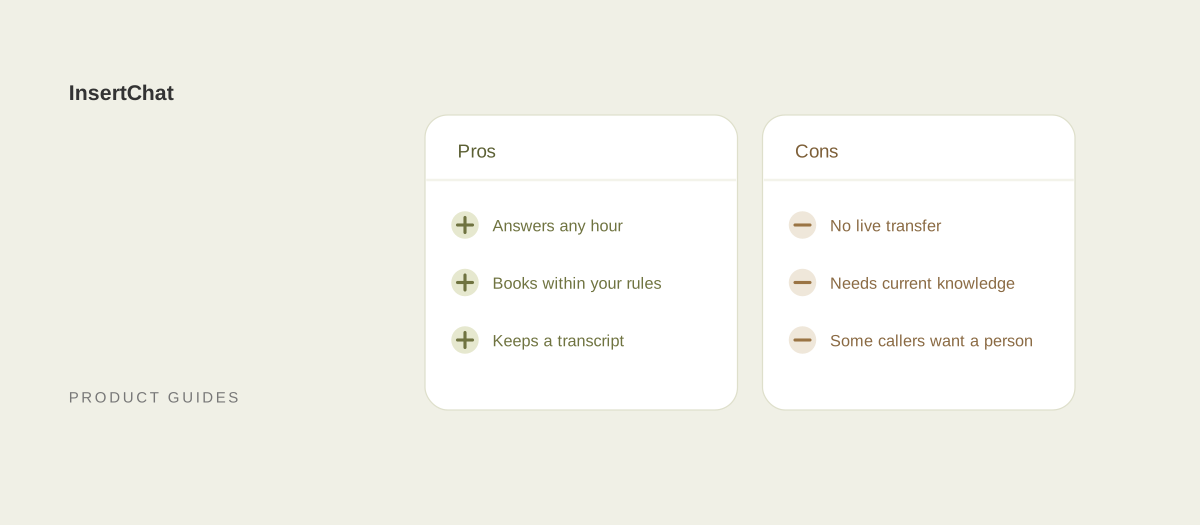
The main advantages of an AI receptionist are coverage at any hour, no hold queue during a rush, consistent answers, and bookings without staff time. The main disadvantages are that it follows rules instead of judgment, needs accurate knowledge to work, and, in some products, can’t transfer a live call. Most of the downsides can be managed with setup.
Most pros-and-cons lists are written by vendors who skip the cons. This one comes from a vendor too, so it names InsertChat’s own limits alongside the general ones, with the fix for each. Details are current as of October 2026.
What are the pros of an AI receptionist?
An AI receptionist answers every call routed to it, at any hour, with the same approved information, and can book appointments without anyone stopping work. It also keeps a written record of every call, which most small businesses never had.
It answers when you can’t
A business with one person on the phones covers about 40 of the 168 hours in a week. The AI receptionist can take the rest: evenings, weekends, holidays, lunch breaks, and the minutes you spend with a customer. With after-hours answering, you choose exactly which hours it covers, in your time zone, including overnight shifts.
Rushes don’t create a hold queue
A person can take one call at a time. The AI receptionist isn’t limited to one caller, so a Monday-morning rush or a storm that sends every customer to the phone at once doesn’t leave people listening to hold music or voicemail.
Answers are consistent
The AI answers from the website pages, documents, and questions and answers you approve in Knowledge. Update a source, let it finish processing, and every caller gets the new answer. Nobody has to remember that the price changed last week.
It books without your time
With scheduling turned on, it offers open times from your calendar, books after the caller confirms, and can reschedule or cancel appointments it booked. Customers can get text or email reminders 72 and 24 hours before the appointment.
It captures leads you would have missed
A caller who reaches voicemail may hang up and call the next business on the list. The AI receptionist answers their questions first, then collects the name, contact details, and request when a booking or follow-up needs them. Teammates you choose can be notified the first time a new contact is captured, immediately or in a daily summary, so the lead reaches someone while it is still warm. See lead capture.
Every call is written down
Each call becomes a transcript and short summary in the shared inbox, attached to the caller’s contact record. You can see what was asked, what was promised, and what still needs a person.
It speaks your callers’ languages
The AI receptionist follows the language the caller speaks, and you can set your business language from 58 options. See bilingual answering.
One assistant covers every channel
The same knowledge answers website chat, SMS, email, and WhatsApp, so a caller who texts later gets the same answer they heard on the phone.
Cost is a plan, not a payroll
InsertChat plans start at $98 per month with one phone number and 5,000 monthly credits. There is no recruiting, training, or cover for sick days, and you can keep your existing number in the US and Canada by forwarding it.
What are the cons of an AI receptionist?
The honest cons fall into four groups: it follows rules rather than judgment, it depends on the knowledge you give it, some callers want a person, and every product has feature limits. Here are the ones that matter most, including InsertChat’s own.
It follows rules, not judgment
An AI receptionist doesn’t bend a policy for a regular, read frustration between the lines the way an experienced receptionist does, or decide that today is the day to squeeze someone in. It books within your appointment length, buffers, notice, and booking window, and hands the rest to your team.
No live transfer in InsertChat
InsertChat does not transfer live calls. When a caller needs a person, the AI collects the details, marks the conversation needs-you, emails your team, and tells the caller your team will follow up. If your business depends on putting callers straight through, this is a real limit.
It’s only as good as its knowledge
If your hours, services, or prices are wrong or missing, the AI can’t answer correctly. InsertChat’s default rule tells it not to guess when approved information is missing or conflicts, which turns gaps into handoffs rather than wrong answers, but handoffs still cost your team time.
Some callers want a person
Callers with complaints, emergencies, or complicated situations often want a human from the first second. An AI receptionist can collect their details and flag them, but it can’t replace the reassurance of a person.
No voicemail, recording, or outbound AI calls
InsertChat doesn’t take voicemail, record calls, or make outbound AI calls. Each call is kept as a transcript and summary instead, and follow-up texts and emails the assistant proposes wait for approval from an owner, admin, or manager.
Usage costs follow talk time
Calls use credits by the minute, and each call rounds up to whole minutes with a one-minute minimum. Spam calls and quick hang-ups that reach the AI count as at least a minute. SMS and WhatsApp can carry their own charges, and additional numbers cost $10 per month each.
It needs upkeep
Expect to review transcripts weekly at first, add answers when callers ask something new, and update hours before holidays. The work is small, but it never reaches zero.
Some limits depend on where you are
Keeping your number by forwarding works for US and Canadian numbers; elsewhere you use a local or toll-free InsertChat number where available, and number porting is not offered. Healthcare practices that handle protected health information need the Enterprise plan, which can sign a Business Associate Agreement. The HIPAA guide explains why.
It can’t give professional advice
An AI receptionist shouldn’t give medical, legal, or financial advice, quote custom prices it can’t verify, or promise anything your team hasn’t approved. Those requests belong in your handoff rules.
How do the pros and cons stack up?
Here they are side by side, with what each depends on. The pros are strongest when calls are routine; the cons are strongest when calls need a person.
| Pro | Con | What decides which wins |
|---|---|---|
| Answers any hours you route to it | Follows rules, not judgment | How many calls need judgment |
| No hold queue during rushes | Some callers want a person | How emotional your calls are |
| Same approved answer every time | Only as good as its knowledge | How well you maintain sources |
| Books within your calendar rules | Won’t make exceptions | How often you bend the schedule |
| Transcript and summary of every call | No recording or voicemail | Whether you need audio records |
| One assistant for calls, chat, email, SMS, and WhatsApp | Texts can carry their own charges | Which channels your customers use |
| A monthly plan instead of payroll | Usage follows talk time | Call volume and length |
| Keeps your number in the US and Canada | No live transfer in InsertChat | Whether callers need to be put through |
How do you reduce each downside?
Most cons have a setup answer. The table lists the practical fix for each, using settings InsertChat already has.
| Downside | How to reduce it |
|---|---|
| No live transfer | Use “AI when unanswered” so your team’s phone rings for 5 to 60 seconds first; publish a separate emergency line |
| Callers who want a person | Say it’s an AI assistant in the greeting; keep the rule that flags anyone who asks for a person |
| Missing or wrong knowledge | Review transcripts daily for the first week and add answers where the AI handed off |
| Rigid booking | Set realistic buffers and notice; route exceptions to your team as a handoff topic |
| Upset callers | Keep the default rule for threats, severe frustration, or repeated complaints |
| Emergencies | Write safety steps, including the number to call, for the AI to read out |
| Spam and short calls | Use caller scope to answer only unknown numbers or saved contacts where that fits |
| Usage surprises | Estimate with the usage estimator and check usage after the first week |
| Upkeep | Make one person the owner of knowledge updates and holiday hours |
The human handoff guide covers the rules in detail, and the setup guide walks through every setting.
Who is an AI receptionist a good fit for?
It fits businesses that miss calls because they are busy, closed, or on site, and whose callers mostly ask routine questions or want appointments. It fits less well where most calls need negotiation, specialist advice, or a live transfer.
Strong fits:
- Trades and home services where the owner is on a job. See home services and plumbing.
- Appointment businesses such as salons, gyms, and veterinary clinics, where booking drives most calls.
- Professional services that need a consistent intake before a consultation. See legal and accounting.
- Any business with an after-hours gap, even one with a great receptionist during the day.
Weaker fits:
- Businesses where most calls are negotiations, escalations, or complaints.
- Departments that depend on live transfers between people.
- Practices handling protected health information that aren’t ready to move to a plan with a Business Associate Agreement.
How do you decide for your business?
Score your own calls. Take two weeks of your call log and mark each call as routine, booking, needs a person, or urgent. If routine and booking calls make up most of the list, the pros will dominate. If most calls need a person, keep people on the phone and use the AI only after hours.
Then answer five questions:
- Which hours do calls go unanswered today?
- What share of calls could be answered from written information?
- Do callers need to be put through to someone live?
- Who will own the AI’s knowledge and review conversations?
- Do any calls involve protected health information?
If the answers point to coverage gaps, routine questions, and a person who can own the upkeep, an AI receptionist is likely worth it. The AI vs human receptionist guide compares the options on cost and fit.
Weigh it on your own calls
The fastest test is a week of real after-hours calls. Start your free trial, route only after-hours calls to the AI, and read every transcript. Or explore the demo to see the inbox with sample data, and check plans on the pricing page.