
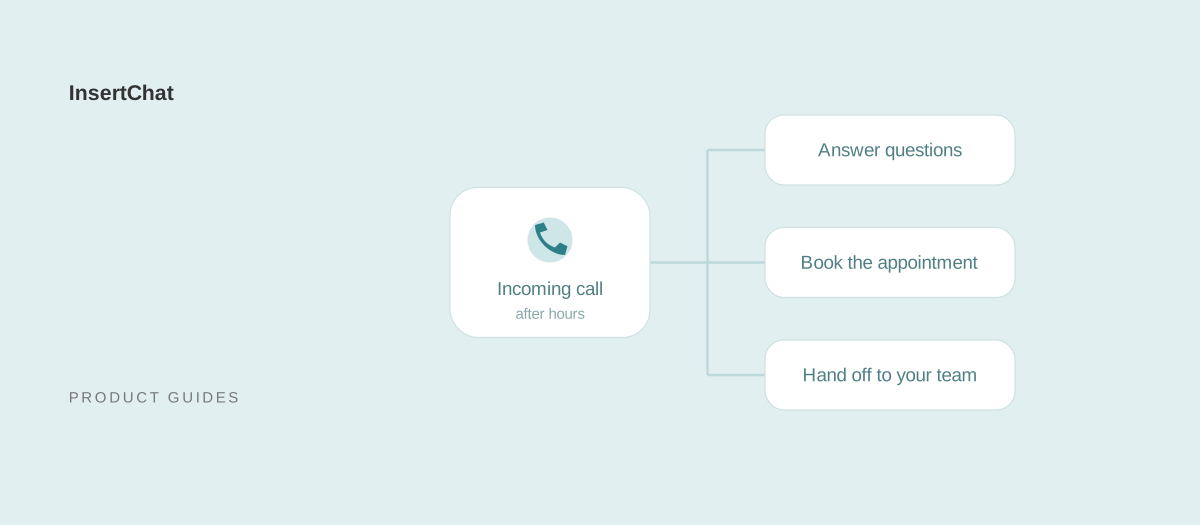
An AI receptionist is software that answers your business phone calls in a natural voice. It answers questions from your business information, collects caller details, and can book appointments or bring in a person under rules you set. Unlike voicemail, it holds a conversation instead of recording a message.
This guide explains how AI receptionists work, what they cost, and how to set one up. Details about InsertChat’s AI receptionist are current as of September 2026.
How does an AI receptionist work?
A call reaches the AI receptionist through a number you set up or forward. A voice AI model listens, works out what the caller needs, and replies using the knowledge and instructions you provided. When a request needs an action, such as booking, it uses only the tools you enabled, then records a summary for your team.
A typical call has four stages:
- Connect. The call arrives on a dedicated business number or is forwarded from your existing line.
- Understand. The receptionist listens to the request and asks follow-up questions when details are missing.
- Answer or act. It answers from your knowledge base, such as services, hours, service area, and policies, and uses connected actions like calendar booking only within the permissions you set.
- Record and hand off. The conversation appears in your shared inbox with a short internal summary. If a person needs to step in, the call or conversation goes to your team.
The answers are only as good as the information behind them, which is why setup starts with knowledge, not the phone number.
In InsertChat, the same assistant can also answer website chat, email, SMS, and WhatsApp from the same knowledge.
What can an AI receptionist do?
An AI receptionist can answer routine questions, capture caller details as leads, offer available appointment times, and book, reschedule, or cancel appointments within the permissions you grant. It can also notify your team and connect a caller to a person when a call needs human judgment.
In InsertChat, that covers:
- Answer questions: opening hours, location, service area, services, preparation instructions, and policies, from the sources you add.
- Capture leads: the caller’s name, phone number or email, and the details of their request. The receptionist answers questions first and collects contact details when an action or follow-up needs them.
- Book appointments: with scheduling enabled, it checks availability, offers a few open times, and creates the appointment after the caller confirms one.
- Reschedule and cancel: it can move or cancel appointments it booked, again only after the caller confirms.
- Notify your team: teammates can be notified when a new contact is captured or an appointment is booked, either immediately or in a daily summary.
- Transfer to a person: when a call needs your team, it can ring a phone number you choose and connect the caller, depending on your phone setup, and mark the conversation as needing you.
You decide how booking works: appointment length from 15 minutes to two hours, buffers, minimum notice, how far ahead callers can book, how many times to offer, and the location, whether your address, by phone, an online link, or elsewhere. You can also require the receptionist to repeat the date, time, time zone, service, and contact details before saving.
An AI receptionist is not a substitute for professional judgment. It shouldn’t quote custom prices it cannot verify, give medical, legal, or financial advice, or make commitments your team hasn’t approved. Those requests belong in your handoff rules.
How does an AI receptionist compare with an answering service or voicemail?
An AI receptionist answers calls at any hour from the same approved information each time. A human answering service brings empathy and judgment, with coverage that depends on its staffing and your plan. Voicemail and phone menus are the simplest option, but they record messages or route callers rather than answering questions or booking appointments.
| AI receptionist | Human answering service | Voicemail or phone menu (IVR) | |
|---|---|---|---|
| Availability | Any hours you configure, including after hours; not limited to one caller at a time | Depends on the provider’s staffing and your plan | Always on, but only records messages or routes calls |
| Cost model | Per minute, per call, per unique caller, or a monthly plan with included usage | Usually per minute or per call, sometimes with a monthly minimum | Often part of your phone service |
| Consistency | Answers from the same approved sources every time | Varies by agent and by how closely your script is followed | Fixed recorded prompts |
| Complex or emotional calls | Should hand off to a person under your rules | Handles empathy and judgment well | Not handled; the caller waits for a callback |
| Booking and lead capture | Books within your permissions and logs caller details | Takes messages or books in shared tools, depending on the service | Caller leaves a message for later follow-up |
| Setup | Add knowledge, hours, booking permissions, and handoff rules, then test calls | Provide scripts and instructions to the service | Record a greeting or build a menu |
These options aren’t mutually exclusive. You can keep your team on the phones during opening hours and let an AI receptionist take after-hours and overflow calls, with anything sensitive going to a person.
How much does an AI receptionist cost?
AI receptionist pricing usually follows one of four models: per minute, per call, per unique caller, or a flat monthly plan with included usage. InsertChat uses monthly plans with included credits. Calls consume credits by the minute, rounded up to whole minutes, and each paid plan includes one phone number.
Per-minute pricing tracks how long callers talk. Per-call pricing is easier to predict when call lengths vary. Per-unique-caller pricing counts people rather than calls. Flat plans make the bill predictable but may cap minutes or features. Whichever you compare, ask how partial minutes are rounded, whether there is a minimum per call, and whether numbers, transfers, and text messages cost extra.
Here is how InsertChat meters usage:
- Plans: Pro, Growth, Scale, and Enterprise each include monthly credits, seats, and assistants; current prices and allowances are on the pricing page. Annual billing is charged upfront at the cost of ten monthly payments.
- Calls: calls use credits. Each call rounds up to whole minutes with a one-minute minimum, so a 20-second call counts as one minute and a 61-second call counts as two.
- Phone numbers: each paid plan includes one phone number. Additional numbers cost $10 per month each.
- Other usage: credits also cover written conversations, knowledge processing, and tools. Usage depends on your model, conversation length, and tools, so credits are not a fixed number of messages or minutes.
- Connected services: SMS, WhatsApp, and other provider services may have their own charges.
The pricing page lists current plans and includes a usage estimator for your own call volume and call length. Treat its result as an estimate: rates depend on your setup, and the estimator’s example rates are editable assumptions, not a quote. Review the channel costs before connecting a number.
When should a call go to a person?
A call should go to a person when the caller asks for one, when the answer is missing or uncertain, when the receptionist has failed to help twice, when the caller is upset, or when the request falls outside approved permissions. Clear handoff rules are what make an AI receptionist trustworthy.
InsertChat includes five handoff rules. Each is on by default, and you can adjust them in your settings:
- The customer asks for a person. The receptionist asks for help whenever the caller clearly requests someone.
- The answer is uncertain. It doesn’t guess when approved information is missing or conflicts.
- Two attempts fail. It stops repeating an answer after the caller says twice that it didn’t help.
- The customer is upset. Threats, severe frustration, or repeated complaints bring in a person.
- The action is sensitive or restricted. It won’t complete actions outside your approved permissions or business rules.
Add your own escalation topics on top of those defaults: emergencies, urgent faults, custom quotes, billing disputes, and anything that needs professional judgment. The same caution applies to email. Automatic email replies are off by default; when you turn them on, replies that are uncertain, involve an upset customer or a complaint, or touch payment or legal matters wait for a person.
For the handoff itself, tell the caller what happens next, and don’t promise a callback time your team cannot meet. The human handoff guide explains how to configure and test it.
Can I keep my business phone number?
In the US and Canada, yes. Forward your existing number to the private routing number InsertChat gives you, and a verification call confirms that forwarding works; the call forwarding guides list the steps for common carriers. Elsewhere, give the receptionist a local or toll-free InsertChat number where one is available. Number porting is not offered.
The two approaches suit different situations:
- Forward your existing number: customers keep calling the number they already know, and your listings and printed materials stay the same.
- Use a new number: give the receptionist its own line for a new location, a campaign, or a dedicated after-hours line. Each paid plan includes one number; additional numbers are $10 per month.
Follow the phone setup in your workspace, then call the number yourself and confirm the call appears in the inbox.
Is an AI receptionist HIPAA compliant?
An AI receptionist is not HIPAA compliant on its own; compliance depends on your agreements with the vendor and how you use the tool. If the receptionist will handle protected health information, HIPAA generally requires a signed agreement with the vendor. InsertChat Enterprise plans can sign a Business Associate Agreement (BAA).
A BAA is a contract, not a certification. Review it with your compliance advisor, and apply the same care to how the receptionist is configured:
- Don’t add protected health information (PHI) to the receptionist’s knowledge unless you are covered by a BAA. Knowledge should describe your services, hours, and policies, not individual patients.
- Limit what the receptionist collects. Booking needs a name, contact details, and a preferred time, not a diagnosis.
- Route clinical questions, test results, and anything about a specific patient’s care to a person through your handoff rules.
If you need a BAA, contact us about an Enterprise plan.
Is an AI receptionist a good fit for a small business?
An AI receptionist suits a small business that misses calls while the team is busy, closed, or on site, and whose callers mostly ask routine questions or want appointments. It is a weaker fit when most calls need negotiation or specialist advice, because those calls should still go to a person.
Examples:
- Home services: technicians on a job can’t always answer. The receptionist answers service-area questions, collects the address and problem, and routes urgent faults to your team.
- Beauty and wellness: staff are with clients. The receptionist answers from your service menu, appointment lengths, and cancellation policy, and collects booking preferences.
- Professional services: the receptionist collects a brief before a consultation, while your team reviews quotes, advice, and commitments.
These are illustrative workflows, not customer results. Before deciding, ask:
- Which calls do you miss today, and at what times?
- Which of those could be answered from written information?
- Which need a person, and who should receive them?
- How do you book appointments now, and can a calendar connection support that process?
How do I set up an AI receptionist?
Set up an AI receptionist in six steps: add your business knowledge, set your hours, choose booking permissions, define handoff rules, run test calls, and go live on one number. Testing before you route customer calls matters most, because it shows you exactly what callers will hear.
- Add your knowledge. Include services, published prices, service area, opening hours, policies, and the questions your team answers most. Add website pages, documents, and FAQs, and wait for each source to finish processing. The knowledge guide covers what to include.
- Set your hours. Business hours shape what the receptionist tells callers and which appointment times it can offer.
- Choose booking permissions. Connect your calendar in scheduling, decide whether the receptionist can offer times, book, reschedule, and cancel, then set appointment length, buffers, notice, and how far ahead callers can book.
- Define handoff rules. Review the five default rules, add your own escalation topics, and choose who receives notifications when a caller needs a person.
- Run test calls. Call as a customer. Ask a routine question and one your sources don’t answer, book an appointment, change it, and ask for a person. Check each result in the shared inbox.
- Go live. Forward your existing number or publish the new one, starting with the calls you miss most, such as after-hours calls. Review conversations in the first weeks and update your knowledge where answers fall short.
To see the workflow before setting it up, explore the InsertChat demo with a fictional business and sample data. When you are ready, follow the guide to connect your first channel.