
An AI call center uses voice AI to answer and handle phone calls the way a trained agent would. The AI agent listens to the caller, works out what they need, answers from approved business information, and completes tasks such as booking an appointment or updating a record. Calls that need judgment go to people with a transcript and summary.
The term covers two different setups. In a large contact center, AI mostly works next to human agents: it transcribes calls, suggests answers, scores quality, and routes callers. For a small business, an AI call center usually means one AI agent that answers every inbound call, several at a time, at any hour. InsertChat details are current as of October 15, 2026.
What is an AI call center?
An AI call center is a phone operation where AI agents answer some or all calls, or support the people who do. The AI understands speech, replies in a natural voice, and acts in connected business tools. Where a phone menu sorts callers into queues, an AI agent handles the request in conversation.
You’ll see several names for the same idea:
- AI call center or AI call centre: the broad term, for fully automated answering and for AI added to a staffed center.
- AI contact center or contact center AI: the same technology across phone, chat, email, and messaging, usually the tools large support teams buy.
- AI call center agent or AI voice agent: the software that holds the conversation. The voice AI agent glossary entry explains its building blocks.
- Conversational AI contact center: a contact center that uses conversational AI in place of keypad menus.
- AI receptionist: an AI call center agent with a front-desk job at a smaller business. See what an AI receptionist is.
When you compare products, check two things. Inbound AI answers the calls customers place to you; outbound AI places calls, such as reminders or sales campaigns, under stricter rules. And some products replace the first person a caller reaches, while others only assist human agents.
How does an AI call center work?
A call reaches the AI through a phone number or a forwarding rule. Speech recognition turns the caller’s words into text, a language model works out the request and finds the answer in your knowledge, and a synthetic voice replies. When the caller wants something done, the agent uses connected apps, then saves a transcript and summary.
Every call runs through the same stages:
- Telephony. The call arrives on a number the AI service provides, or your phone system forwards it there: every call, after-hours calls, or the ones nobody picks up.
- Speech recognition. The caller’s audio becomes text in real time. A noisy line can garble a name or address at this step.
- Understanding and knowledge. A language model works out the intent, such as booking, a price question, or a complaint, and looks up the answer in the information you approved. This grounding, called retrieval-augmented generation, keeps replies tied to your facts.
- Actions in connected apps. The agent checks open times in a calendar, creates a booking, or updates a CRM contact. A well-built agent waits for the app to confirm before telling the caller it’s done.
- Voice reply. Speech synthesis reads the answer back, and the agent manages turn-taking: noticing when the caller has finished and stopping when interrupted.
- Handoff and records. When a call needs a person, the agent collects the details and alerts the team. Every call ends with a transcript and summary on the caller’s contact record.
Older systems chain separate speech-to-text, language, and text-to-speech models. Newer realtime voice models listen and speak within one model, which can shorten the pause before each reply. InsertChat’s AI voice agent uses a realtime voice model and answers in the language the caller speaks.
What does one busy minute look like?
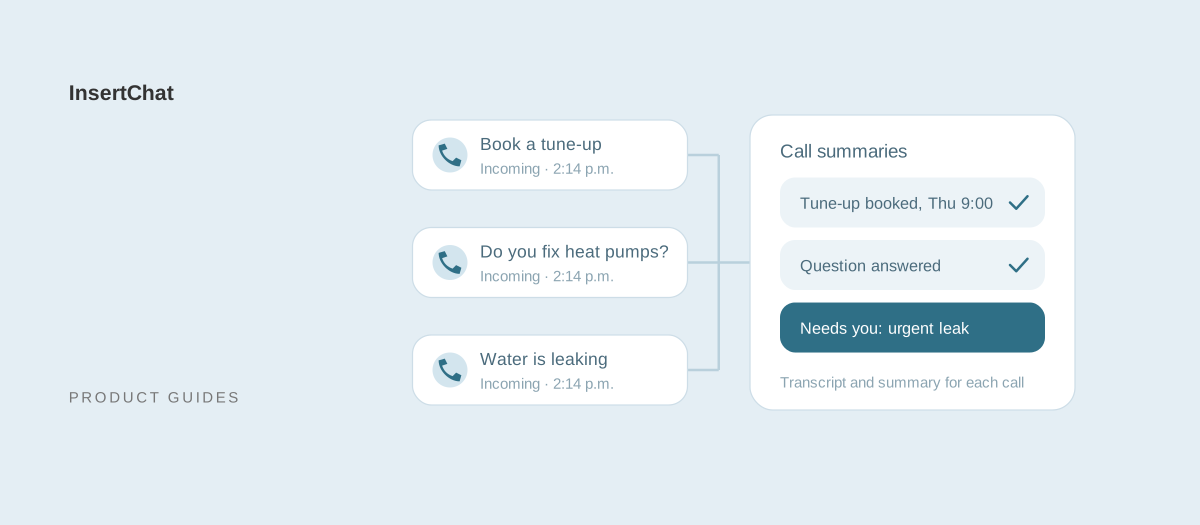
Bayview Heating and Air is a fictional HVAC company with both technicians on jobs and nobody at the desk. At 2:14 p.m., three calls arrive within the same minute, and the AI agent answers all three.
- Caller 1 wants a furnace tune-up. The AI offers Thursday at 9 a.m. or 1 p.m., the caller picks 9, and the AI repeats the date, time, and address back before booking it.
- Caller 2 asks whether the company services heat pumps and what a diagnostic visit costs. The AI answers from the service list and the price the owner published, then offers a time.
- Caller 3 says water is pooling under the furnace. The AI reads the safety steps the owner wrote, takes the address and phone number, marks the conversation urgent, and the team gets an alert.
A single receptionist could take one of those calls; the other two would ring out or reach voicemail. Here, each call ends with a transcript, a summary, and a contact record in one inbox. This scenario is illustrative, not a customer result.
How does an AI call center compare with a call center, answering service, or IVR?
An AI call center agent answers each call it receives, several at once, from approved information, and finishes routine tasks. A traditional call center uses trained people, one call per agent. An answering service takes messages from a shared operator pool. An IVR plays a recorded menu and routes callers without answering their questions.
| AI call center agent | Traditional call center | Answering service | IVR phone menu | |
|---|---|---|---|---|
| Who answers | Software, from your knowledge and rules | Trained agents on scheduled shifts | A shared pool of operators following your script | A recording |
| Calls at once | Several at a time, up to the platform’s limit | One per agent on shift | As many as operators are free | As many as your phone lines carry |
| Hours | Any hours you route to it | Staffed hours | Often around the clock, depending on the plan | Always on |
| Answers questions | Yes, from approved information | Yes, with training and a knowledge system | Basic scripted answers | Recorded messages only |
| Completes tasks | Books, updates records, and captures leads within your permissions | Yes, in the tools agents use | Takes messages; some book or dispatch | Only the self-service flows you build |
| Reaching a person | Depends on the product: live transfer or a flagged handoff | Escalation to a supervisor or specialist | A relayed message or a patched call | Transfer to an extension |
| Record of each call | Transcript, summary, and contact record | Agent notes, often a recording | Message notes | Call log |
| Typical pricing | Monthly plan plus usage, or per seat | Hourly or per-seat staffing | Minutes or calls in monthly bundles | Often included with phone service |
| Best for | Routine calls, overflow, and after hours | Complex, high-volume support | Message taking and urgent dispatch | Routing to departments |
The lines blur in practice: many contact centers keep an IVR for routing and put an AI agent behind one branch. The AI receptionist vs IVR guide follows the same call through a menu and a conversation, and the virtual receptionist vs answering service guide covers the human options.
What does AI handle well, and where do people still matter?
AI handles calls with a known answer or a defined task: questions about hours, services, and published prices; booking and rescheduling; intake; and order or appointment lookups. People still matter wherever a call needs judgment, authority, or empathy: complaints, exceptions to policy, custom quotes, emergencies, and upset callers.
What AI agents do well:
- Repeat questions: the same approved answer at 2 p.m. or 2 a.m.
- Booking and changes: open times from the real calendar, booked after the caller confirms.
- Intake: name, number, address, and request collected in a consistent order.
- Volume spikes: several callers answered at once instead of queued.
- Language: answers in the caller’s language from the same knowledge.
- Records: a transcript and summary for every call, so you can review all of them rather than a sample.
Where people still matter:
- Judgment calls: refund exceptions, disputes, custom quotes, and anything your policies don’t cover.
- Emotion: an angry or distressed caller should reach a person quickly.
- Emergencies: the AI can read your safety steps and alert the on-call person, but a person owns the response.
- Professional advice: medical, legal, and financial questions belong with qualified staff.
The split that works is routine calls to AI and everything else to people. The AI collects the details first, and that depends on clear human handoff rules.
Will AI replace call center agents?
AI is taking over routine calls, though not every call center job. The US Bureau of Labor Statistics projects employment of customer service representatives to decline 5% from 2025 to 2035 as their tasks are automated, and it still projects about 289,500 openings a year. All of them replace workers who change occupations or retire.
The BLS Occupational Outlook Handbook counted 2,666,000 customer service representative jobs in 2025 and notes that many of these workers are in call centers. It ties the projected decline to automation and to self-service systems that let customers handle simple tasks without a representative. It also expects some companies to keep in-house service centers for complex issues, such as processing refunds or verifying insurance coverage.
For a small business, the question looks different, because most never had a call center to replace. The AI takes calls that used to ring out, reach voicemail, or interrupt someone mid-job. If you keep a receptionist, point the AI at after-hours and overflow calls first, so the two work together.
How do enterprise contact centers use AI?
Large contact centers use AI in two places. In front of agents, AI virtual agents and smarter routing handle or sort calls. Alongside agents, AI transcribes calls, suggests answers, drafts after-call notes, and scores quality. Forecasting and scheduling tools also use AI to plan staffing across shifts.
Common enterprise uses:
- Virtual agents: AI resolves common requests, such as order status, before a person is needed.
- Intent-based routing: the caller states the reason instead of pressing 1, and the call reaches the right queue.
- Agent assist: live transcription with suggested answers on the agent’s screen.
- After-call summaries: drafted notes, aimed at shortening wrap-up time between calls.
- Quality assurance: automated scoring of every call for script adherence, required disclosures, and sentiment, where a supervisor would otherwise sample a few.
- Workforce management: call volume forecasts that drive shift planning.
These platforms assume agents, queues, supervisors, and an IT team to integrate them, and they are sold that way, often per agent seat or per minute through a sales process. Metrics such as first call resolution and call abandonment rate usually anchor the business case.
What does a small business actually need from an AI call center?
A small business needs an AI agent that answers the calls the team can’t take, books appointments, captures caller details, and flags what needs a person. Queues, seats, and workforce planning don’t apply. The job is closer to a front desk than a call center, and small-business products are often sold as AI receptionists.
- Inbound answering: every call you route to it answered from your website pages, documents, and FAQs.
- Booking: appointments in the calendar you already use, within your rules for length, buffers, and notice. See AI scheduling.
- Intake: the caller’s name, contact details, and request saved as a contact. See lead capture.
- After-hours and overflow coverage: your team answers first when it can, and the AI takes the rest. See after-hours answering.
- Several calls at once: a second caller isn’t sent to voicemail while the first one is booking.
- Other channels: customers who text, email, or use your website chat get the answers they would hear on the phone.
- A clear handoff: calls that need a person arrive with a transcript and summary, so nobody calls back cold.
| Enterprise contact center AI | Small-business AI call answering | |
|---|---|---|
| Main job | Help many agents handle high volume | Answer the calls a small team misses |
| Who answers first | Often an IVR or virtual agent, then a person | The AI agent, or your team with the AI as backup |
| Core features | Routing, agent assist, quality scoring, forecasting | Answers, booking, intake, handoff, after-hours coverage |
| Setup | An integration project with IT | Knowledge, a calendar connection, and call forwarding |
| Pricing | Per seat or per minute, often through sales | Monthly plan plus usage |
| Success measure | Handle time, first call resolution, service levels | Calls answered, bookings made, leads captured |
The small business guide covers which calls to hand over first and what to measure in the first weeks.
How much does an AI call center cost?
For a small business, AI call answering costs a monthly plan plus usage, metered by the minute, by the call, or in credits. InsertChat starts at $98 a month for Pro with one phone number and 5,000 monthly credits. A staffed call center costs far more, because each agent is a salary that covers one call at a time.
Here is how InsertChat prices calls:
- Plans: Pro at $98, Growth at $198, Scale at $498, and Enterprise from $998 per month, each with monthly credits. Annual billing costs ten monthly payments.
- Calls: each call rounds up to whole minutes, with a one-minute minimum. At the usage estimator’s rate of 12 credits per billable minute, Pro’s 5,000 credits cover about 416 call minutes, roughly 138 three-minute calls, or about 71 cents of the Pro price per call, if you spend them only on calls.
- Numbers and channels: one phone number is included, and additional numbers cost $10 per month. Website chat, email, SMS, and WhatsApp use the same credits; SMS, WhatsApp, and other connected services can carry their own charges.
- Trial: new customers can try Pro free for 7 days with 500 credits. A card is required at checkout.
On the human side, the BLS puts the median customer service representative wage at $44,770 a year ($21.53 an hour, May 2025). Wages and salaries were 70.0% of private-industry employer compensation costs in June 2026, according to the BLS Employer Costs for Employee Compensation release, so one full-time agent costs roughly $64,000 a year before software, training, and supervision. For a front-desk comparison, the median receptionist wage is $38,010 a year ($18.27 an hour, May 2025).
| Full-time call center agent | InsertChat Pro | |
|---|---|---|
| Yearly cost | About $64,000 ($44,770 ÷ 0.70) | $1,176 billed monthly, or $980 billed annually |
| Calls at once | One | Several per assistant |
| Hours covered | About 40 of the week’s 168, minus breaks and time off | Whatever hours you route to it |
| Strengths | Judgment, empathy, complex cases | Routine questions, booking, intake, after hours |
The loaded figure is an estimate from national averages, not a quote for your area. Enterprise contact center AI pricing varies by vendor and contract, so get written quotes. The AI receptionist cost guide compares 10 small-business providers at the same call volume, and the receptionist cost calculator runs the comparison with your own numbers.
What are the risks of an AI call center, and which rules apply?
The main risks are wrong answers, callers who feel misled, mishandled sensitive data, and outbound calls placed without consent. The fixes: ground answers in approved knowledge, disclose the AI in the greeting, keep sensitive data on plans and agreements built for it, and get consent before calls you place.
- Hallucination. A language model can state something plausible and wrong, known as AI hallucination. Limit the agent to approved knowledge and send unknowns to a person. InsertChat is set to say when information is unavailable instead of guessing, and an uncertain answer triggers a handoff.
- Misheard details. Have the agent repeat names, dates, and addresses back before saving a booking.
- Identity. Caller ID can be spoofed, so an agent shouldn’t treat it as proof of identity. InsertChat’s voice agent doesn’t.
- Disclosure. Tell callers they’re speaking with an AI assistant. In the EU, Article 50 of the AI Act requires AI systems that interact directly with people to be designed so those people are informed, unless that is obvious from the context. A one-line greeting covers it: “Thanks for calling Bayview Heating and Air. I’m the team’s AI assistant.”
- Outbound calls. In February 2024 the FCC ruled that AI-generated voices count as “artificial” under the Telephone Consumer Protection Act, so AI-voice calls a business places are held to the same robocall rules, including prior express written consent for telemarketing. The ruling targets calls you place; answering calls customers make to you is a different situation. The TCPA glossary entry has more.
- Health information. If the agent will handle protected health information, HIPAA generally requires a Business Associate Agreement (BAA) with the vendor. A BAA is a contract, not a certification. InsertChat Enterprise plans can sign a BAA; on other plans, keep patient health information out of the agent’s knowledge and intake questions. HHS publishes sample business associate agreement provisions, and the HIPAA guide goes further.
- Payments. Keep card numbers off AI calls unless the platform is built for secure phone payments.
Rules vary by country, state, and industry. This is general information, not legal advice, so check with your advisor before you go live in a regulated field.
How do you set up an AI call center, step by step?
Set one up in eight steps: list why people call, write the knowledge, connect your calendar and apps, set permissions and handoff rules, choose routing, pick a voice and greeting, test, and go live on one slice of calls. Start with after-hours or overflow calls, then widen once the transcripts look right.
- List why people call. Read your phone provider’s call log and group calls into questions, bookings, changes, quotes, complaints, and emergencies.
- Write the knowledge. Add website pages, documents, and questions and answers on services, published prices, hours, service area, and policies. The knowledge guide covers what to include.
- Connect your calendar and apps. InsertChat books into its built-in calendar, Google Calendar, Outlook, Calendly, or Cal.com, and acts in apps such as HubSpot and Zendesk.
- Set permissions and handoff rules. Switch on only the actions the agent needs, choose which wait for approval, and add handoff topics such as emergencies and billing disputes. The handoff guide explains each rule.
- Choose routing. The AI on every call, the AI after hours, or your team first, with the AI taking calls nobody picks up within 5 to 60 seconds.
- Pick a voice and greeting. Choose one of 10 voices and write a short greeting that names the business and says an AI assistant is answering.
- Test like a customer. Ask a routine question and one your knowledge doesn’t cover, book and change an appointment, ask for a person, and report an emergency. Read each transcript.
- Go live on one slice. Forward after-hours or unanswered calls first. In the US and Canada, keep your number by forwarding it, using the call forwarding guides; elsewhere, use a local or toll-free InsertChat number where available. Number porting is not offered. Review conversations weekly and fill gaps in the knowledge.
The setup guide walks through all 11 steps in the InsertChat app.
What should you check before you buy?
Test the agent on your own calls, and get direct answers on call direction, concurrency, handoff, actions, billing, and data. Run five test calls that mirror your real ones to hear how it will treat your customers.
| Question to ask | Why it matters | InsertChat’s answer |
|---|---|---|
| Does it answer inbound calls, place outbound calls, or both? | Outbound AI calls carry consent rules | Inbound only |
| How many calls can it take at once? | Spikes are when callers hang up | Several at once per assistant |
| How does a caller reach a person? | The hard calls shape your reputation | Handoff rules mark the conversation needs-you and email your team; your phone can ring first; no live transfer |
| What can it do in my apps? | Answers alone don’t book jobs | Booking in five calendar options; actions in HubSpot, Zoho CRM, Dynamics 365, Zendesk, Square, and Stripe, within your permissions |
| What unit do you bill, and how do you round? | Rounding changes the real price | Monthly credits; calls round up to whole minutes with a one-minute minimum |
| Can I keep my number? | Customers already know it | Forwarding in the US and Canada; local or toll-free numbers elsewhere; no porting |
| What record do I get? | You need to check its work | Transcript, AI summary, and contact record in a shared inbox; no call recording or voicemail |
| Which languages does it speak? | Callers won’t switch language for you | Answers in the caller’s language |
| What reporting is included? | You need to see what it resolved | Reports for the last 30 days on every plan; topic and sentiment analysis on Scale and Enterprise |
| Will you sign a BAA? | Required for protected health information | On Enterprise |
| Can I try it first? | Test calls beat demos | 7-day free trial with 500 credits; card required |
Where does InsertChat fit?
InsertChat is an AI front desk for small and local businesses rather than a contact center platform. One assistant answers inbound calls, website chat, email, SMS, and WhatsApp from the same knowledge, books into your calendar, and hands your team the conversations that need a person, each with a transcript and summary.
What it does:
- Answers calls in one of 10 voices, in the caller’s language, several at once per assistant.
- Books appointments after the caller confirms, moves or cancels the ones it booked, and customers can get reminders 72 and 24 hours before.
- Saves every caller as a contact with their request, and updates connected apps such as HubSpot, Zoho CRM, and Zendesk within your permissions.
- Hands off with context: conversations that need your team are marked needs-you, the teammates you choose get an email, and the transcript and summary are waiting. A caller who asks for a callback gets a confirmation by text or email.
- Lets your team go first: your phone rings for 5 to 60 seconds before the AI picks up, or the AI takes only after-hours calls.
What it doesn’t do: InsertChat doesn’t transfer live calls, place outbound calls, take voicemail, or record calls, and it doesn’t replace your phone system. It has no agent desktop, call queues, workforce management, or per-agent quality scoring. Large support teams need contact center software for those.
See it answer your calls
An AI call center for a small business comes down to one agent that answers every call you route to it and hands your team the rest. Explore the InsertChat demo with a fictional business and sample data, compare plans on the pricing page, or start your free trial and route your after-hours calls to the AI first. The AI receptionist page covers routing modes and keeping your number in detail.