
An AI receptionist is software that answers your business phone in a natural voice, answers questions from your own information, books appointments, and sends you a summary of every call. For a small business, the best one is the one whose routing, billing model, and limits match your actual calls. Published entry plans run from about $25 to $150 a month, and a business taking 100 three-minute calls usually pays between $70 and $215.
This guide covers what an AI receptionist handles well, the limits that vary from tool to tool (live transfer, call recording, voicemail), the four ways to route calls to it, how each vendor meters usage with worked monthly costs, a test-call script, and a checklist to use before you pay. Vendor facts were checked on official pages in late October and on November 1, 2026.
What an AI receptionist handles on a call, and what it hands back
An AI receptionist handles the predictable calls: questions about services, prices, hours, and service area; new-inquiry intake; and booking, rescheduling, and canceling appointments. It passes everything that needs judgment to a person, ideally with the caller's details and a transcript already attached.
Here is how that line looks for InsertChat, based on its AI receptionist product page. Most tools draw a similar line, but where they put it differs.
| Handled on the call | Passed to your team |
|---|---|
| Questions about services, prices, hours, and service area | A caller who asks for a person |
| New inquiries, saved with name, number, and request | A question the knowledge base doesn't answer |
| Booking, rescheduling, and canceling appointments | An upset caller or a complaint |
| Callback requests, confirmed by text or email | Emergencies, flagged urgent after the caller hears your safety steps |
| Callers who speak Spanish or another language | Actions you set to wait for approval |
The useful design principle is that the AI should hand off before it guesses. A receptionist that invents a price or promises a time slot that doesn't exist costs more than a voicemail does. Look for tools that answer only from your knowledge base and calendar, and that log every handoff.
What an AI receptionist can't do: the limits to check on every tool
The limits that matter most are live call transfer, call recording, voicemail, and outbound calling, and they differ a lot between vendors. Top-ranking vendor lists rarely spell these out, so check each one against your workflow before you shortlist.
The table below uses each vendor's own pricing and product pages as of November 1, 2026. "Not stated" means the page we read didn't say, which isn't the same as "no"; ask before you buy.
| Tool | Live transfer to your phone | Call recording | Notes |
|---|---|---|---|
| Goodcall | Yes; transfers go to the right person, with a backup if they don't pick up | Yes; every call recorded and transcribed | States SOC 2 and HIPAA compliance on its site |
| Upfirst | Live warm transfer on all plans | Included on all plans | BAA listed only on the Custom plan |
| Smith.ai AI Receptionist | Can hand complex calls to a live North America-based receptionist | Included, with transcripts and summaries | Free plan covers 25 calls |
| Dialzara | Listed on the higher plans; check which plan you need | Not stated | Call routing from the Lite plan |
| My AI Front Desk | Transfer is an agent action (2 allowed on its $99 plan) | Not stated | Voicemail not stated |
| InsertChat | No; flags the team and arranges a follow-up | No; transcript and AI summary instead | No voicemail, no outbound calls, no number porting |
If you need an on-call technician or attorney to pick up a live call, choose a tool that lists warm transfer on the plan you'll actually buy. If you'd rather have a written transcript than an audio file, or you want to avoid recording-consent questions, a no-recording tool may be the better fit. Neither choice is wrong; they solve different problems.
The four routing modes, and which one fits your phone
Routing decides who picks up first, and it matters more than the voice. There are four common modes: the AI answers every call, the AI answers only after hours, the AI answers only when nobody picks up, or the AI is switched off and calls ring your team.
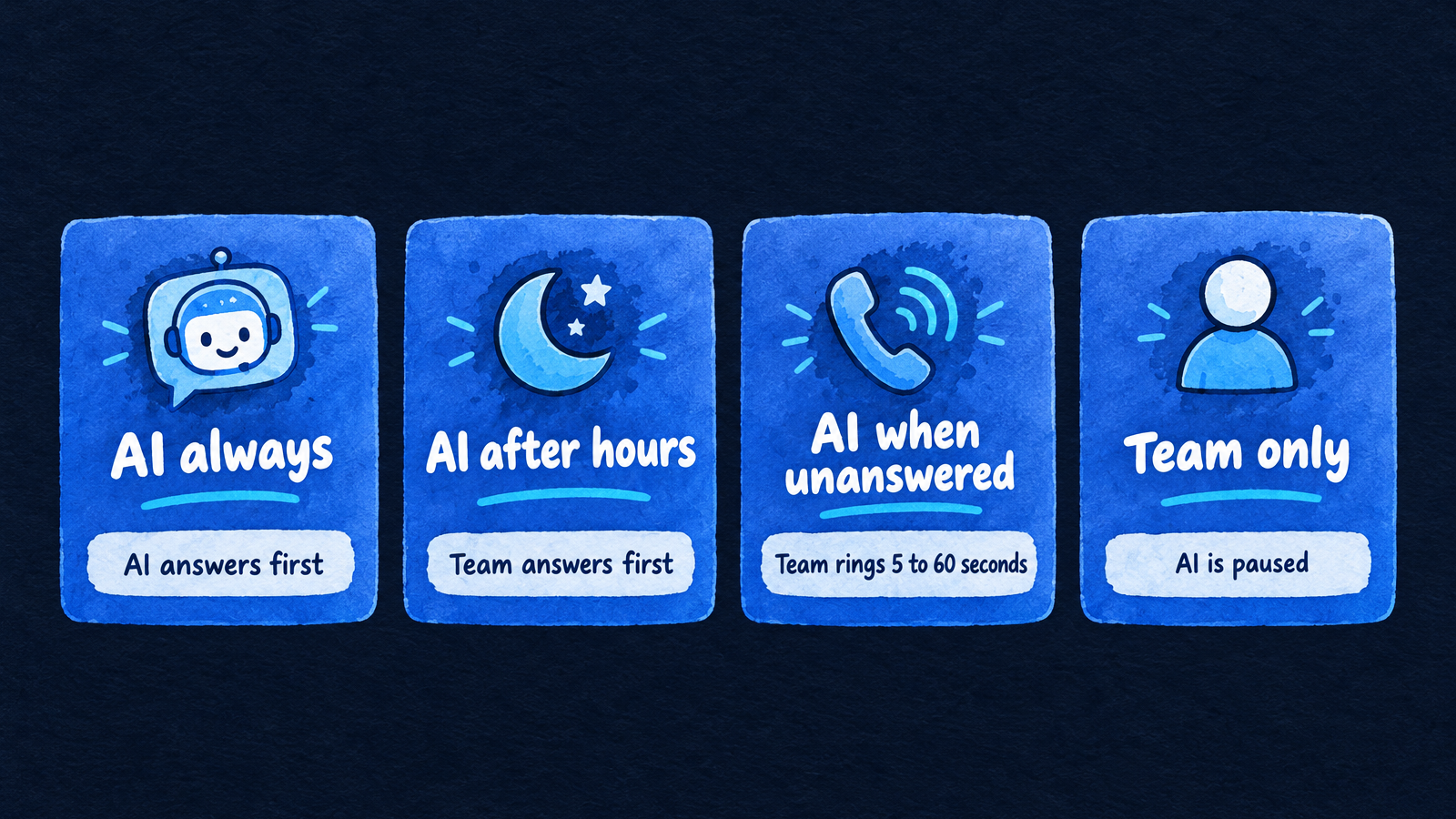
Routing decides who picks up first; AI when unanswered keeps your team in front.
These are the four modes InsertChat offers per phone number, with the situation each suits:
| Routing mode | Who answers first | Good fit when |
|---|---|---|
| AI always | The AI receptionist | Nobody can pick up during the workday, or every caller should get the same fast answer |
| AI after hours | Your team, during the opening hours you set | Someone covers the phone while you're open |
| AI when unanswered | Your team's phone, for 5 to 60 seconds | You want a person first and no missed calls |
| Team only | Your team | You want to pause the AI without changing your forwarding |
"AI when unanswered" is the cheapest hybrid setup there is. Your staff keeps the calls they can take, and the AI only catches the ones that would have gone to voicemail. Goodcall describes the same idea: forward calls to the agent only when your line is busy or unanswered, or every time if you prefer.
To keep your existing number, you forward it from your carrier. InsertChat supports that for US and Canadian numbers and doesn't offer number porting; elsewhere you use a local or toll-free InsertChat number. Our call forwarding glossary entry explains the settings, and it's worth testing forwarding on a Sunday before you rely on it.
How much does an AI receptionist cost per month?
Most small businesses pay between $25 and $350 a month, depending on call volume and how the tool counts usage. The same 100 calls can cost $70 or $215 depending on whether you're billed per call, per minute, per unique caller, or from a shared credit pool.
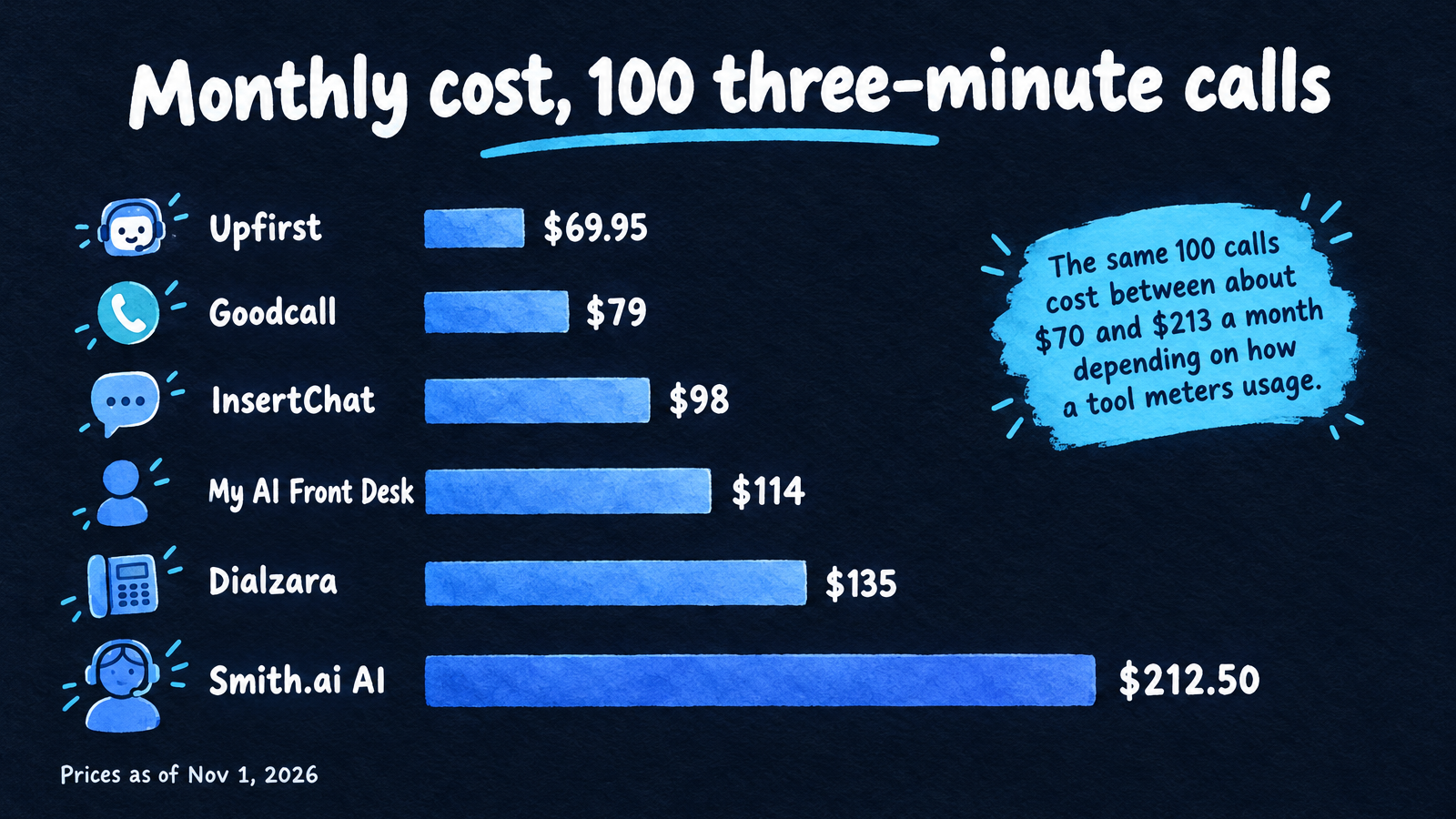
Published prices as of November 1, 2026, assuming 100 three-minute calls, all billable.
Vendors meter usage in five main ways:
- Per call. You pay for each call answered (Upfirst, Smith.ai). Short calls are cheap and long calls cost the same.
- Per minute, with a bundle. You buy a block of minutes and pay a rate after it (Dialzara, My AI Front Desk). Long, chatty calls raise the bill.
- Per unique caller. Each phone number counts once a month (Goodcall). Repeat callers cost nothing extra.
- Flat monthly. One price whatever the volume. Check fair-use terms.
- Shared credits. One monthly pool covers calls and written conversations (InsertChat). Calls use credits, round up to whole minutes, and have a one-minute minimum.
Developer voice platforms are a sixth route. Retell AI, for example, advertises usage pricing from $0.07 a minute, but you assemble the knowledge base, booking, and handoff yourself, so it suits teams with a developer more than a plumber or a dental office.
The table works out a month of 100 and 200 three-minute calls (300 and 600 minutes) on each tool's published prices as of November 1, 2026. It picks the cheapest plan that fits, adds overage, and treats every call as billable. These are planning numbers, not quotes.
| Tool | How it meters | Plan used at 100 calls | 100 calls | 200 calls |
|---|---|---|---|---|
| Upfirst | Per call; spam not billed | Premium, $59.95 for 90 calls, $1.00 each after | $69.95 | $159.95 (Pro, 300 calls) |
| Goodcall | Per unique customer | Starter, $79 for 100 customers | $79 | $129 (Growth, 500 customers) |
| InsertChat | Shared credits | Pro, $98 with 5,000 credits | $98 | $198 (Growth, 10,000 credits) |
| My AI Front Desk | Minutes plus credits | $99 for 200 minutes, then $0.25 a minute | $114 | $189 |
| Dialzara | Per minute | Business Pro, $99 for 220 minutes, $0.45 after | $135 | $239 (Plus, $199 for 500 minutes) |
| Smith.ai AI Receptionist | Per call | Pro, $150 for 75 calls, $2.50 after | $212.50 | $385 |
A few notes on reading it. Goodcall's figure assumes your calls come from fewer unique numbers than the plan allows, which flatters it for businesses with repeat customers. The InsertChat figures use the pricing page's example rate of 12 credits per billable minute: 300 minutes use 3,600 of Pro's 5,000 credits, and 600 minutes use 7,200, which pushes you to Growth. Credits aren't a fixed number of minutes, since usage varies by model and setup, and the same pool also covers website chat, texts, and email. Add $10 a month for each extra InsertChat number. For a deeper cost breakdown, see our AI receptionist cost guide and the best answering service for small business comparison, which also prices live and hybrid services.
For context on the alternative, the Bureau of Labor Statistics puts the median receptionist wage at $18.27 an hour (May 2025 data), which is about $3,168 a month for a full-time hire before benefits and payroll taxes. A full-time hire answers one call at a time during scheduled hours; an AI receptionist can be on several calls at once, at any hour.
Do missed calls justify the cost?
For most businesses, yes, if a booked call is worth more than a few dollars. Be careful with the statistics, though. CallRail reports (June 2026) that 28% of inbound calls go unanswered on average across its customers, though it doesn't disclose the dataset size. The widely repeated claim that 62% of small-business calls go unanswered traces to a 2016 study by 411 Locals of just 85 businesses.
Your own call log beats any average. A rough estimate is missed calls per month, times the share that would have booked, times your average job value. A hypothetical business missing 30 calls a month, where one in three would have booked a $300 job, loses about $3,000 a month. The missed call calculator does this math with your numbers.
Intake and booking: what a good call leaves behind
A good AI receptionist call ends with a contact record, a clear reason for the call, and either a booked slot or a callback promise your team can act on. If the output is a vague message, you've bought an expensive voicemail.
Check these four outputs on the tool you're evaluating:
- Contact record. Name, number, and request saved as a contact, not buried in an email.
- Transcript and summary. Enough detail that you can call back without asking the caller to repeat themselves.
- Booking. It writes to a calendar you already use. InsertChat books into its built-in calendar, Google Calendar, Outlook, Calendly, or Cal.com, with appointment lengths from 15 to 120 minutes and reminders by text or email 72 and 24 hours before. Goodcall's help pages list Google Calendar as its native calendar connection, so check which calendar your tool writes to.
- Urgency flag. Emergencies reach you fast, with the details attached. Because InsertChat doesn't transfer live calls, it flags urgent calls, emails your team, and tells the caller your team will follow up.
Each industry needs different intake questions. A no-heat call needs a safety question before anything else, and a burst pipe needs a shut-off question. Our guides for HVAC and plumbing include the intake questions and triage rules that carry over to any tool.
A test-call script to run before you pay
Place five test calls during the trial, from a phone that isn't saved in your contacts, and read the transcript after each. Most trials last 7 to 14 days, enough time to run all five.
- The routine question. Ask your hours, a price, and whether you serve a specific ZIP code. Check each answer against your website.
- The booking. Ask for a slot tomorrow, change it, then cancel. Check the calendar after each step.
- The emergency. Describe a real emergency for your trade. See what it says to the caller and how fast you get notified.
- The curveball. Ask a question your knowledge base can't answer, or push for a discount. It should say it will have someone follow up, not make something up.
- The demand for a person. Say "let me talk to someone." Note exactly what happens: a transfer, a callback promise, or nothing.
Also listen for the pause before it speaks, how it handles being interrupted, and whether it says it's an AI when asked. Start with a narrow job, like after-hours coverage, and widen it after you've reviewed a week of transcripts.
A buyer's checklist: eight questions to answer in writing
Before you commit, get answers to these. They cover most of the surprises people report after signing up.
- Which routing modes does it offer, and can I set them per number and by opening hours?
- Can it transfer a live call, and on which plan?
- Does it record calls, take voicemail, or only transcribe?
- How is usage counted: per call, minute, caller, or credit, and how does it round?
- What happens when I exceed my plan: overage, automatic upgrade, or a cap?
- Do spam calls, wrong numbers, and very short calls count?
- Which calendars and CRMs does it write to directly?
- Can I keep my number, and how do I turn forwarding off?
If you also want website chat, texts, or email answered, add a ninth: does the same assistant and knowledge base cover those channels, or is each a separate product? That question decides whether you'll manage one setup or four.
Is there a free AI receptionist?
There are free starting points, but no tool gives you full coverage for nothing. Smith.ai's AI Receptionist has a free plan with 25 calls a month, then $3 a call. Goodcall lets you build and test a demo agent for free and charges only once you connect a phone number.
The rest offer trials instead. Upfirst gives 14 days with no card required, Dialzara and My AI Front Desk give 7 days, and InsertChat's Pro trial is 7 days with 500 credits (a card is required, and Pro starts when the trial ends unless you cancel first). Quo's Sona agent has also been listed with 10 calls included on a Quo phone plan. Voicemail with transcription is the free fallback, but many callers won't leave a message.
Will callers hang up on an AI? What the data says
Most callers accept an AI if it helps quickly and gives them a way to reach a person. In Gartner's 2026 survey of 3,566 customers, conducted in February and March, 87% said companies using generative AI for service must provide access to a human agent. Half of respondents said GenAI made their interactions easier. The survey mixes business and consumer customers, so treat it as direction, not a measure of your callers.
Three practices follow from that. Tell callers up front that it's an AI assistant in your greeting (InsertChat greetings run up to 200 characters). Make "I want a person" always lead somewhere real, whether that's a transfer or a firm callback. And keep the first answer short, because long silences and long scripts are what make callers hang up.
Is AI replacing receptionists?
AI is changing what front desk work looks like, but it isn't eliminating the job. According to the Bureau of Labor Statistics' Occupational Outlook Handbook, receptionist employment is projected to fall 2% from 2025 to 2035, from 947,500 to 931,600 jobs. BLS expects about 105,100 openings a year anyway, mostly from people moving to other jobs or leaving the workforce, and says employment is constrained as organizations automate or consolidate administrative functions.
For a small business, the practical split is simple. The AI covers the repetitive calls and the hours nobody works. People keep the conversations that need judgment: an upset client, a sensitive intake, a negotiation. Our comparison of AI and human receptionists and AI receptionists versus answering services goes through that trade-off call by call, and the virtual receptionist glossary entry explains how the terms overlap.
Compliance basics: HIPAA, recording, and AI disclosure
Three checks cover most small businesses: whether the vendor will sign a HIPAA Business Associate Agreement if you handle patient information, whether calls are recorded and who must consent, and how your greeting discloses the AI. This is general information, not legal advice.
- HIPAA. Under HHS guidance on business associates, a vendor that handles protected health information for a practice needs a BAA. Plans differ: InsertChat signs BAAs only on Enterprise, and Upfirst lists them only on its Custom plan. See our guide on whether an AI receptionist is HIPAA compliant and the medical practice setup.
- Recording. According to the Reporters Committee for Freedom of the Press, about 11 states, including California, Florida, Illinois, Pennsylvania, and Washington, primarily require every party's consent to record. If your tool records calls, announce it in the greeting.
- AI voices. The FCC's February 2024 ruling treats AI-generated voices as artificial under the TCPA, which matters for outbound AI calls. An inbound AI receptionist isn't outbound calling, but some states have their own disclosure rules, so an honest greeting is the safe default.
Which businesses get the most from an AI receptionist
The biggest gains come where the owner is hands-busy or the phone rings after hours: trades, medical and dental offices, law firms, salons, and property managers. The common thread is calls that are routine most of the time and urgent some of the time.
- Home services. Crews are on a job when the phone rings. See the guides for plumbers and HVAC for intake scripts and worked costs.
- Dental and medical practices. Booking and insurance questions dominate, but PHI rules apply, so settle the BAA question first.
- Professional firms. New-client intake and consultation booking, with sensitive matters routed to a person.
- Agencies reselling to clients. A white-label setup matters more than the voice; see our guide to white label chatbots for agencies.
If you also want website chat and texting answered by the same assistant, chatbot pricing models differ enough from phone pricing to be worth reading before you buy two separate tools.
Where InsertChat fits, and where it doesn't
InsertChat is an AI front desk: the same assistant and knowledge base answer your phone, website chat, email, SMS, and WhatsApp, with every thread in one shared inbox and human handoff on every plan. It fits businesses with low to moderate call volume where the AI can resolve routine calls and your team follows up on the rest. It isn't the right pick if your workflow depends on live call transfer.
What's included: every paid plan has the AI receptionist, one phone number, website chat, the shared inbox, and human handoff. Pro is $98 a month ($81.67 a month billed annually) with 3 assistants, 3 team seats, and 5,000 credits. There are 10 voices, 58 business language options, and calls answered in the caller's own language. Each call lands in the inbox with a transcript, an AI summary, and a contact record.
What it doesn't do: it doesn't transfer live calls, take voicemail, record calls, or place outbound calls, and it doesn't port numbers. Credits also make monthly cost less predictable than a flat plan, which is why the table above shows where you'd move up a plan. Use the pricing page's estimator with your own call counts to see where you'd land, and start your 7-day free trial to run the five test calls above on your own business.
Frequently asked questions
What is the best automated answering service for a small business?
The best one depends on your calls, not the brand. If callers need a person on the line, pick a tool that lists live transfer on your plan. If most calls are questions and bookings, pick one that books into your calendar and bills in a way that fits your volume. Run the five test calls above on two or three tools before you decide.
Can an AI receptionist transfer a call to my phone?
Some can and some can't. Upfirst and Goodcall list live transfers, Dialzara lists them on its higher plans, and Smith.ai's AI can hand complex calls to a live receptionist. InsertChat can't transfer a live call; it can ring your phone first for 5 to 60 seconds, or flag the team and arrange a follow-up.
Do I need a new phone number for an AI receptionist?
Not usually. Most tools work by call forwarding, so you keep publishing your existing number and forward all calls, after-hours calls, or unanswered calls. InsertChat supports this for US and Canadian numbers, and every paid plan also includes one local or toll-free number. Porting your number into InsertChat isn't offered.
Will callers know they're talking to an AI?
They will if you tell them, and you should. Goodcall says callers are told they're speaking with an AI assistant. InsertChat's assistant says it's an AI if a caller asks whether they're speaking with a person, and you can write the greeting to say so up front. Callers care less about the voice than about a fast, correct answer and a way to reach a person.
Can an AI receptionist also answer website chat, texts, and email?
Some can. Phone-only tools handle calls and nothing else, while others cover more channels. InsertChat's assistant answers calls, website chat, email, SMS, and WhatsApp from one knowledge base and one shared inbox, drawing on one monthly credit pool, so you update your hours or prices once instead of in several places.