
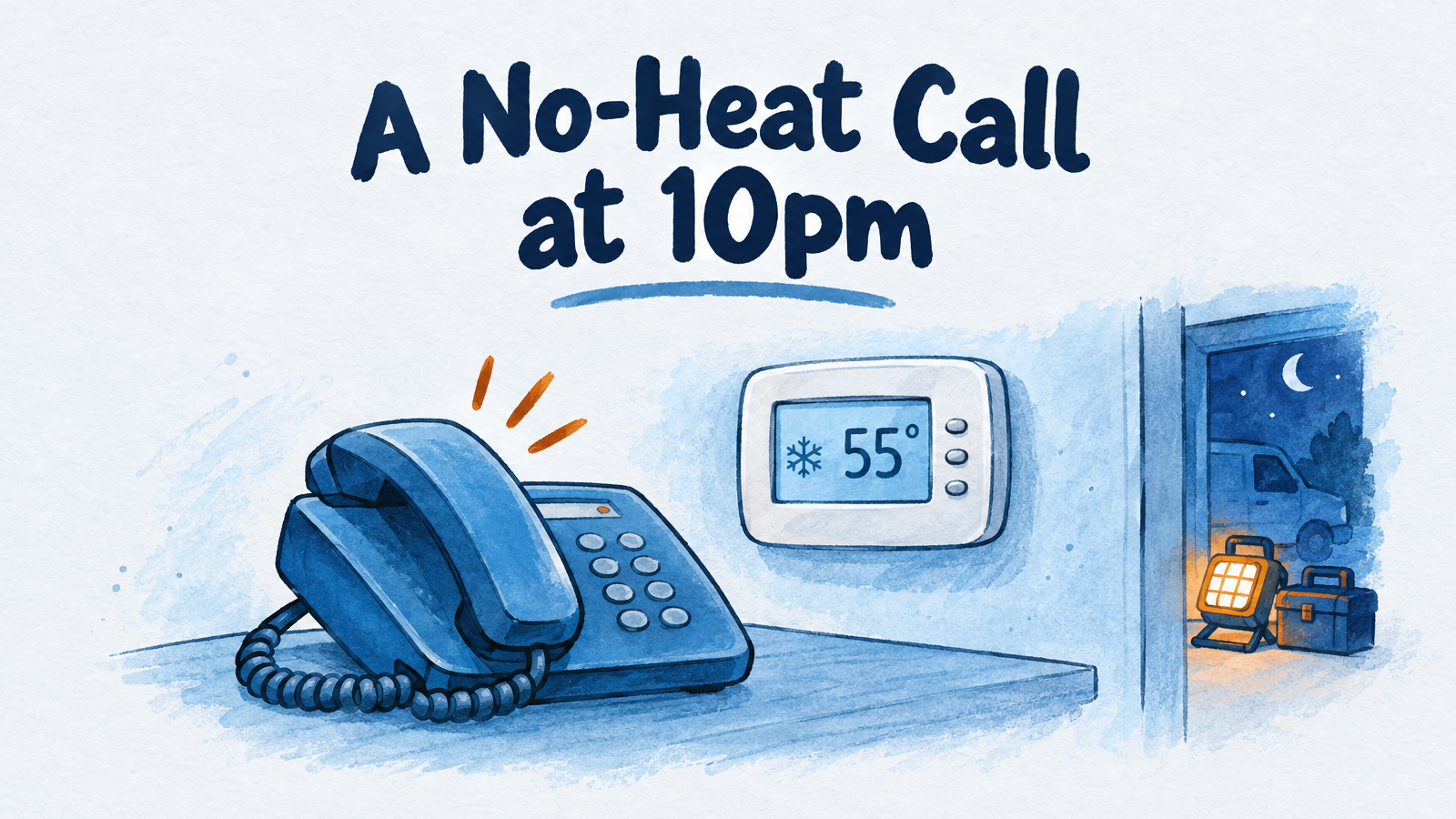
The right HVAC answering service is the one that gets a no-heat call to someone who can send a truck, and the options differ most on exactly that. A live service costs about $777 to $1,965 a month at 200 calls and can page or patch your on-call tech. Most AI plans cost roughly $110 to $200 for the same volume, and whether they can ring a tech depends on the product. The AI add-ons inside Jobber, ServiceTitan, and Housecall Pro suit shops already running that software.
This guide compares those options on published October 2026 prices, works out a normal month and a stress month, and gives you a no-heat triage script you can hand to an operator or load into an AI receptionist. It also says plainly where each option falls short, including the AI receptionist we sell.
Why HVAC calls go unanswered
HVAC is one of the hardest home-service trades to reach by phone. In Invoca's Home Services Lead Conversion Benchmarks Report, published in July 2026, a live person answered 34% of inbound HVAC calls, the second-lowest of nine home-services sub-industries (PPC Land's coverage of the report; the overall home-services figure was 52%, per the Invoca report). "Answered by a person" is not the same as "missed," because it leaves out calls handled by menus and voicemail, and Invoca's customers skew toward advertisers. Still, it shows how often a caller with a dead furnace reaches nobody.
Nights are only part of the problem. ServiceTitan's State of the Trades analysis (published June 3, 2026, covering 2025 calls to residential HVAC contractors) found that off-hours calls, meaning weekdays before 8am or after 5pm plus weekends, were 14.1% of inbound calls in June and 9.8% in October, the lowest point of the year. ServiceTitan says the data comes from one software vendor's customers and is not nationally representative, and the page does not publish winter months. The practical reading: most HVAC calls arrive while your office and your techs are busy, so a service that only switches on at 5pm covers a minority of your missed calls. Plan for daytime overflow, too.
Four ways to cover HVAC calls
There are four setups, and many shops combine two of them.
- On-call phone rotation. Techs pass one cell phone around. It costs nothing but a tech's nights, and it fails when the tech holding the phone is in a crawlspace or asleep.
- Live answering service. Trained operators answer in your company name, follow your script, and page or patch your on-call tech. Billing is per minute or per call.
- Field-service-software AI. Jobber, ServiceTitan, and Housecall Pro each sell an AI call-answering feature that works inside their own platform.
- AI receptionist. Software answers your business number, asks your triage questions, books on a calendar, and tells your team. Some products can transfer a live call to a tech. Others cannot.
What each option does with a no-heat call at 10pm
At 10pm the difference is not who answers but how the on-call tech finds out. The table is built from each vendor's official pages and help articles, accessed October 27, 2026.
| Option | Who picks up | How the on-call tech hears | Main limit |
|---|---|---|---|
| On-call phone | The tech holding the phone | The call rings their cell | Voicemail if they sleep through it; burns out your techs |
| Live answering service | A trained operator reading your script | Page, text, or call patched to the tech. PATLive lists emergency dispatch on every plan; Specialty Answering Service charges $0.10 a minute to patch | Per-minute bills climb in a cold snap; operators follow a script, not a diagnosis |
| Field-service-software AI (Jobber, Housecall Pro, ServiceTitan) | AI inside the platform | Jobber transfers to a number you set or texts a transcript snippet; Housecall Pro sends the call to a number you choose | Works with that platform only; Housecall Pro and ServiceTitan do not publish current prices |
| AI receptionist that can transfer | AI | Rings a number you set. Rosie offers transfers from its Scale plan; Goodcall lets you pick who receives them | Transfer is often a higher plan tier; test it at night |
| AI receptionist without live transfer (InsertChat) | AI | Reads the caller your safety steps, saves the details, marks the conversation urgent, and emails the teammates you chose | No ring on the tech's phone; the alert is email, so the on-call tech needs push notifications on |
For the full cross-industry price comparison, see our guide to the best answering service for small business, and for the after-hours angle see the best after-hours answering services.
What an HVAC answering service costs in a normal month and a peak month
Expect roughly $108 to $198 a month for most AI plans and $777 or more for live service at 200 calls, and watch what happens when volume doubles. The table assumes a mid-sized residential shop where 200 calls a month roll to the service, each three minutes long, so 600 minutes. The stress month doubles that to 400 calls and 1,200 minutes. Doubling is a stress test, not a forecast; scale the per-minute rates to your own numbers. Prices are list prices from each vendor's page, accessed October 27, 2026, before taxes and add-ons, and each row uses the cheapest published plan for that volume.
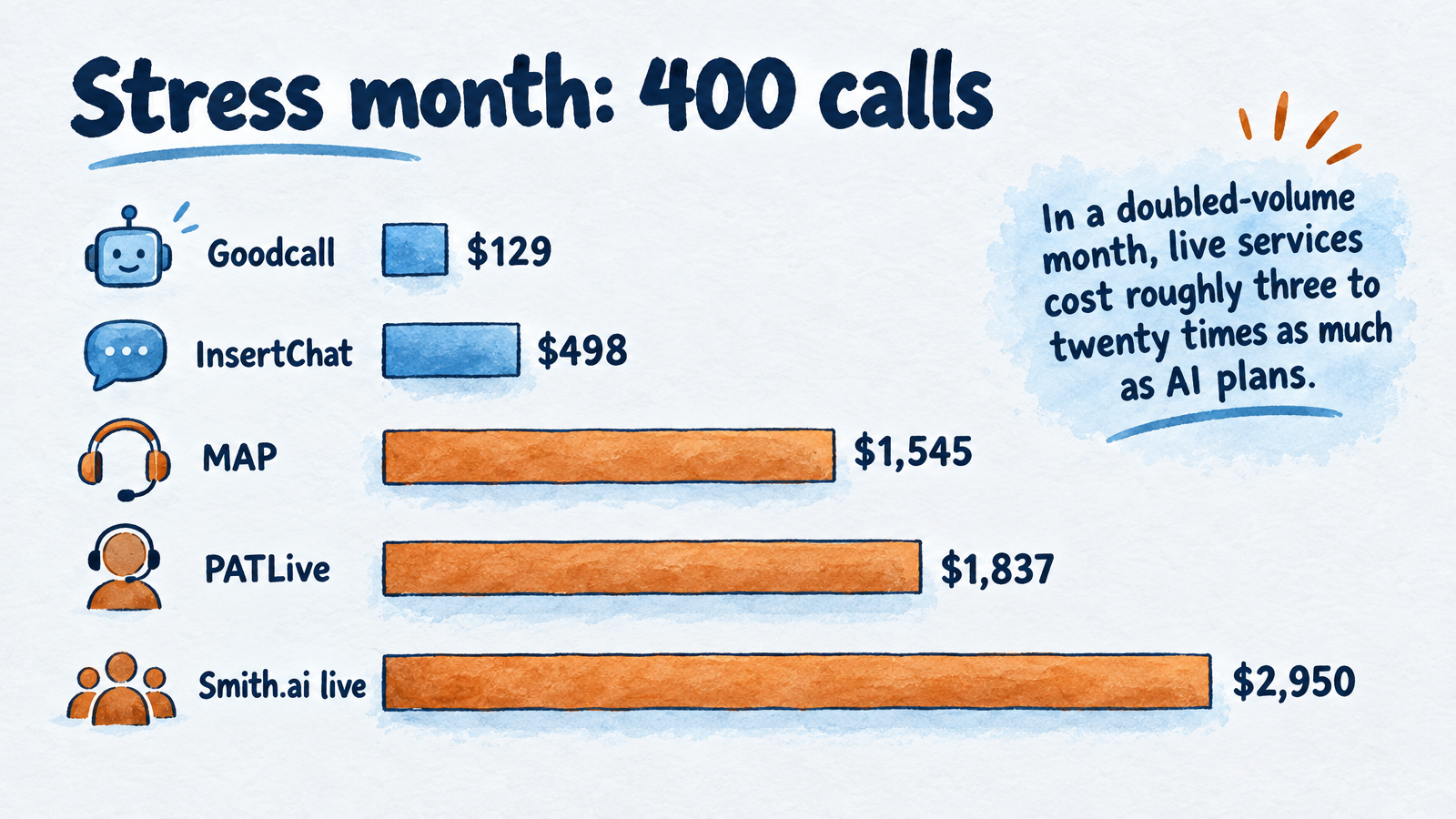
At 400 calls a month, live per-minute and per-call plans cost several times more than AI plans.
| Option | Billing | 200 calls (600 min) | 400 calls (1,200 min) |
|---|---|---|---|
| MAP Communications (live) | Minute bundle; $1.28/min over | $777 | $1,545 |
| Specialty Answering Service (live) | By the second; $1.29 to $1.34/min over | $783 | $1,457 |
| PATLive (live) | Minute bundle; $1.69 to $1.79/min over | $938 | $1,837 |
| Ruby (live) | Minute bundle; overage rate unpublished | $1,725 plus overage | Quote |
| Smith.ai live receptionists | Per call; $8.50 to $10.50 over | $1,965 | $2,950 |
| ServiceTitan AI Voice Agent | Reported from $2.75 a call; unconfirmed | About $550 | About $1,100 |
| InsertChat (AI) | Shared monthly credits | $198 (Growth) | $498 (Scale) |
| Rosie (AI) | Minute bundle | $149 (Scale) | $299 (Growth) |
| Goodcall (AI) | Per unique caller | $129 | $129 if under 500 unique callers |
| Jobber Receptionist (AI add-on) | $29 add-on plus $0.79 per extra conversation | $108 to $163, plus your Jobber plan | $266 to $321, plus your Jobber plan |
| On-call phone | None | $0, plus a tech's night | $0, plus a tech's night |
How to read it:
- Per-minute plans punish surges. Stay on the plan sized for an ordinary month and a doubled month costs MAP $1,545, PATLive $2,012, and Specialty Answering Service $1,587. The table shows the cheaper result of moving up a tier, which you have to remember to do.
- Jobber's range exists because its own help pages disagree. The Receptionist article lists 30 included conversations and the add-on article lists 100, so the table shows both. A conversation is not always a call.
- ServiceTitan's figure is a podcast-page mention of usage pricing "starting at $2.75 per call," with lower rates for volume. Confirm the current rate with ServiceTitan.
- Housecall Pro's CSR AI is sold separately with no published price, so it is not in the table.
- InsertChat's tiers depend on call length. At the pricing page's example rate of 12 credits per billable minute, Pro's 5,000 credits cover about 416 minutes, Growth's 10,000 cover about 833, and Scale's 25,000 cover about 2,083. Calls round up to whole minutes with a one-minute minimum, so five-minute triage calls use credits faster than three-minute message-taking calls. The same credits also cover website chat and texts.
- Covering only nights is cheaper. If the AI answers only after hours and your office handles the day, 130 three-minute calls is about 390 minutes, which fits in Pro's $98 plan at the example rate. That mode, "AI after hours," is one of four routing modes.
For comparison, a full-time receptionist earns a median $18.27 an hour, according to Bureau of Labor Statistics data (May 2025), or about $3,168 a month before benefits and payroll taxes, and one person answers one line at a time.
A no-heat emergency triage script
A good script does three things in order: it protects the caller, it collects what the on-call tech needs, and it sorts the call. Give the same script to a live service, an AI receptionist, or a new office hire. The cutoffs below are shop policy, because no authoritative source defines an indoor temperature at which no heat becomes an emergency. Set yours and write them down.
Step 1: Screen for safety before anything else
Ask three yes/no questions first: Do you smell gas? Is a carbon monoxide alarm sounding, or is anyone dizzy, nauseated, or has a headache? Do you see smoke or smell something burning?
A yes to any of them ends the booking. Gas utilities agree on the response. Con Edison's gas safety guidance says to leave right away with everyone, avoid anything that could spark (matches, switches, doorbells, even a phone near the leak), and call 911 or the gas emergency line from a safe distance. For a sounding alarm, the Consumer Product Safety Commission says in its February 2024 release: "Get outside immediately. Then call 911."
The CDC says more than 400 Americans die each year from unintentional carbon monoxide poisoning not linked to fires, and that people who are asleep can die before symptoms appear. The CPSC notes that blocked or defective venting and poor maintenance can make furnaces a source of fatal CO levels.
Suggested wording:
"I'm going to stop the questions because this could be a safety problem. Please get everyone out of the house now. Don't flip any switches. From outside, call 911 or your gas company. Once everyone is safe, our team will follow up with you."
The operator or AI should never book a service window for these calls, and should flag the call to the owner and the on-call tech immediately.
Step 2: Collect what the on-call tech needs
Capture these in the same order every time so the tech can decide from the alert alone:
- Name, callback number, and service address.
- Equipment and fuel: gas furnace, heat pump, electric, oil, or boiler, plus the age if the caller knows it.
- What it is doing: completely dead, or running but not heating, and for how long.
- Conditions: indoor temperature now and the weather outside.
- Who is home: infants, older adults, anyone using power-dependent medical equipment.
- Whether they are a maintenance-agreement member.
- What they have already tried.
A few checks are safe for the caller and save truck rolls. Carrier's Bryant brand lists them: thermostat set to heat and above room temperature with fresh batteries, furnace power switch on, a tripped breaker reset once, and a clean filter with unblocked vents. The same page warns callers not to bypass safety switches or touch the gas valve. Stop troubleshooting if there is any gas smell, smoke, or flame.
Step 3: Sort the call into one of four bins
Every call lands in one of four bins, and the bin decides who gets woken up.
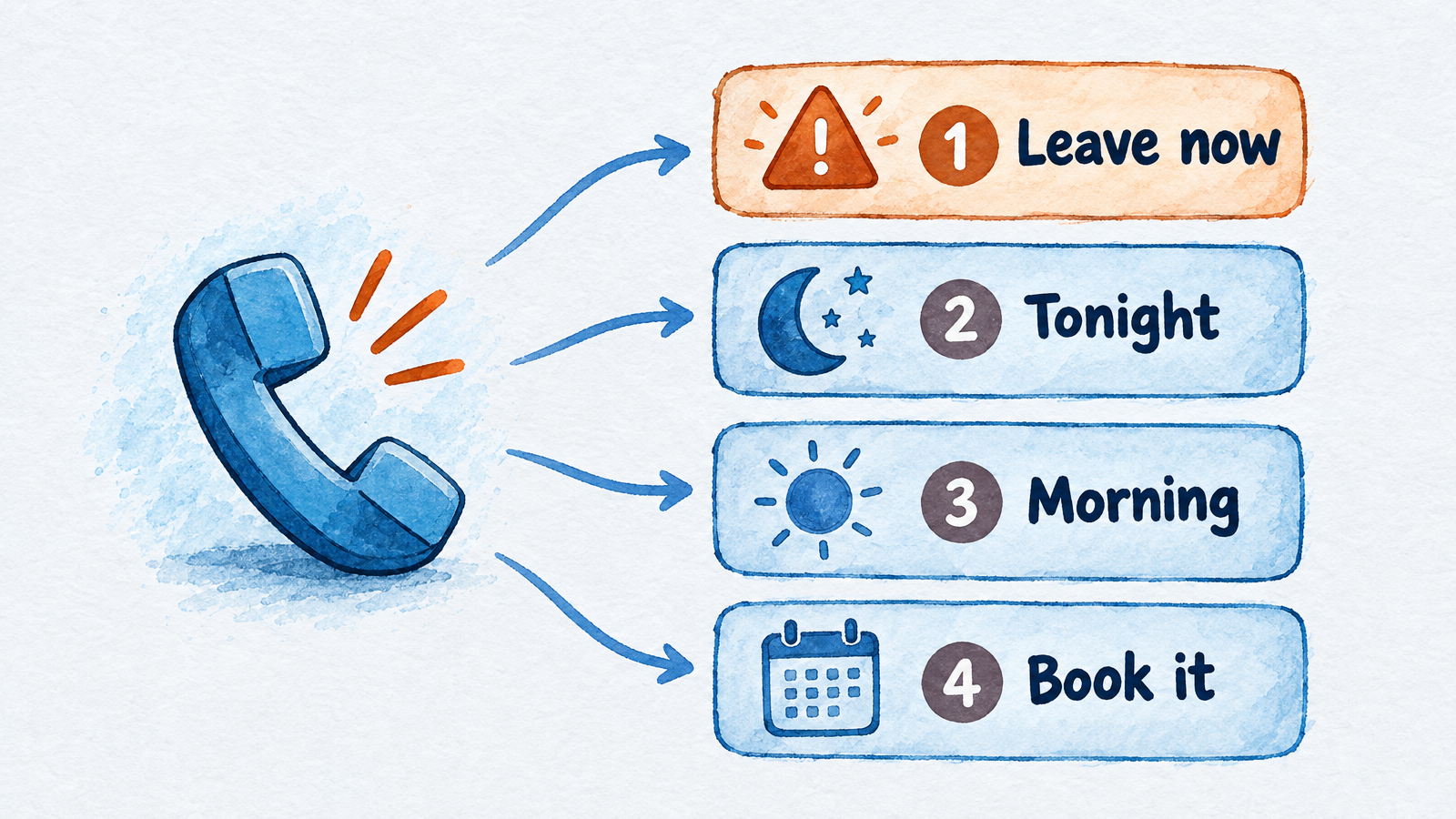
The bin decides who gets woken up, and bin 1 never ends in a booking.
| Bin | Triggers | Action |
|---|---|---|
| 1. Leave now | Gas smell, CO alarm or symptoms, smoke or burning smell | Safety wording above; no booking; flag owner and on-call tech |
| 2. Wake the on-call tech | No heat with freezing weather or an indoor temperature below your cutoff (for example 60°F); an infant, older adult, or medical-equipment user at home; water leaking from equipment; sparking | Send the full alert tonight; tell the caller a person will follow up |
| 3. First thing tomorrow | No heat in mild weather with a healthy household, a noisy blower, one room running cold, a thermostat question | Book the first morning slot; give safe-heating reminders |
| 4. Book it | Tune-ups, replacement estimates, second opinions on another company's quote | Book the visit or in-home estimate on the calendar |
One cutoff is worth setting precisely. The Insurance Institute for Business & Home Safety recommends keeping the thermostat at 55°F or higher to protect pipes, so a home sliding toward 55°F in a freeze belongs in bin 2 even if nobody is in danger yet.
Step 4: Close without over-promising
The script should end with what happens next, not a guess. Suggested wording for bin 2:
"I've marked this urgent and sent the details to our on-call technician. They will contact you at [number]. If it gets colder in the house or anyone feels unwell, tell us right away. Please don't use an oven or a gas stove to heat the home."
Never let an operator or an AI quote prices it has not been given, promise an arrival time, or diagnose a failure from a description. Both are common sources of angry callbacks.
Replacement leads and tune-ups: do not let them wait
A replacement estimate is the highest-value call you take, and the caller is usually comparing several companies. The script should ask the system's age, its recent repair history, and the reason for the call, then book an in-home estimate on your comfort advisor's calendar before the caller hangs up. Tune-ups and minor repairs are worth booking at any hour too, and pushing them into next week keeps this week's trucks free for no-heat calls.
If the caller asks whether to repair or replace, many HVAC pros use a rule of thumb, covered in the FAQ below. Treat it as a conversation starter for the estimate, not a verdict from the phone.
Does it fit your field service software?
The honest answer depends on where your jobs live. If you run Jobber, ServiceTitan, or Housecall Pro, their built-in AI writes jobs straight into that system, and that integration is hard for an outside tool to match. The trade-off is that you pay that platform's price, get its limits, and for Housecall Pro and ServiceTitan have to ask for a quote.
An outside AI receptionist or live service works with any software but passes information through a summary, a text, or an email, which someone then enters as a job. InsertChat, for example, lists integrations with Google Calendar, Gmail, Outlook, HubSpot, Stripe, Calendly, Cal.com, WhatsApp, Zoho, Zendesk, Square, and Microsoft Dynamics 365. It does not list a native ServiceTitan, Jobber, or Housecall Pro connection, so your dispatcher would re-enter new jobs unless you build something with its API (Growth and above) or webhooks (Scale and above). Ask any vendor for the exact handoff, not just the word "integration."
Where InsertChat fits, and where it doesn't
InsertChat's AI receptionist answers your business number from the services, hours, and service area you give it, books on a calendar, and saves each call with a transcript and summary to a shared inbox. For HVAC, the useful settings are:
- "AI when unanswered." Your office or on-call phone rings first for 5 to 60 seconds, then the AI answers. Regular customers still reach your staff, and daytime overflow stops going to voicemail.
- "AI after hours." Your team answers during opening hours you set; the AI covers the rest.
- Safety steps you write. Emergencies and safety risks are flagged urgent after the caller hears the steps you set, which is where the Step 1 wording goes.
- Bilingual answering. It answers in the language each caller speaks, with 58 business language options.
It also has hard limits for an HVAC shop. It does not transfer live calls, take voicemail, record calls, or place outbound calls, and it cannot port your number. When a caller needs a person, it takes the details, marks the conversation as needing your team, emails the teammates you chose, and tells the caller someone will follow up. If your rule is that a human must be on the line with a no-heat caller within a minute, choose a live service or an AI product with transfer. If your rule is that the on-call tech gets a complete, structured alert and calls the customer back, this works and costs less. You can keep your US or Canadian business number by forwarding calls. Our HVAC industry page covers the HVAC setup in more detail, and the home services roundup compares other AI receptionists for the trades.
Pro is $98 a month with one phone number, the AI receptionist, website chat, the shared inbox, and human handoff. For the full AI-versus-service cost breakdown, see AI receptionist vs answering service, and to price your own call volume use the missed call calculator.
How to choose
Pick by the rule your business needs at 10pm, then price it at your busiest month.
- A person must be on the line with the caller within a minute: a live service with dispatch, or an AI receptionist with live transfer. Budget for the stress month.
- The on-call tech should get a full written alert and call back: an AI receptionist without transfer is the cheapest fit.
- Your jobs already live in Jobber, ServiceTitan, or Housecall Pro: price that platform's AI first, then compare.
- You get fewer than 50 calls a month: an on-call phone with a clear script may be enough. The Smith.ai and Jobber entry tiers are also small.
Whichever you pick, run the test calls before cold weather arrives. Call after dark and play five callers: a gas smell, a sounding CO alarm, a no-heat call from an 80-year-old, a tune-up request, and a replacement quote. Then check what landed in the on-call tech's phone and how long it took.
When you want to test the AI option on your own number, start your 7-day free trial on Pro. It includes 500 credits, about 41 call minutes at the example rate, and a card is required at checkout.
Frequently asked questions
What is the $5,000 rule in HVAC?
It is a repair-or-replace rule of thumb: multiply the system's age in years by the repair quote, and if the result is above $5,000, replacement usually makes more sense. A 12-year-old system with a $500 repair scores $6,000. It is a guide for starting the conversation, not a price from the phone.
Can I keep my business number with an HVAC answering service?
Usually yes. Most live and AI services work by call forwarding, so you keep publishing your number and forward all calls, after-hours calls, or unanswered calls. InsertChat supports forwarding for US and Canadian numbers; elsewhere you use a local or toll-free InsertChat number, and number porting is not offered.
Should the AI tell callers it is not a person?
Yes, say so in the greeting. In Gartner's 2026 survey of 3,566 customers, 87% said companies using generative AI for service must offer access to a human, and a Five9 and Hanover Research survey found 71% say knowing it is AI is very or extremely important. Make sure urgent calls reach your team fast.
What happens when the AI doesn't know the answer?
With InsertChat, handoff rules fire when a caller asks for a person, the assistant is unsure, the caller is upset, or the request involves a sensitive action. It collects the details, marks the conversation as needing your team, emails the teammates you chose, and tells the caller someone will follow up. It does not guess a price or a booking.