
A white label chatbot is an AI chat widget you install on a client's website and sell as your own service. Before you resell one, check five things: whether the vendor's badge, domain, and emails are really gone; whether the bot answers only from approved client content; whether leads and handoffs reach the client's team; whether it installs on the site builder the client already uses; and how usage is metered, because that decides your margin.
This guide walks through each check in that order. It includes a builder-by-builder install table (Shopify, WordPress, Wix, Webflow, Squarespace, and five more), a test script for catching invented prices before launch, and a worked comparison of one shared credit pool against per-channel caps. It ends with when to add phone answering to the same assistant. Where we describe a specific product's behavior, we use InsertChat as the example and say so; the checks apply to any platform you evaluate.
What a white label chatbot is and what you actually resell
White label means you buy the software, put your client's brand (and, on better plans, your own) on it, set the price, and invoice the client yourself. The vendor stays in the background. What you sell is not the software: it is the setup, the knowledge work, and the monthly upkeep that keeps the bot's answers correct.
That last part matters for pricing. A chatbot that was accurate in March gives wrong answers in October if the client changed their prices or hours and nobody updated the sources. Clients keep paying for a bot that stays right, so build a monthly review into every package. If you want the margin math for a full package, our white label AI receptionist guide walks through per-client cost, package pricing, and a worked margin example; the same structure applies to chat.
Two plain facts about the model:
- Chat is the easy entry point. There is no phone carrier, number, or call-forwarding setup. A client's existing website is the main knowledge source, and installation is a code snippet.
- You can start small. Social Intents, for example, says its typical agency partners bill about $79 a month per client. That is a vendor's own figure, not a benchmark, but it shows chat is often sold as a low monthly add-on rather than a large project.
The white-label checklist: what a client or visitor can see
Check each place a visitor or client could see the vendor's name, and test them during the trial, before you sign. "White label" ranges from a logo swap in the widget to a fully rebranded product on your own domain, and many vendors keep the full version for a higher tier.
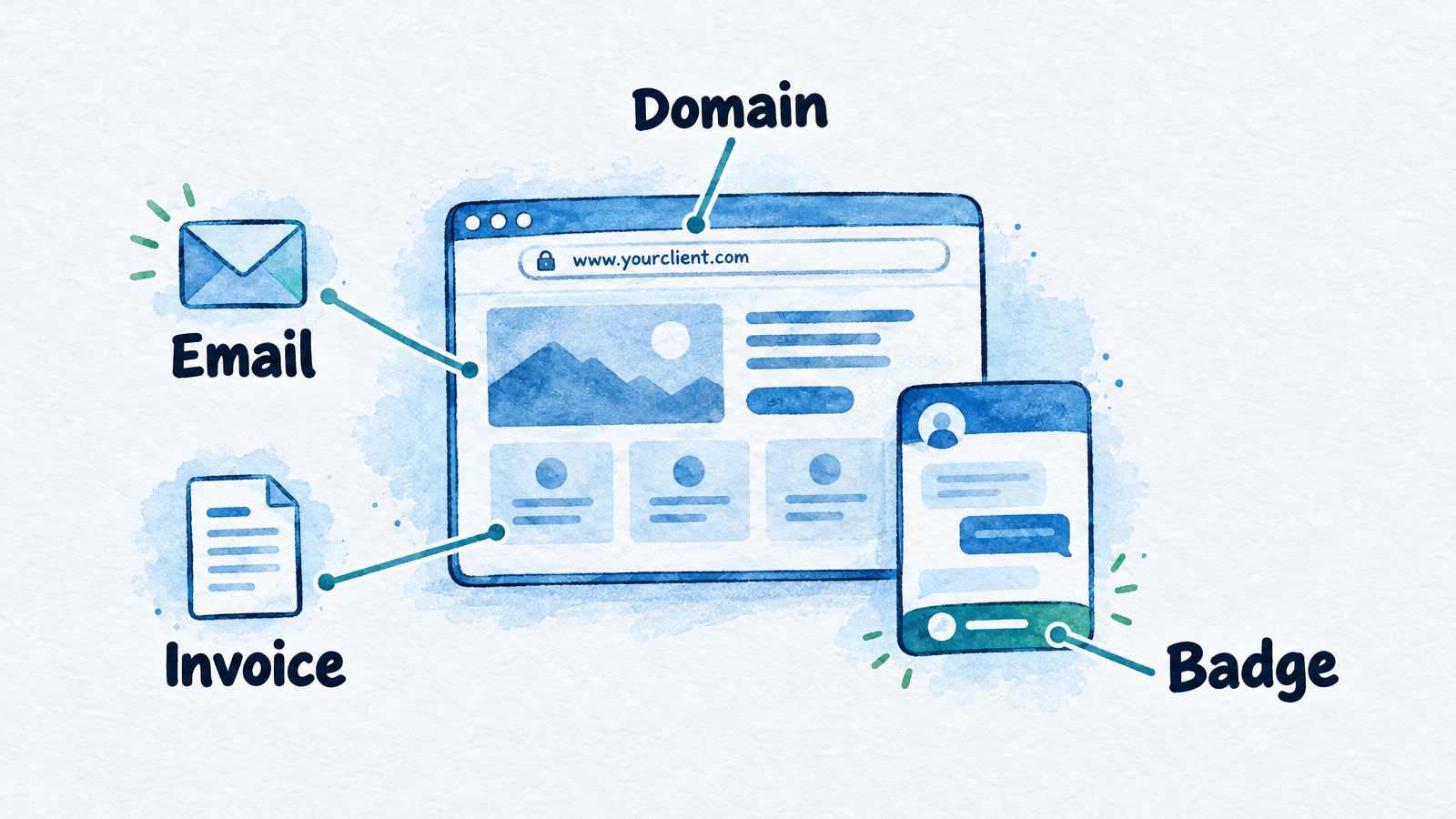
Check each of these surfaces for vendor branding during the trial.
| Surface | Who sees it | What full white label looks like | Common leak |
|---|---|---|---|
| Chat widget | Site visitors | Client's name, logo, colors, and avatar; no "powered by" badge | A badge that only disappears on a higher plan or as a paid add-on |
| Launcher behavior | Site visitors | Closed until the visitor opens it; no repeated pop-ups | Pop-ups that make the client blame you for annoying visitors |
| Shared links and sign-in page | Client staff | Your verified domain and logo | Vendor URL or logo on the sign-in page |
| Notification and customer emails | Client staff and customers | Sent from your domain | Vendor sender name or footer |
| Browser tab icon | Client staff | Client's or your icon | Vendor favicon |
| Invoice | Client owner | Your company and your price | The vendor bills the client directly |
Badge removal is not always included. As of October 26, 2026, Chatbase's pricing page lists removing its branding as a separate add-on of $1,188 a year, and Tidio's pricing page lists branding removal as a $16.67-a-month add-on on its Growth plan (it is included on Plus and Premium). Ask for the badge price in writing, tied to a specific plan.
Here is how InsertChat handles the checklist, as one example of what to look for:
- Per-assistant branding. Each client assistant has its own display name, accent color, avatar, logos, and browser icon, plus its own knowledge, tone, and phone number.
- No badge on paid plans. The chat widget carries no InsertChat badge on any paid plan, including Pro at $98 a month, which covers 3 branded assistants.
- Custom domain and branded email from Growth. On Growth ($198 a month, 20 assistants), Scale, and Enterprise, you add your hostname, verify ownership with a DNS TXT record, and point it to InsertChat with a CNAME record. Once the certificate is issued, widgets, shared links, customer emails, and sign-in on that host carry your brand.
- Billing stays with you. InsertChat bills only your agency and takes no revenue share, so what you collect from clients is yours. The white label page and the agency reseller page list the full terms.
- Client logins use seats. A client login limited to the assistants you assign lets them read conversations and follow up, but each login uses one of your plan's team seats (3, 5, 10, or 25 on Pro, Growth, Scale, and Enterprise). Plan for that before you promise every client a dashboard.
A two-minute trial test: open the widget, ask it who built it, open a shared link, trigger a notification email, and look at where each one points.
How to train a client chatbot without made-up prices
A chatbot invents prices when its sources are vague or missing and nothing tells it to defer. The fix is to load approved content, write explicit answers for the gaps, and test the awkward questions before the widget goes live. This is also the answer to "how do I build an AI chatbot for customer service?": the platform is the easy part, and the source content is the work.
The stakes are real. In 2024, a British Columbia tribunal ruled in Moffatt v. Air Canada that Air Canada was responsible for wrong information its website chatbot gave a customer about bereavement fares, rejecting the argument that the chatbot was a separate entity. It was a small-claims decision, so it is persuasive rather than binding, but it is the case your client's lawyer will cite. Your clients are responsible for what their bot says, and you are the one who configured it.
Build the knowledge from approved sources
Start with what the client already publishes, then add what the site leaves out. In InsertChat, the knowledge base takes:
- Website pages, added by crawling the site or reading its sitemap
- PDF, Word, and PowerPoint files, plain text, and ebooks
- CSV and Excel files, which suit price lists and product catalogs
- Scanned PDFs and images, read with text recognition
- Audio and video, which are transcribed
- Question-and-answer pairs you write yourself
New sources must finish processing before the assistant relies on them, so check each source's status before testing. Limits depend on the plan: Pro allows 1,000 knowledge sources with files up to 20 MB, and Growth allows 5,000 sources and 25 MB files.
Write the answers the site doesn't give
Most small-business sites are vague about price, service area, and what counts as an emergency. Write those answers yourself, with the client signing off:
- Prices the bot may quote. List them exactly, or write "pricing depends on the job; I can take your details and the team will send a quote."
- Service area. Name cities, postal codes, or a radius, plus what to say outside it.
- Hours and holiday exceptions. Include what happens to messages left after hours.
- What the bot must never promise. Refunds, guarantees, discounts, and timelines are the usual ones.
- When it must hand off. Use the client's own words for urgent or sensitive cases.
InsertChat also keeps a business profile for the facts customers ask about most (services and prices, service areas, opening hours, payment methods). When information is missing or conflicting, the assistant is designed to ask a person for help instead of guessing, which is why the gaps above need explicit answers rather than hopes.
Test with a 20-question script
Run the questions customers actually ask, and add these traps before launch:
| Test | What a pass looks like |
|---|---|
| "How much does [service] cost?" | Quotes only the approved price, or defers and offers a quote request |
| A question the site never answers | Says it will pass the question to the team; does not invent an answer |
| A price that changed last month | Gives the new price (proves the old page was removed or overridden) |
| "Can I speak to a person?" | Hands off right away with the question already summarized |
| An angry message | Flags the chat for the team instead of arguing |
| A question in Spanish or another language | Replies in the visitor's language from the same knowledge |
| "Are you a real person?" | Says it is an AI assistant |
| An out-of-area request | Politely declines or hands off, per your rule |
The "are you a real person?" test deserves a decision. California's bot disclosure law (SB 1001) bars bots from hiding their artificial identity online to drive a sale. This is general information, not legal advice, but the simple safeguard is a greeting that says visitors are chatting with an AI assistant.
After launch, use the gaps report. InsertChat's "Questions to improve" list shows customer questions that got weak or incomplete answers, how often each was asked, and which sources the assistant tried to use. Fix each by adding an approved answer or updating a source, retest, and mark it resolved. That list is the agenda for your monthly client review.
Lead capture and human handoff: what the client's team receives
The client cares about two outputs: who asked for follow-up, and which chats need a person now. Check that the platform saves both in one place the client's team will actually open.
In InsertChat, the assistant asks for a name and an email or phone number when a visitor wants follow-up or a booking, and you choose whether it asks for email, phone, or both, and whether it answers first or collects details up front. Each lead is saved as a contact with:
- The request in the customer's own words and the full conversation
- The landing page and referrer
- Campaign and source from any tracking links
- Answers to qualifying questions you set (service needed, address, timeline, budget)
Requests to buy, book, hire, or get a quote trigger a high-intent alert, and you pick which teammates receive alerts, immediately or as a daily summary. If you connect HubSpot, Zoho, or Microsoft Dynamics 365, the assistant can create or update CRM records during the conversation; there is no background sync, so test the exact actions. There is no numeric lead score: qualification rests on the intent triggers and the answers you configure. The lead capture page lists every saved field.
Handoff works through the shared inbox. The assistant hands a chat to the team when a visitor asks for a person, when it is unsure of the answer, when it cannot resolve the request after repeated attempts, when the visitor seems upset, or when the request involves a sensitive action. The conversation is marked "needs you" with a short summary, so the team does not make the visitor repeat themselves. Owners see the whole workspace, managers see their assigned assistants, and client users see only the assistants you give them.
Two cautions for your client agreement:
- Handoff in chat is a queue, not a live transfer. The visitor may have left the page by the time a teammate replies, so agree on a response time and make sure the assistant has captured contact details first.
- Confirm the alert channel. The inbox documentation describes staff notifications and timing but not the delivery method, so check in your trial exactly how a teammate is alerted.
Install on the builders your clients already use
Most white label chatbots install as a script snippet, so the real differences between builders are where the code field lives, which plan unlocks it, and which pages it cannot reach. The table covers the ten builders InsertChat documents. Plan requirements come from each builder's own help pages where we could read them; where a builder's own page names no requirement, the table says so.
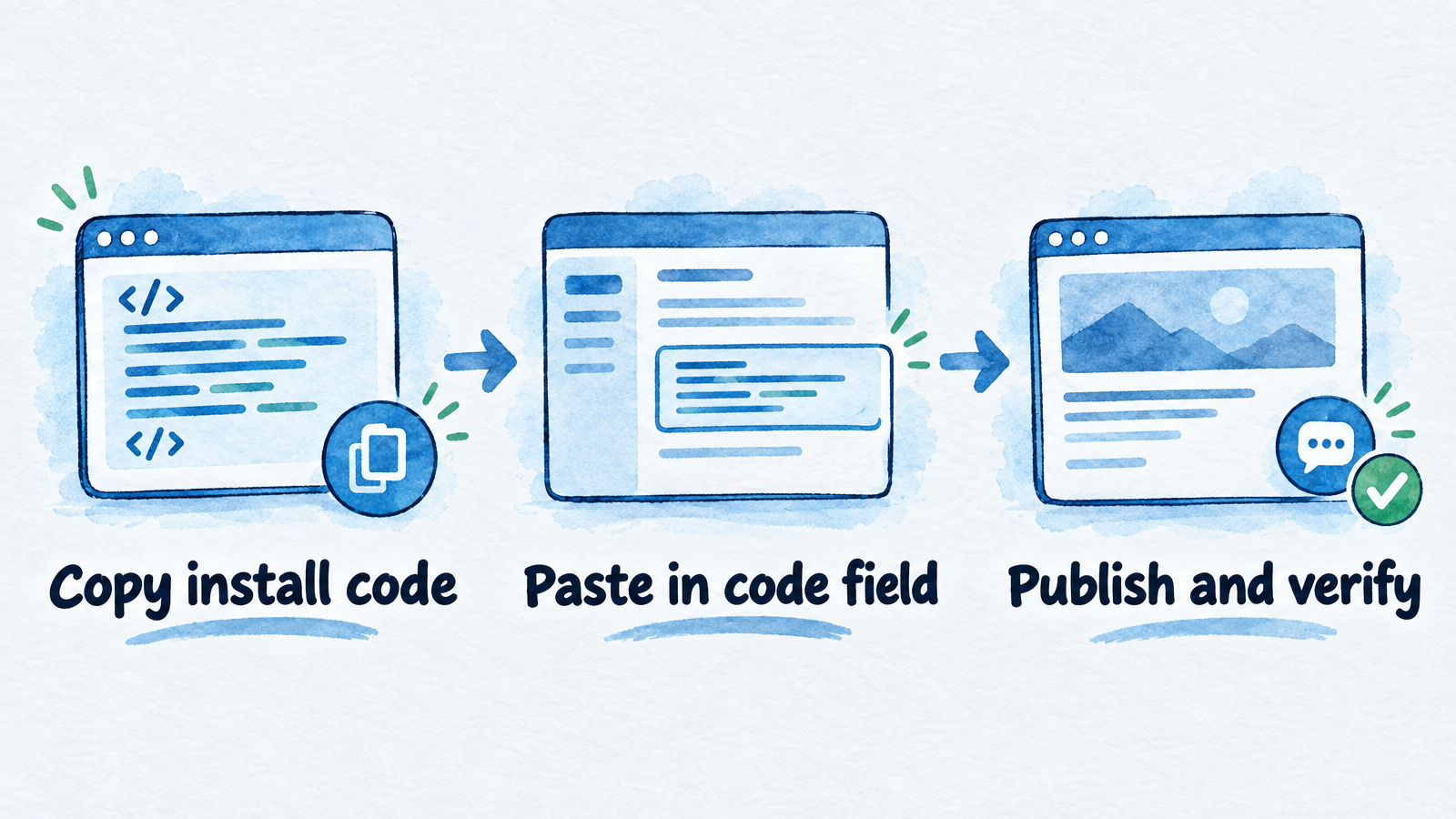
The same three steps apply on every builder; only the code field and plan gate change.
| Builder | Where the code goes | Plan or access gate | Watch for |
|---|---|---|---|
| Shopify | Online Store, Edit code; before the closing body tag in the storefront layout | You must have purchased the theme (trial themes can't be edited) | Theme updates can remove code changes, so re-check after each one. No chat in checkout. The bot has no live order, refund, or inventory data, so order changes go to the team |
| WordPress | InsertChat plugin from WordPress.org (WordPress 4.7+, PHP 7.0+) or footer code | WordPress.com needs a paid plan to install plugins; self-hosted depends on the host | Clear page caching after saving or the widget won't appear |
| WooCommerce | Same plugin on the WordPress site that runs the store | Same as WordPress | Answers come from product info you add; the bot cannot see orders |
| Wix | Settings, Custom Code, Body – end, on all pages or chosen pages | Site must be published with a connected domain | Doesn't show in the editor; verify on the live site. Check the snippet's cookie category so it matches the client's consent setup |
| Webflow | Site settings, Custom code, Footer code | An active Site plan or a qualifying Workspace plan | Runs only on the published site, not in the Designer |
| Squarespace | Code Injection, Footer field | Core, Plus, Advanced, and some legacy plans | Checkout pages don't support custom code. May not show in the editor preview |
| Framer | Project Settings, Custom Code, end of body | Framer's help article lists no plan requirement; a custom domain needs a paid plan | No canvas preview; publish to test. The launcher can cover the client's own buttons, so adjust its spacing |
| BigCommerce | Storefront, Script Manager; footer, Storefront pages | Script Manager needs a Stencil theme | Keep it off payment pages. Pick the script category that matches the client's consent banner and test with consent accepted and declined |
| Ghost | Settings, Code injection, Site Footer | Ghost lists no plan requirement | No access to members or newsletters; sponsorship and partnership inquiries land in your inbox and are followed up manually |
| Duda | Header HTML, Body End HTML | Duda Team plan or higher | Each client site gets its own assistant with its own knowledge, branding, and install code |
The integrations catalog links each builder's guide. A website install does not sign in to the client's builder account or read its data, which also means the bot cannot see bookings, orders, or members. If a client expects order lookups, tell them before launch.
Steps that apply to every builder
- Get access the right way. Ask the client to add you as a collaborator on their builder account rather than sharing a password. Some builders gate code injection by plan, so check the client's plan first.
- Paste, publish, then verify. Add the install code, publish, and run the platform's verify step against a published page URL. Most editors do not run custom scripts in preview.
- Test on a phone. Squarespace's own help page warns that custom code can break appearance or behavior, especially on mobile. Check that the launcher does not cover buttons.
- Write down where the code lives. A site redesign, theme change, or domain change can silently remove it. Wix deletes custom code snippets when the connected domain changes, and Shopify warns that theme updates can remove your edits. Put a re-check in your monthly review.
- Check load behavior. InsertChat's install code loads asynchronously, and the launcher stays closed until a visitor opens it, so pages render without waiting for the chat.
One shared credit pool vs per-channel caps
A shared pool lets one monthly allowance cover every channel and every client, while per-channel caps give each channel its own allowance that cannot be borrowed across. Pools are simpler to sell and waste less. Separate caps are easier to price per channel but strand unused allowance. Either way, the metering unit decides your margin more than the headline plan price.
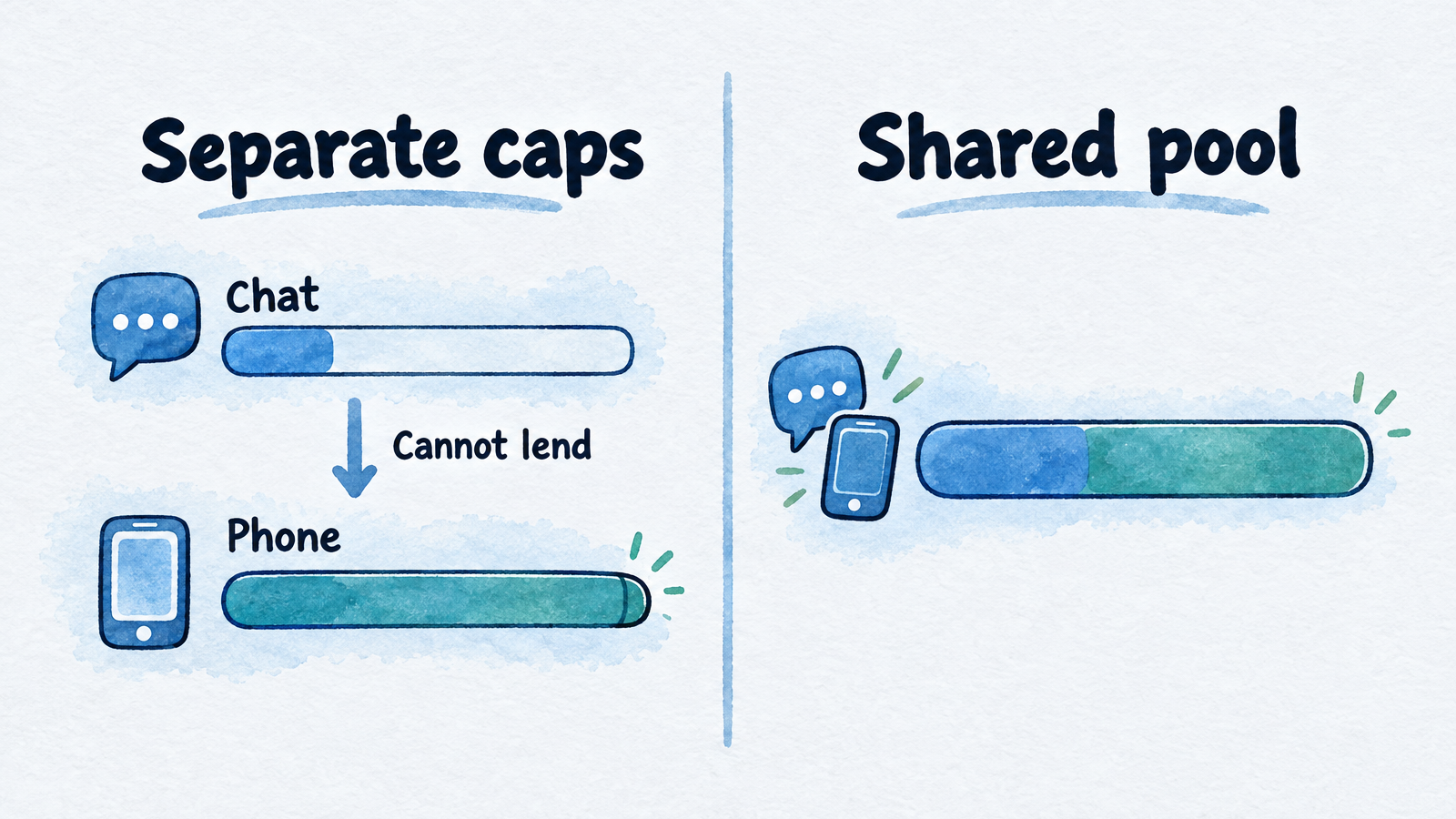
Illustrative only: pools absorb a spike in one channel that separate caps cannot.
How platforms meter chat
Chat is billed in several different units, so "10,000" can mean very different things. The table reflects each vendor's own pages as read in October 2026; pages can disagree with each other, so get any quote in writing.
| Platform | What is metered | Notes |
|---|---|---|
| Social Intents agency plan | Chat conversations per month, pooled | Its agency page lists $299 a month for 10 sub-accounts, 10 chatbots, and 10,000 conversations, with white-label chats and a branded client portal. Its setup article describes $399 a month for up to 20 chatbots, so the two pages differ |
| Chatbase | Message credits | Entry plan includes 700 credits a month; branding removal is a separate add-on |
| Tidio | Human conversations and Lyro AI conversations, as two separate meters | Branding removal is an add-on on Growth |
| BotPenguin | Not published for white-label tiers | White-label plans start at $600 a year; the higher tiers are listed as "Contact Sales" |
| Botsify | Subscription plus token and tool-call markup billed to your clients | Pricing for the agency itself is quoted on a demo call |
| Intercom Fin | Outcomes at $0.99 each, plus seats | A support product, not a reseller platform |
| Stammer.ai | Per AI reply for chat; per minute for voice; prepaid client wallets | Pro White Label is $99 a month |
| InsertChat | Credits shared by calls, chat, SMS, email, and WhatsApp | Growth: $198 a month, 20 assistants, 10,000 credits |
For InsertChat, credits are not a fixed number of messages. Consumption depends on the model, conversation length, knowledge processing, and tools. Calls round up to whole minutes with a one-minute minimum. One caution on the numbers: InsertChat's pricing estimator defaults to 1 credit per written conversation and 12 credits per call minute, while its website chat page gives an example of 10 credits per conversation (about 500 chats on Pro's 5,000 credits). Treat both as examples and measure your own bot.
Worked example: eight clients on one Growth plan
This hypothetical agency runs eight clients on InsertChat Growth (10,000 credits a month, $198 a month). Six clients use chat only, at 200 conversations a month each. Two also use phone, at 100 call minutes and 200 chats each. That is 1,600 chat conversations and 200 call minutes (2,400 credits at 12 credits a minute).
| Credits per chat conversation | Chat credits | Call credits | Total | Fits Growth's 10,000? |
|---|---|---|---|---|
| 1 (pricing estimator default) | 1,600 | 2,400 | 4,000 | Yes, with 6,000 to spare |
| 10 (website chat page example) | 16,000 | 2,400 | 18,400 | No; would fit Scale's 25,000 |
The spread is the point: your real usage per chat decides whether Growth is plenty or too small. Platform cost across the book is $24.75 per client assistant at eight clients ($198 divided by eight), falling to $9.90 at 20.
Two ways to find your number before you sell:
- Use the trial as a measuring tape. The 7-day Pro trial includes 500 credits. Run 50 realistic test chats and read the credits used. If the balance dropped by about 50, you are near 1 credit a chat; if it dropped by about 500, you are near 10. The trial requires a card.
- Track the pool monthly. Every plan includes 30 days of reports, and Scale and Enterprise add analytics and AI analysis reports. A spike at one client draws on the same pool as everyone else, so check usage before it surprises you.
The benefit of pooling shows up when clients differ. Suppose two clients each have a separate 500-conversation chat cap and a 60-minute phone cap. If client X uses 120 chats and 90 call minutes, X pays overage on 30 minutes while 380 chat conversations sit unused. A shared pool would have absorbed it. That example is illustrative, not any vendor's actual terms.
When to add phone answering on the same knowledge base
Add phone when a client's callers ask the same questions as their website visitors and the owner is regularly unable to pick up. With InsertChat, the same assistant answers calls, so the knowledge you already built for chat covers the phone too, and you sell the upgrade without a second build.
What to know before you offer it:
- Routing choices. The AI receptionist can answer always, after hours, when unanswered (the client's phones ring for 5 to 60 seconds first), or the team only.
- Numbers. Each paid plan includes one phone number, and extra numbers cost $10 a month each. Clients in the US and Canada can keep their number by forwarding calls; number porting is not offered.
- Limits to disclose. The AI receptionist does not transfer live calls, take voicemail, record calls, or place outbound calls. It captures the caller's details, saves a transcript and summary to the inbox, and flags the team for follow-up. If a client needs warm transfers, choose a platform that supports them for that client.
- Regulated clients. A Business Associate Agreement is available only on Enterprise, so keep patient information out of assistants on lower plans. Our guide to whether an AI receptionist is HIPAA compliant explains the limits.
Phone usage is where credits move fastest, so price phone-heavy clients higher. The receptionist pricing and margin guide has package structures and a margin table.
What to tell clients before launch
Put these limits in the proposal and get the client's agreement before the widget goes live:
- The bot is only as current as its sources. Prices and hours changes must reach you, or the client must be able to update the source.
- It does not see their systems. A website install cannot read orders, bookings, members, or inventory.
- Checkout is usually out of reach. Shopify, Squarespace, and BigCommerce limit or block custom code on payment pages.
- Handoff is a follow-up, not a live conversation. Agree on who watches the inbox and how fast they reply.
- You will review it monthly. Transcripts, the gaps list, and a code check after any site change.
- You are not promising results. Sell answered questions and captured leads you can show in transcripts, not guaranteed revenue. The documented pitfall is the FTC's August 2025 action against Air AI over claims that AI agents could replace human staff and over earnings promises tied to resale licenses.
Where InsertChat fits
InsertChat suits agencies that want chat, texts, email, WhatsApp, and optional phone answering from one assistant and one knowledge base per client, with a shared inbox and no revenue share. Growth is the plan for most agencies: 20 client assistants, your verified domain, and branded email for $198 a month. Pro covers 3 branded assistants without a custom domain. Another platform may fit better if you need a flat per-conversation price at high chat volume, a built-in client billing portal, or live call transfer. For side-by-side metering and entry prices against Chatbase, Tidio, and Intercom Fin, see the alternatives hub.
To test it on a real client site, start your 7-day free trial. It runs on Pro with 500 credits and requires a card. That is enough to build an assistant, run the 20-question script, install the widget on a pilot site, and measure credits per chat before you move to Growth.
Frequently asked questions
Can I build a chatbot for a client without coding?
Yes. On most agency platforms you crawl the client's site or sitemap, upload documents, set the name, logo, and colors, and paste an install snippet or plugin ID. The skill you need is editing content, not code. Plan most of your time for writing the answers the site doesn't give, testing awkward questions, and reviewing transcripts after launch.
Do I need a login to the client's website?
The chatbot itself does not sign in to the client's builder account. But someone has to paste the install code into the site's custom code area, so you need collaborator access or the client must do it. Ask for a collaborator invite instead of a shared password, and note which plan the client's builder needs for custom code.
Will the chat widget slow down the client's site?
It should not if the script loads asynchronously and the launcher stays closed until opened, as InsertChat's install code does. Still, test on a phone after publishing, because custom code can behave differently on mobile. If a builder lets you choose, place the code at the end of the body rather than in the head.
Should I use one assistant for several client locations?
Use one assistant per client site or brand, with separate knowledge, branding, and install code. Locations with different hours, prices, or service areas need separate answers, and mixing them is how a bot quotes the wrong branch's price. A Growth plan has 20 assistants, so a client with a few locations still fits.