
A legal answering service picks up a law firm's calls when nobody can, runs a short intake script for new matters, takes messages for existing clients, and books consultations, all without giving legal advice. For a solo or small firm the real decision is who answers: live receptionists (published plans run about $350 to $1,725 a month at 200 to 500 minutes), an AI receptionist (about $70 to $200 a month at 100 calls), or a mix of both.
This guide covers what separates a legal service from a generic one, the intake questions to script for six practice areas, the lines it must never cross, the conflict-check details to capture, and what 100 calls a month costs on each model. It is general information, not legal advice. Your state's rules govern what your firm may delegate.
What a legal answering service does that a generic one doesn't
A legal answering service treats a ringing phone as a possible new matter, not a message to relay. It separates prospective clients from existing clients, collects the facts you need to decide whether to take a case, captures the names a conflict check requires, and knows what it must not say.
A generic service can answer in your firm's name and take a message. A legal one adds five things:
- Triage by caller type. New matter, existing client, court, opposing counsel, someone in custody, or a vendor each get a different path.
- Practice-area questions. A car-accident caller and a divorce caller are asked different things, in a different order.
- Conflict-check data. It collects every party's name, not just the caller's.
- A consultation, not just a message. It books a time on the right attorney's calendar when you allow it.
- Guardrails. It declines legal questions, outcome predictions and fee promises in a consistent way.
The firm stays responsible for all of it. ABA Formal Opinion 506 (June 2023) says a lawyer may train and supervise nonlawyers, including outside vendors, to handle prospective-client intake tasks such as collecting initial facts, running an initial conflict check, and answering general questions about the process, provided the lawyer meets the supervision duties of Model Rule 5.3 and the tasks don't amount to practicing law. The ABA's summary of the opinion is a good starting point.
How many calls to law firms go unanswered
Most new-client calls to law firms do not get a live answer. In the secret-shopper study behind Clio's 2024 Legal Trends Report, researchers contacted 500 US firms: only 40% answered the phone (down from 56% in 2019), and 48% neither answered nor called back. Just 33% responded to an email, according to the Illinois Supreme Court Commission on Professionalism's summary.
Callers do not wait long. Martindale-Avvo's 2023 consumer survey of more than 1,800 visitors to its own legal sites (a self-selected sample) reported that 80% would contact another attorney if they hadn't heard back within 48 hours. Treat that as a direction, not a precise rate.
One popular claim is missing here on purpose: the line that "78% of clients hire the first lawyer who responds." It circulates on vendor sites with shifting attributions, and I could not trace it to a primary legal source. Web forms show the same pattern. Hennessey Digital's 2025 study of 1,333 firms found 26% never responded to a form inquiry within seven days, with a median reply time of 13 minutes.
Who is calling? Routing new clients, existing clients, and everyone else
The first job on any legal call is deciding who is on the line, because each caller needs different handling and the wrong one costs you either a client or a confidentiality problem.
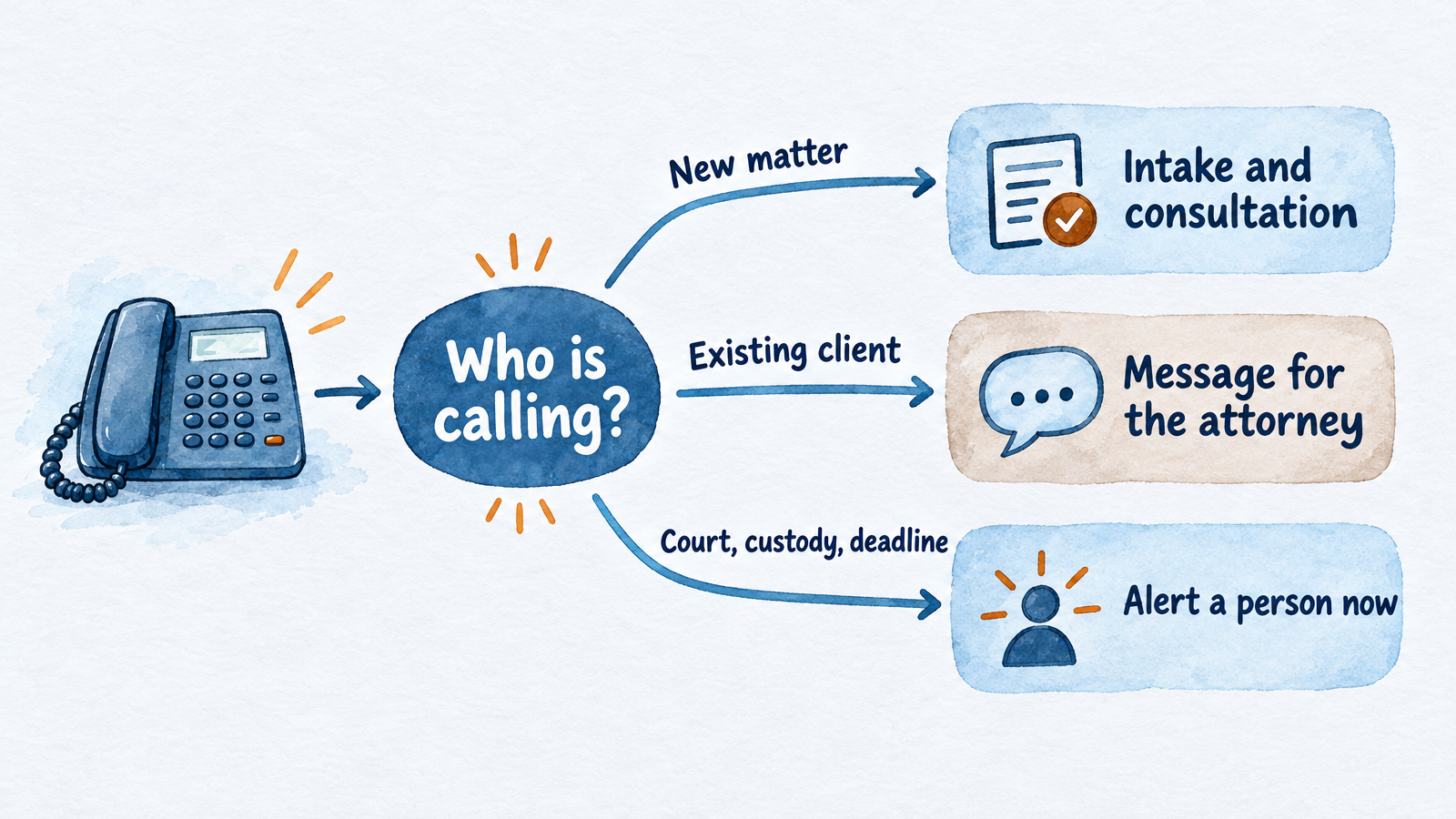
Sort the caller first; the right path depends on who is on the line.
| Caller | What the answering service should do | What it should never do |
|---|---|---|
| New prospective client | Run the practice-area intake, capture conflict names, book a consultation or arrange a callback | Say whether the firm will take the case |
| Existing client | Confirm name and matter, take a precise message, tell them when to expect a reply | Discuss case status or strategy |
| Court clerk or judge's staff | Treat as urgent; capture case name, number, date, document and callback; follow your rule for reaching an attorney now | Treat as a sales or intake call |
| Opposing counsel or opposing party | Take a message only | Confirm or deny whether someone is a client; book them a consultation |
| Someone in custody, or family reporting an arrest | Ask about custody first, then follow your urgent path | Run a long questionnaire first |
| Caller asking for free legal advice | Say it can't give advice, then offer the consultation | Estimate case value or give an opinion |
| Caller outside your practice areas | Decline politely and offer your referral line or a message | Comment on the merits |
| Vendor or solicitor | Follow your written screen: message or end the call | Put them through |
Two setup details matter. First, give the service a standing list of existing clients, opposing counsel and courts you want treated specially. Second, decide in advance what "urgent" means and how an attorney is reached. A live service can usually transfer or call your on-call number. Some AI receptionists cannot transfer a live call, so the urgent path becomes an immediate alert to your team with the details attached. Know which one you are buying.
A short greeting sets the tone for all of it. If your service is automated, say so up front. A greeting under 200 characters is enough:
"Thank you for calling Harper & Lane Law. I'm the firm's AI assistant, not a lawyer. Are you a current client, or calling about a new matter?"
For greeting patterns that work when nobody picks up, see business voicemail greeting examples.
Intake scripts by practice area
Good intake asks the one question that decides urgency first, then collects a short list of facts, and stops. These templates give the first question, the data to capture, and the triggers that should push a call to a person immediately. Treat them as drafts for your own attorney to edit. Nothing here replaces your firm's judgment or your state's rules.
Every call, in every practice area, also captures: full name, best callback number and a backup, the other party or parties, whether another lawyer has been consulted, how the caller found you, and the deadline the caller already knows about.
Personal injury
Ask first: "Were you hurt, and when did it happen?" The incident date matters because limitation periods vary by state.
Capture: date, time and place of the incident; injuries and treatment so far; police report or report number; the at-fault party and their insurer; the caller's own coverage; whether the caller has talked to or signed anything for an insurer; prior counsel.
Escalate now: a death, a limitation date measured in weeks, or an insurer asking for a recorded statement.
Sample line: "I'm sorry that happened. I can't give legal advice, but I'll note the insurer's request for a statement and flag it for the attorney today."
Family law
Ask first: "Is anyone in danger right now?" If yes, give emergency services and the firm's urgent number before anything else.
Capture: matter type (divorce, custody, support, modification); state and county; whether papers have been filed or served; spouse or other parent's full name; children's names and ages; court dates; any protective order.
Escalate now: safety concerns, a hearing in the next few days, or a recent service of papers.
Sample line: "Thank you for telling me. I'll collect a few details so the attorney can review them before you speak. Can I have your spouse's full name?"
Criminal defense
Ask first: "Is the person in custody?" If so, stop the questionnaire.
Capture: who is calling and their relationship; the person's full name; facility and county; charge if known; next court date; bond status; co-defendants; prior counsel; best contact and backup.
Escalate now: any custody, arrest or court date in the next few days. Callers here often phone in the evening or on a weekend, so the urgent path has to work at 2 AM.
Sample line: "I'm going to get this to the on-call attorney right now. Which facility is he in, and what's the best number for a call back?"
Estate planning
Ask first: "Is this for planning ahead, or because of something that just happened?" A recent death, a property closing or a health event shortens the timeline.
Capture: what they need (will, trust, power of attorney, probate); state of residence; marital status; children, including minors or dependents with special needs; whether documents already exist; any date driving the request.
Escalate now: a death in the last few days, a probate deadline, or a capacity concern.
Sample line: "I can book a consultation. You won't need to bring everything; the attorney will go through your assets with you."
Immigration
Ask first: "Do you have a hearing or a deadline coming up, or has someone been detained?"
Capture: preferred language; country of origin; current status; A-number if they have one; any notice to appear or court date; entry date; prior filings or denials; arrests or convictions (ask on every call); family members' statuses; sponsor or employer. If someone is detained, capture the facility and A-number.
Escalate now: detention or a hearing date. Many callers prefer Spanish or another language, so confirm the service stays in the caller's language and does not switch back to English.
Sample line: "Thank you. I'll write down the hearing date exactly as you give it and make sure the attorney sees it first."
Employment
Ask first: "Are you still employed there, and what's the most recent date something happened?"
Capture: employer's name as it appears on pay records; role and tenure; what happened and the reason given; any protected-category concern in a sentence; agency filings or notices received; severance offered or signed, and its deadline; whether an arbitration agreement was signed; prior counsel.
Escalate now: a severance deadline, an agency notice, or a termination within the last few weeks. Watch for callers who won't say where they work or only want to "know their rights," and have the script offer the consultation instead.
Intake vendors, state bar sample forms and practice-management guides publish versions of these lists; none is official, so build yours around the matters your firm actually accepts. Keep each call short. Upfirst reports an average of about two minutes for answered law-firm calls where the caller spoke (17,058 calls across 100 firms, June to September 2026), which means your script should ask only what decides whether to follow up, then leave detailed facts for the consultation.
What a legal answering service must never say
A legal answering service must never give legal advice, predict an outcome, quote a fee beyond what you've approved, or say or imply that an attorney-client relationship exists. Put these rules in writing, test them with real calls, and keep the redirect line short.
Never:
- Answer "Do I have a case?" or "Should I sign this?" Redirect: "I can't give legal advice, but I can book you with an attorney who can."
- Predict results or case value. No "you'll probably win," no ranges for settlements.
- Promise that the firm will take the matter. Taking a case is a lawyer's decision.
- Say "you're a client" or "we represent you." A neutral line such as "Speaking with me doesn't make you a client of the firm" helps.
- Discuss other clients or matters, or confirm whether a named person is a client.
- Negotiate fees or interpret an engagement agreement. ABA Opinion 506, as summarized by practitioners, puts questions about what services the caller should obtain, fee negotiation and interpreting the agreement on the lawyer's side of the line.
- Collect the whole story. A short description is enough; detailed facts belong in the consultation.
Why the care? A relationship can form from the caller's reasonable belief. Florida Bar Opinion 24-1 (January 2024) says that, to avoid confusion or deception, a lawyer using a chatbot for intake "must inform prospective clients that they are communicating with an AI program" rather than a lawyer or employee, and the lawyer remains responsible for what it says; the full text is on the Florida Bar site. Oregon's Formal Opinion 2026-208 on chatbots and AI agents reaches a qualified yes, and warns that an AI agent that does something like send an engagement letter could be read as forming a relationship the lawyer never intended. Human receptionists carry the same risk, which is why the redirect line matters either way.
Conflict-check data to capture on the first call
A conflict check is only as good as the names collected, so the intake should capture every person and entity involved, not just the caller. People run the check; the service collects.
Ask for:
- The caller's full legal name, plus any other names used.
- Every other party: opposing person or company, an insurer, an employer, a landlord, a spouse or co-parent.
- Related parties, such as co-defendants, witnesses or business partners, where relevant.
- Whether the caller or a relative was ever a client of the firm.
- Prior lawyers consulted on the same matter.
- Matter type and location, to confirm jurisdiction.
Have the service say why it's asking ("so the firm can check for conflicts before you speak with an attorney") and never confirm or deny that the firm represents anyone else. Some live services price this as an add-on: Smith.ai lists conflict checks at $0.50 per call on its live plans. For most others, check whether the script captures names but leaves the check to you.
Put intake data into your conflict system promptly. Oregon's opinion points out that what an intake tool collects can create duties to a prospective client even if you never take the case.
The ethics duties you keep, whoever answers
Handing the phone to a vendor or an AI does not hand off your professional responsibility. Four rules do most of the work.
- Rule 1.18 (prospective clients). A person who consults a lawyer about possibly forming a relationship is a prospective client, and the lawyer owes confidentiality about what is learned. Comment 2 to the rule says the test turns on the circumstances, including what the person reasonably expects.
- Rule 1.6 (confidentiality). Reasonable efforts to protect information apply to call content, transcripts and the vendor that holds them.
- Rule 5.3 (nonlawyer assistance). You must make reasonable efforts to ensure outside vendors act compatibly with your obligations, including by giving instructions and supervising.
- Rule 5.5 (unauthorized practice). A nonlawyer, or software, must not give legal advice on your behalf.
For AI specifically, ABA Formal Opinion 512 (July 29, 2024) applies the existing rules to generative AI: understand how a tool handles information before client information goes into it, and supervise vendors as you would other nonlawyer providers. It does not create a new AI rule.
Before you sign with any service, human or AI, get written answers to these:
- Where are call transcripts and recordings stored, and for how long?
- Is call content used to train AI models?
- Who at the vendor, and in your firm, can read a transcript?
- Does the service record calls, and how does it handle recording notices? Recording consent laws vary by state, and Justia's 50-state survey is a place to start; ask your own counsel.
- What happens on an urgent call, and how fast does a person see it?
- What does the script say when a caller asks for legal advice? Test it.
State bar rules differ. Have the attorney responsible for ethics at your firm sign off on the final setup.
Live vs AI vs hybrid: what 100 calls a month costs
At 100 calls a month, an AI receptionist runs about $70 to $200 a month, live per-minute services run about $350 to $1,725 depending on how long calls last, and per-call live service from Smith.ai runs about $915. Billing model matters more than the headline price, because intake calls are longer than a quick message.
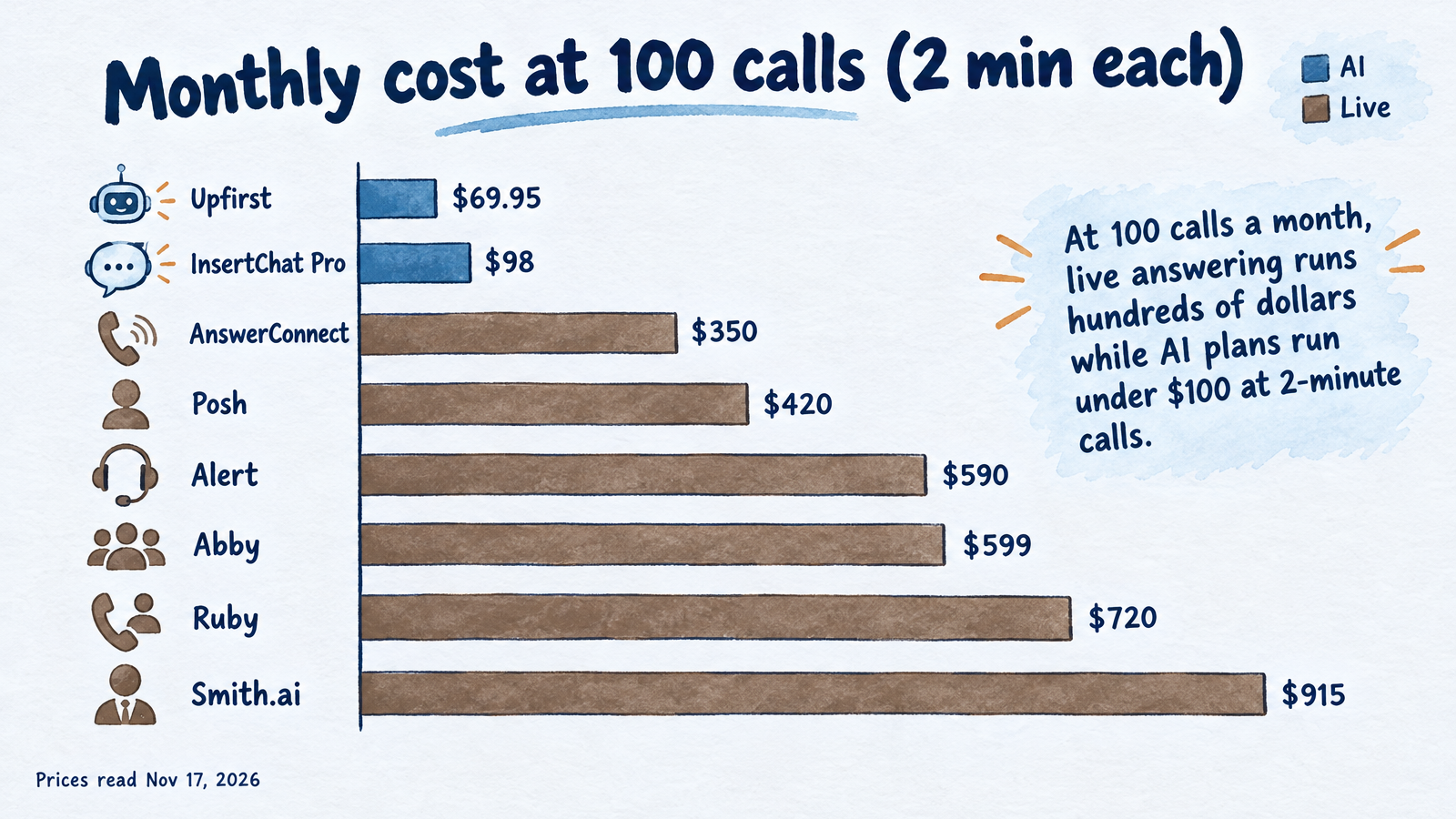
Published plan prices, read November 17, 2026, at two call lengths.
To compare fairly, the table assumes two firms, each with 100 calls a month: one whose billed calls average 2 minutes (200 minutes), and one that runs fuller 5-minute intakes (500 minutes). Plan prices were read from each vendor's official page on November 17, 2026, except where noted.
| Service | Who answers | Billing | 100 calls at 2 min (200 min) | 100 calls at 5 min (500 min) |
|---|---|---|---|---|
| Posh | Live | Per minute, bundles | $420 (200-minute plan) | $975 (500-minute plan) |
| AnswerConnect | Live | Per minute, rounded up | $350 plus $49.99 setup | $765 (300 minutes at $395, 200 more at $1.85) |
| Abby Connect | Live, AI or both | Per minute, bundles | $599 | $1,380 |
| Ruby | Live | Per minute, bundles | $720 | $1,725 |
| Alert Communications | Live intake | Per minute, bundles | $590 (250 minutes) | $590 plus overage (rate not published) |
| Smith.ai (human-first) | Live | Per call | $915 (90 calls at $810, 10 at $10.50) | $915 |
| Upfirst | AI | Per call | $69.95 (90 calls at $59.95, 10 at $1.00) | $69.95 |
| InsertChat Pro | AI | Shared credits | $98 (about 2,400 of 5,000 credits) | Over Pro's credits (about 6,000); Growth at $198 includes 10,000 |
Four notes on reading it:
- Rounding. Official pages confirm whole-minute rounding at LEX Reception and AnswerConnect, and Ruby's blog says it rounds up in 60-second increments, though other Ruby pages and articles say 30 seconds. A call that averages 2:05 can bill as 3 minutes, so a 200-minute estimate can really be 300.
- Plans that don't publish prices. Answering Legal and LEX Reception show plan prices only after a form or in a quote. Upfirst's September 2026 comparison reported Answering Legal at $676 for 200 minutes and LEX Reception at $450 for 300 minutes; confirm both directly.
- Add-ons and spam. Smith.ai charges per call for extras such as conflict checks ($0.50). Upfirst says it does not bill spam or calls under 15 seconds. Ask every provider how they bill hang-ups, spam, wrong numbers and hold time.
- InsertChat's credit math. Calls use credits, round up to whole minutes, and have a one-minute minimum. At the example rate of 12 credits per billable minute, Pro's 5,000 credits cover about 416 call minutes. That rate is an example, not a quote, and credits are shared with chat, texts and email. See how each billing model behaves at 100, 300 and 500 calls.
For context, a full-time in-house receptionist at the Bureau of Labor Statistics median wage of $18.27 an hour (May 2025) is about $3,168 a month before benefits, which is the figure InsertChat's pricing page uses. It buys one person on one call at a time, during scheduled hours.
Live receptionists bring something software cannot: a person's voice when a caller is frightened. AI brings consistency, instant answers at any hour, and several calls at once. Many small firms land on a hybrid: a person for calls that need reassurance, AI after hours or when nobody picks up. Abby Connect sells that mix on one plan and, on its legal page, counts an AI-answered minute as half an Abby Minute, so shifting routine calls to AI stretches a plan. For a plain-English comparison of the models, see what a virtual receptionist is.
Where InsertChat fits for law firms, and where it doesn't
InsertChat's AI receptionist suits firms that want every call and website chat answered and logged, and are fine with a follow-up instead of a live transfer. It answers from your firm's own information, saves each caller's name, number and request as a contact, books consultations, and puts a transcript and AI summary in a shared inbox. Its professional services page describes intake questions and consultation booking with the advice left to you, and its personal injury page describes accident intake that records injuries and insurers and flags deadline risks for attorneys.
What matters to a law firm:
- Routing you control. The AI can answer always, only after hours, only when your team doesn't pick up within 5 to 60 seconds, or never. You keep your current US or Canadian number by call forwarding; see conditional call forwarding. Number porting is not offered.
- Booking. It books into the built-in calendar, Google Calendar, Outlook, Calendly or Cal.com, with appointment lengths from 15 to 120 minutes and reminders by text or email 72 and 24 hours before.
- One knowledge base across channels. The same assistant covers phone, website chat, email, SMS and WhatsApp, with one shared credit pool.
- Human handoff. Every plan includes a shared inbox. A caller who asks for a person, an upset caller, an unknown question or an emergency is flagged to your team with the details attached.
- Languages. It answers in the caller's language, with 58 business languages and 10 voices.
- Actions with approval. Connected-app actions can wait for your team's approval before they run.
The limits are real, and they matter more in law than in most trades:
- No live transfer. The AI receptionist does not transfer a live call. For an arrest or a court emergency it flags the case urgent and emails your team, so your on-call rule has to be fast.
- No voicemail, no outbound calls, no call recording. It keeps a transcript and summary rather than audio.
- No Clio on the published integrations list. The list includes Google Calendar, Gmail, Outlook, HubSpot, Stripe, Calendly, Cal.com, WhatsApp, Zoho, Zendesk, Square and Microsoft Dynamics 365. If your intake must land in a specific case-management system, check that first.
- BAA only on Enterprise. Business Associate Agreements are available on Enterprise plans.
- Credits vary. Usage depends on model and call length, so run your own numbers.
For a side-by-side with other tools, see the best AI receptionist for law firms and AI receptionist for small business.
How to choose: three rules of thumb
- If every caller must reach a person, choose a live or hybrid service. That fits most criminal-defense and family practices with frequent emergencies.
- If most calls are intake, questions and bookings, and after-hours coverage is the gap, an AI receptionist or a hybrid costs far less and answers every time.
- If your call length is unpredictable, prefer per-call pricing or a plan that doesn't round every call up, and ask about spam and hang-ups.
Whichever you pick, run five test calls before committing: a new matter, an existing client, a caller asking "do I have a case?", a court clerk, and an urgent custody call. Listen for the redirect line, the names captured, and how fast a person sees the urgent one.
Try it on your own calls
The cheapest way to see whether AI intake fits your firm is to run your own scripts against it. Start your 7-day free trial of InsertChat Pro, which includes 500 credits and requires a card; the Pro plan starts when the trial ends unless you cancel first. Load your practice areas and intake questions, forward after-hours calls, and read the transcripts before you decide.
Frequently asked questions
Is a legal answering service worth it?
It is worth it when missed calls cost you more than the service does. Clio's 2024 secret-shopper study found only 40% of law firms answered the phone, so a service that answers every call can capture matters competitors miss. Estimate your own numbers: monthly calls missed, share that are new matters, and your average fee.
Do callers hang up when they realize it's an AI?
Some do, and surveys sponsored by live-answering vendors report that many callers prefer a person. Independent data is thin. Upfirst reports that greetings that disclosed an AI up front were linked to about 20% fewer hang-ups in its own June 2026 study. Disclosing is also what Florida's Opinion 24-1 requires of chatbot intake.
Can I keep my firm's existing phone number?
Usually yes. Most services work by call forwarding: you keep publishing your number and forward all calls, after-hours calls or unanswered calls. InsertChat supports this for US and Canadian numbers, and every paid plan also includes one local or toll-free number. Porting your number into InsertChat is not offered.
Do I need to tell callers a call is recorded?
If any party records, consent rules apply, and they vary by state: some require every party to consent. Check whether your service records audio or only keeps transcripts, put the required notice in the greeting, and have your own counsel confirm the rule for the states your clients call from.
What if a caller is in custody or in danger?
The script should ask first and skip the questionnaire. For danger, give emergency services and your urgent number. For custody, capture the facility, the person's name and a callback number, and alert the on-call attorney immediately. Confirm that your provider can do this at night, and whether it can transfer live or only alert you.