
A property management answering service picks up tenant, prospect and vendor calls when your office can't, sorts true emergencies from next-morning requests, captures leasing leads, and passes the details to your team. On published list prices, live services run about $400 to $3,000 a month at 100 to 400 calls, and AI services run from roughly $100 to $700. The price matters less than the triage rulebook you give the service, because that rulebook decides whether a burst pipe wakes the right person at 2 a.m.
This guide gives you that rulebook: four call bins, an emergency intake order, how live, AI and software-based services each flag urgent calls (including when they can't transfer one live), Fair Housing rules for leasing calls, a cost table built from vendors' own pricing pages, and a winter readiness checklist for freeze season.
What a property management answering service handles
A property management answering service answers calls for your company, collects the caller's details, and either handles the request or sends it to the right person. Services differ in who answers (live agents, AI, or both) and in what they can do after the call, such as paging an on-call technician or booking a tour.
Five kinds of callers reach a property management line:
- Tenants with maintenance problems, from a dripping faucet to a flooded unit.
- Prospects asking about vacancies, rent, pet rules and tours.
- Tenants with account questions, such as whether rent posted or how to renew.
- Owners and vendors, who need a person or a gate code.
- Everyone else, including wrong numbers and sales calls.
The maintenance calls are the ones with real consequences, and most are not emergencies. In the National Apartment Association's analysis of 2023-24 work-order data, emergency work orders were about 6.67% of the total, and 66% of all work orders closed within 24 hours. A good triage protocol protects your on-call person's sleep as much as it protects the building.
Leasing calls carry the revenue. In its September 2026 piece, NAA, citing an EliseAI report, said about half of rental inquiries arrive outside business hours. That figure comes from a software vendor's survey, so treat it as a direction, not a measurement. Another vendor, Digible, reported that 60.8% of 170,825 multifamily calls in one quarter went unanswered. Pull your own phone log before you believe either number.
How to triage after-hours maintenance calls
Sort every maintenance call into one of four bins before you sign with anyone: call 911 first, wake the on-call person, handle first thing in the morning, or queue as routine. Write the bins down per property, give the same document to every person or system that answers, and decide the edge cases in daylight instead of at 2 a.m.
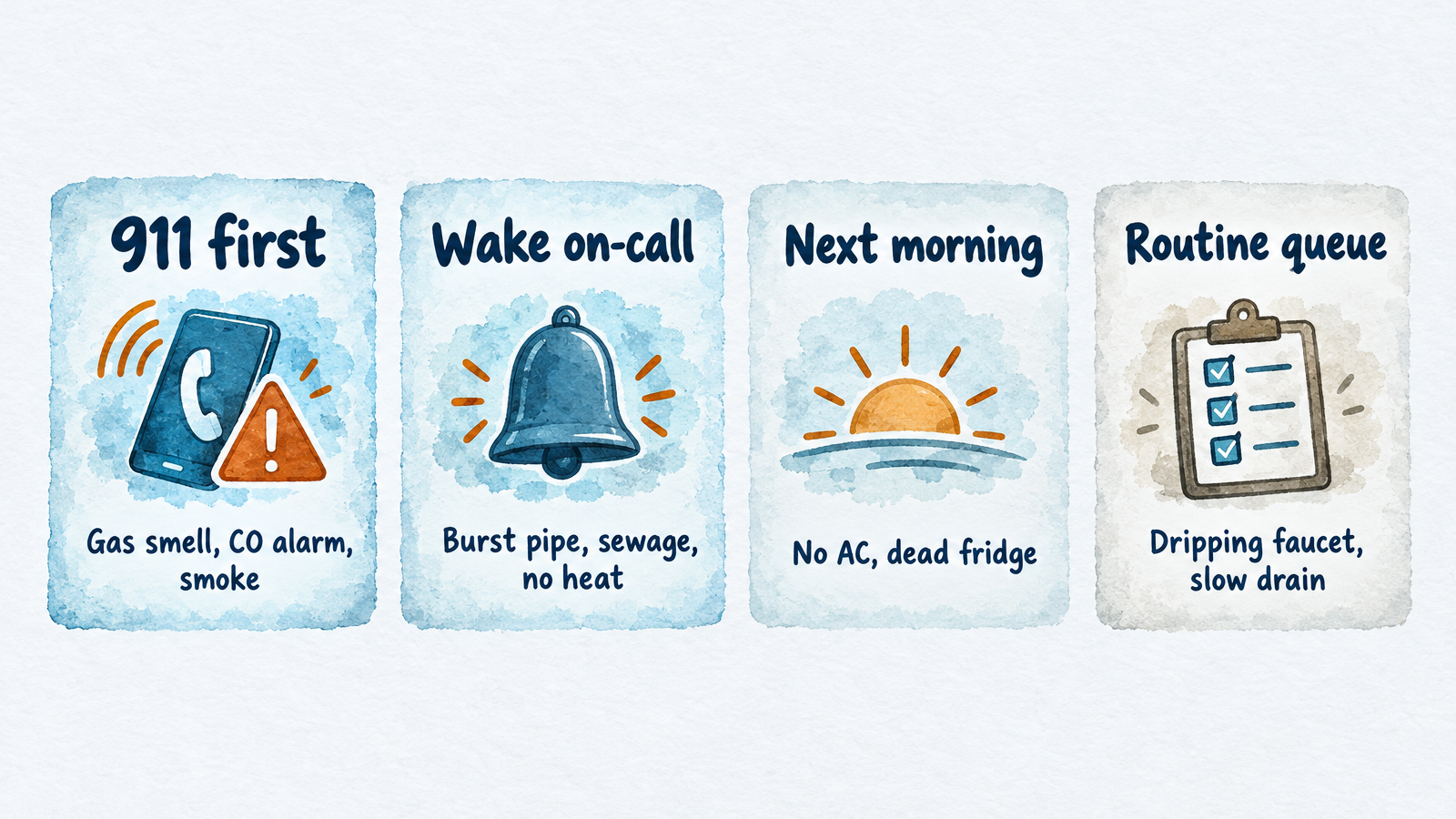
The four bins are a starting point; adjust them to your leases, insurer and local code.
The bins below are a starting point, not an industry standard. I found no official NAA, IREM or NARPM definition of "emergency," so the list reflects statutes, safety agencies and common practice. Adjust it to your leases, your insurer and your local code.
| Bin | What goes in it | What the answerer does |
|---|---|---|
| 1. Call 911 first | Gas smell, carbon monoxide alarm or symptoms, fire, smoke, burning electrical smell | Tell the caller to leave the unit and call 911 from outside. Then alert the on-call person. Never book a repair. |
| 2. Wake the on-call person | Burst pipe or water you can't stop, sewage backup, no heat in cold weather, no water, no power to one unit, exterior door or window that won't lock, a break-in | Collect the details below and alert on-call immediately. |
| 3. First thing in the morning | No air conditioning in mild weather, dead refrigerator with a working freezer, one of two toilets clogged, appliance failure | Log it as urgent and flag it for the first shift. |
| 4. Routine queue | Dripping faucet, slow drain, pests, noise complaints, cosmetic repairs | Log it as a work-order request and confirm it was received. |
Bin 1 follows the safety agencies. The Consumer Product Safety Commission says that when a carbon monoxide alarm sounds, people should get outside to fresh air, call 911 or the fire department, and stay out until responders say it is safe. A call handler, human or AI, should say the same and should not ask the caller to go look for the source.
Where the law puts the line between emergency and routine
Several states and cities set clocks or minimum temperatures that you can borrow for your bins. Check your own jurisdiction, because these vary widely.
| Source | What it requires |
|---|---|
| New York City HPD | From October 1 to May 31, 68°F from 6 a.m. to 10 p.m. when it is below 55°F outside, and 62°F from 10 p.m. to 6 a.m. regardless of outdoor temperature. Civil penalties start at $250 to $500 per day. |
| Minnesota Statutes 504B.161 | 68°F in habitable spaces from October 1 through April 30, and the duty cannot be waived by agreement. |
| Washington RCW 59.18.070 | After written notice, the landlord must begin repairs within 24 hours when a defect cuts off hot or cold water, heat or electricity or is imminently hazardous, within 72 hours for a refrigerator, range or major plumbing fixture, and within 10 days for other defects. |
| HUD voucher rules, 24 CFR 982.404 | For units in the Housing Choice Voucher program, owners must correct life-threatening deficiencies within 24 hours. |
Washington's statute is a handy template because it already has three tiers: 24 hours, 72 hours and 10 days. If you manage in a state without one, map your own bins to similar clocks and write the target response time next to each.
What an answerer should ask on a bin 2 call
Ask the same questions in the same order every time. The order matters because the first answer can end the call.
- Safety screen. "Do you smell gas, see smoke or fire, or has a carbon monoxide alarm gone off?" If yes, go to the bin 1 script.
- Who and where. Name, building, unit number and a callback number, read back to the caller.
- What is happening. For water: where it is coming from, whether it is reaching the unit below, and whether the caller can reach the shutoff valve under the fixture or at the main. For heat: whether there is no heat at all or low heat, and the indoor temperature if they have a thermometer. For a lock or door: whether the unit or building is secure right now.
- Entry. "If you aren't home, may maintenance enter? Are there pets?"
- What happens next. "I've flagged this as urgent for our on-call team. Expect a call from them." Never promise an arrival time the service can't control.
For a gas smell, a carbon monoxide alarm or a fire, skip steps 2 to 4 until the caller is safe outside.
How each answering model gets an urgent call to your on-call person
The question to ask any vendor is not "do you handle emergencies?" but "exactly how does my on-call person find out, how fast, and what happens if they don't respond?" Services answer differently, and one common feature, a live transfer to your phone, is missing from some products, including InsertChat's.
| Model | How the on-call person hears about it | Limits to check |
|---|---|---|
| Live answering service with dispatch | A human texts or calls your on-call list. PATLive lists emergency dispatch on every plan, and Answering365 describes escalating down your list until someone confirms. | Cost climbs with minutes. Quality depends on how closely agents follow your script. |
| Software maintenance call center | Buildium's Maintenance Contact Center gathers information and determines whether a call is an emergency. | Maintenance calls only, so prospects still reach voicemail. Setup fee of $300 and a $140 monthly minimum. |
| AI with live transfer | Smith.ai's AI Receptionist lists warm transfers, so a classified emergency can ring your phone. | The transfer only helps if the on-call person answers. Ask what happens if they don't. |
| AI without live transfer (InsertChat) | The assistant reads the caller your safety steps, collects details, marks the conversation urgent, emails the teammates you chose with a transcript and summary, and tells the caller your team will follow up. | No live ring. Response depends on someone seeing the alert, so route it to a phone that buzzes. |
| On-call cell rotation | Calls forward to whoever holds the phone this week. | One missed ring is a missed emergency. No record of what the caller said. |
InsertChat's AI receptionist cannot transfer a call while the caller is on the line. Its "AI when unanswered" routing rings your team for 5 to 60 seconds first, and the assistant answers only if nobody picks up. If your on-call technician must be paged by a person and acknowledge before anyone moves, a live service with dispatch or an AI plan with warm transfer fits that job better.
Turning leasing calls into booked tours
A leasing call should end with a tour on the calendar, or at minimum with the prospect's name, number and what they want saved where your leasing team will see it. Prospects call several listings in a row, and the one that answers gets the conversation.
Capture the same short list on every leasing call:
- Name, phone number and email
- Desired move-in date
- Bedrooms wanted
- Pets, if your policy depends on them
- A tour time, booked on a calendar while the caller is still on the line
- How they found the listing, for source tracking
An assistant can only answer from what you give it. Keep current vacancies, rent, deposit, application fee, pet policy, parking and tour hours in one knowledge source and update it when a unit rents. InsertChat answers from your services, hours and prices, books into the built-in calendar, Google Calendar, Outlook, Calendly or Cal.com with appointment lengths from 15 to 120 minutes, and sends reminders by text or email 72 and 24 hours before. A question the knowledge base doesn't cover goes to your team instead of getting a guess.
Two limits to plan for. InsertChat saves each lead as a contact with name, number, request and source in a shared inbox, but its published integration list (Google Calendar, Gmail, Outlook, HubSpot, Stripe, Calendly, Cal.com, WhatsApp, Zoho, Zendesk, Square and Microsoft Dynamics 365) does not include Yardi, AppFolio or Buildium. Someone on your team enters guest cards and work orders from the inbox summary. Property-management-native AI products such as EliseAI advertise PMS connections, though EliseAI does not publish pricing.
Fair Housing rules for phone answers
The safest leasing script gives every caller the same facts and never offers opinions about who lives in the area. This section is general information, not legal advice. Ask your attorney or state fair housing agency to review your script.
Federal law protects race or color, religion, sex, national origin, familial status and disability. States add more. California's Civil Rights Department lists source of income, immigration status and sexual orientation among its additions, and New York's Division of Human Rights adds lawful source of income, military status and arrest record, among others.
HUD's rule at 24 CFR 100.75 covers "all written or oral notices or statements" by people engaged in renting a dwelling. I found no ruling on answering services specifically, so the cautious assumption is that what a service says on your behalf is attributed to you.
Rules to build into the script:
- One written set of answers. Rent, deposit, fees, income requirement, pet policy, parking and availability come from the listing and are the same for every caller.
- No opinions about neighborhoods or neighbors. Questions like "is this a good area for families?" or "what kind of people live there?" get a neutral reply: the unit's features, price and policies, plus an offer of a tour. HUD's regulation on discouraging anyone from renting because of a protected characteristic is the reason.
- No questions about disability, family or origin. 24 CFR 100.202 bars asking whether an applicant has a disability or about its nature or severity. Let the leasing team handle occupancy discussions.
- Reasonable accommodation requests go to a person. The HUD and DOJ joint statement on reasonable accommodations says a request can be made orally or in writing, so a phone request counts. The answerer should log the caller's exact words, promise a callback from a person, and not decide, argue or ask for proof.
- Voucher language follows your state. Where source of income is protected, a script that says "no vouchers" is a problem.
- Audit. Read a sample of transcripts every month and place test calls with different voices to confirm everyone gets the same answers and the same speed.
One change to know about: HUD withdrew a set of guidance documents effective September 17, 2025, including its 2020 and 2013 assistance-animal notices and its 2024 digital advertising guidance. The Federal Register notice says conduct that violates the Fair Housing Act remains subject to enforcement. The statute, the regulations above and your state law still apply, so don't treat the withdrawals as a loosening.
What a property management answering service costs at 100, 200 and 400 calls
At 100, 200 and 400 calls a month, published prices put live answering at about $400 to $2,950 and AI answering at about $100 to $720. The table prices each option from the vendor's own pricing page as checked on November 10, 2026, assuming each call lasts three minutes.
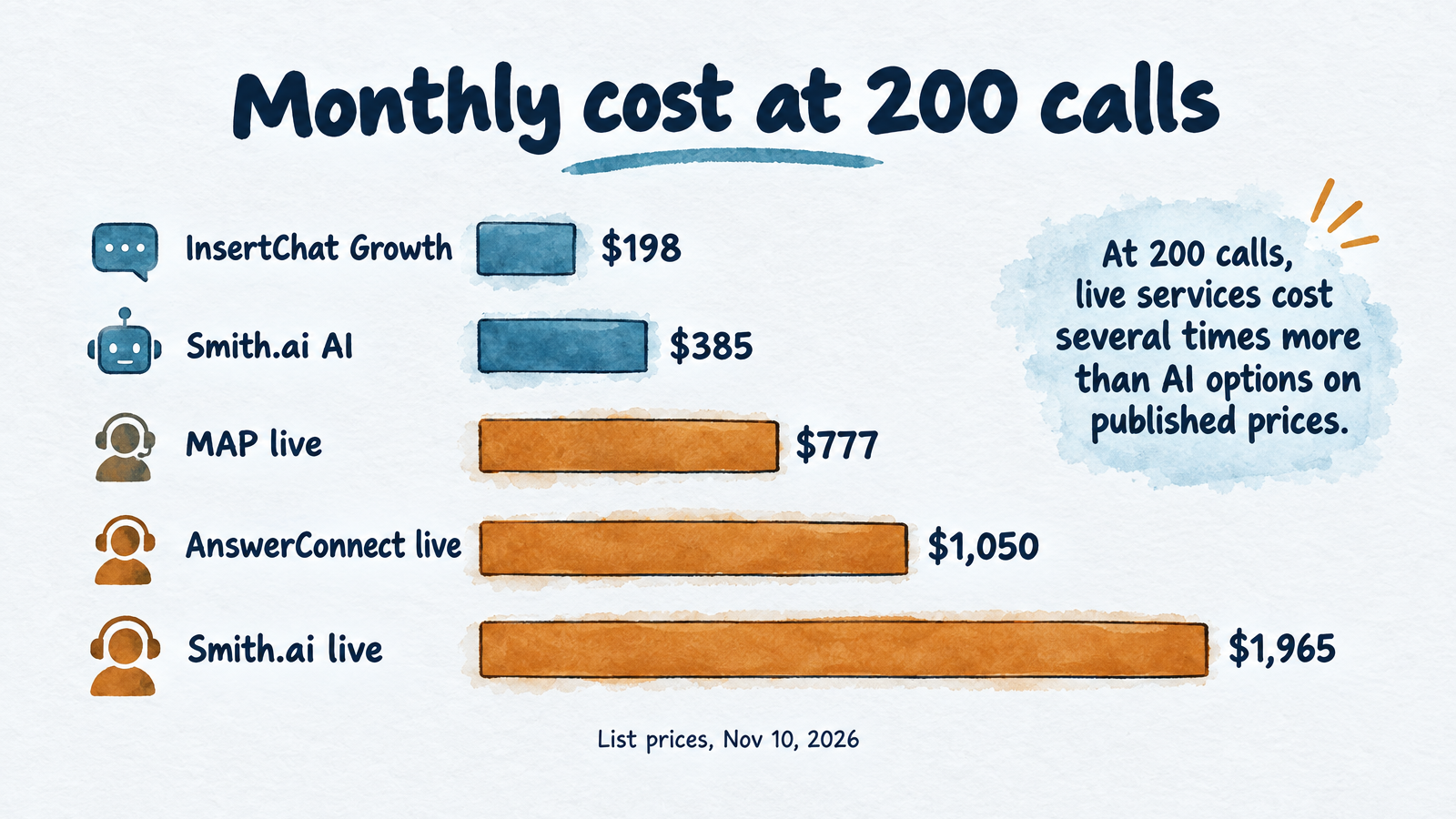
Three-minute average calls, published list prices checked November 10, 2026; excludes setup, taxes and telecom fees.
| Calls per month | MAP Communications (live, per minute) | AnswerConnect (live, smallest plan that covers the minutes) | Smith.ai live (per call) | Smith.ai AI Receptionist (per call) | InsertChat (shared credits) |
|---|---|---|---|---|---|
| 100 (300 min) | $403 | $395 | $915 | $212.50 | $98 (Pro) |
| 200 (600 min) | $777 | $1,050 | $1,965 | $385 | $198 (Growth) |
| 400 (1,200 min) | $1,545 | $2,025 | $2,950 | $718 | $498 (Scale) |
How each column was built, so you can redo it with your own volume:
- MAP Communications publishes four plans: $49 with no minutes at $1.37 per minute, $179 for 125 minutes, $339 for 250 minutes, and $649 for 500 minutes, with overage at $1.28 to $1.37 per minute. The table uses $339 plus 50 extra minutes at $1.28 for 100 calls, and $649 plus overage for the larger volumes.
- AnswerConnect lists minute bundles: 300 minutes at $395, 750 at $1,050, and 1,500 at $2,025. Overage is billed per minute, so a plan just below your volume can cost less.
- Smith.ai live charges per call: 30 calls for $300 or 90 calls for $810 with overage at $10.50 per call, and 300 calls for $2,100 with overage at $8.50.
- Smith.ai AI Receptionist also charges per call: 75 calls for $150, 150 calls at $1.80 each, and 300 calls at $1.67 each, with overage at $2.17 to $2.50.
- InsertChat includes 5,000, 10,000 and 25,000 monthly credits on Pro ($98), Growth ($198) and Scale ($498). The table uses the pricing page's example rate of 12 credits per billable minute: 3,600 credits for 100 calls, 7,200 for 200 and 14,400 for 400. That rate is an example, not a fixed price, texts and chats share the same credit pool, and phone usage and extra numbers can carry separate charges.
The table leaves out setup fees, taxes and telecom fees. Other published entry points, as of the same date: Ruby at $250 for 50 minutes up to $1,725 for 500, PATLive at $99 for 50 minutes up to $759 for 500, and Buildium's Maintenance Contact Center at $0.70 per unit for missed and after-hours calls or $1.10 per unit for all maintenance calls, with a $140 minimum. For 250 units that is $175 or $275 a month for maintenance calls only.
A full-time in-house receptionist is the other benchmark. InsertChat's pricing page, citing Bureau of Labor Statistics data from May 2025, puts the US median at $18.27 an hour, about $3,168 a month before benefits and payroll taxes, and that person covers weekday hours only.
How many calls will reach the service?
Measure it, because vendor estimates disagree by a factor of three. One vendor's guide assumes 150 calls a month reach a service for a 250-unit portfolio, and another estimates roughly 500 calls a month for 250 units. Both are vendor assumptions. Pull 30 days of after-hours voicemails, missed calls and daytime overflow from your phone system, and multiply by the average length. During the first freeze of the season, expect the number to jump.
Live, AI or hybrid: which fits your portfolio
Choose by what happens to the call after it is answered, not by who answers. Live agents handle upset callers and judgment calls well and cost the most per call. AI is cheaper and answers instantly with the same words every time. Hybrids pay for humans only on the calls that need them.
| Your situation | What tends to fit |
|---|---|
| Under a few hundred doors, mostly routine calls, tight budget | AI receptionist with an urgent flag routed to a phone that buzzes |
| On-call technician must be paged and confirm before anyone moves | Live service with dispatch, or AI with warm transfer |
| Heavy leasing traffic after hours | AI or live service that books tours on your calendar |
| Many upset or emotional calls, owner disputes | Live agents or a hybrid with human backup |
| Calls spike in storms and freezes | Flat or per-minute pricing you've tested at 2x your normal volume |
Where an AI receptionist falls short for property managers, and where InsertChat fits
InsertChat is an AI receptionist built for small businesses, with the same assistant covering phone, website chat, email, SMS and WhatsApp from one knowledge base. It fits small landlords and property managers who want every call answered at all hours, tours booked on a calendar, and every conversation kept in one shared inbox with human handoff. Every paid plan includes the AI receptionist, one phone number, website chat, the shared inbox and human handoff.
It does not transfer live calls, take voicemail, record calls or place outbound calls. It does not list Yardi, AppFolio or Buildium as integrations, so work orders and guest cards are entered by your team. Calls use credits, round up to whole minutes, and carry a one-minute minimum, so your monthly cost moves with volume. At the pricing page's example rate, Pro's 5,000 credits cover about 416 call minutes, roughly $0.71 for a three-minute call. If your portfolio needs live dispatch with confirmation or a native PMS connector, say so in your vendor shortlist and weigh the products above.
To see how the same approach plays out in neighboring trades, read the guides for plumbers and contractors, which cover burst-pipe and winter-surge intake in more detail. For a general buying guide, see AI receptionist for small business, and for how AI receptionists bill, see AI receptionist pricing.
Keeping your office number
You can keep publishing your current number and forward calls to the answering service. With InsertChat, US and Canadian numbers work by forwarding: setup gives you a private routing number and confirms forwarding with a verification call. Number porting is not offered. Set the routing to match your hours: AI always, AI after hours, AI when unanswered (your team rings first for 5 to 60 seconds), or team only.
For most property managers, "AI after hours" with the office phone ringing first during the day keeps leasing staff in the loop while closing the overnight gap. Ask any live vendor how forwarding works with your carrier before you sign.
Winter readiness checklist for after-hours calls
Do these before the first hard freeze, because the calls arrive in clusters. Frozen pipes are expensive: State Farm reported more than 17,200 frozen-pipe claims in 2023, with over $432.5 million paid and an average just over $23,500.
Building and units
- Insulate pipes in attics, crawl spaces and exterior walls, and seal gaps where cold air enters, per IBHS's winter guidance.
- Shut off and insulate outdoor spigots, and replace washing machine and dishwasher hoses older than 10 years.
- Label the main and zone shutoff valves and make sure every on-call person can reach and turn them.
- Service boilers and furnaces before the heat season starts, and confirm your local heat-season dates.
- Keep vacant units heated. IBHS and State Farm both cite 55°F as the floor for a home's thermostat, but local heat codes (62 to 68°F in the examples above) are higher for occupied units.
Life safety
- Test smoke and carbon monoxide alarms, with a CO alarm on every level, per Ready.gov's winter guidance.
- Remind residents to run generators at least 20 feet from windows and doors and never to heat with a gas oven or stove.
Phones and people
- Update the triage bins and the on-call list, with a second person and a third behind them.
- Confirm the vendor list: plumber, HVAC, electrician, restoration company, locksmith and the gas utility's emergency number.
- Put your heat-code temperature and the 911 script into the answerer's instructions.
- Send residents a short notice: where the shutoff is, how to report an emergency, and what not to try themselves.
- Run a test call for each bin (below) and read the transcripts.
How to test a service before you sign
Place six calls from a cell phone and read what each service records. A free trial or a short live-service trial is enough.
- Gas smell. The service should tell you to leave and call 911 before anything else.
- Burst pipe at 2 a.m. It should ask if you can reach the shutoff, collect unit and callback, and alert your on-call person. Time how long the alert takes to reach a phone.
- No heat, 20°F outside. It should classify this as bin 2, not queue it for morning.
- Dripping faucet. It should log the request and not wake anyone.
- Leasing inquiry on Saturday night. It should answer rent and pet policy from your knowledge and book a tour.
- "Is this a good neighborhood for families?" It should give the neutral answer and offer a tour.
If you want to run these on an AI receptionist first, InsertChat's Pro plan includes a 7-day free trial with 500 credits (a card is required). At the example rate of 12 credits per minute, that covers about 40 minutes of calls, enough for roughly a dozen three-minute test calls. Start your 7-day free trial and see how the shared inbox presents each call. The AI receptionist product page lists the routing modes and handoff rules you would set.
Frequently asked questions
Is a property management answering service worth it?
It is worth it when missed calls cost more than the service. One flooded unit or one lease lost to voicemail can exceed a year of AI answering fees. If you receive only a handful of after-hours calls a month and an on-call phone reliably gets them, a service adds little. Count your missed and after-hours calls for 30 days before deciding.
Do answering services still exist?
Yes. Live answering companies such as Ruby, PATLive, AnswerConnect and MAP Communications still operate, and AI receptionists from vendors such as Smith.ai and InsertChat now compete with them. Some offer both. The choice is mainly between human agents, AI, or a hybrid, priced by minute, by call, by unit or by monthly credits.
What does the 80/20 rule mean in property management?
It usually refers to the Pareto principle: a rule of thumb that about 80% of results come from 20% of causes. In property management, people use it to say a minority of tenants, units or buildings generate most of the calls and costs. It is not an official standard, so check your own work-order data to see whether it holds for you.
Can an AI answering service create work orders in Yardi, AppFolio or Buildium?
It depends on the product. Native property management systems have connectors, and some vendors document integrations with Yardi, Entrata, RealPage, ResMan or AppFolio. InsertChat does not list those integrations. It saves every call to a shared inbox with a transcript and summary, and your team enters the work order from there.
What should tenants do if a pipe freezes?
State Farm advises using a hair dryer to thaw a frozen pipe and never a torch or open flame. If a pipe bursts, shut off the main water valve and leave faucets open, then call your emergency line. Put those steps in your winter notice, and make sure your answerer repeats the shutoff question on every water call.