
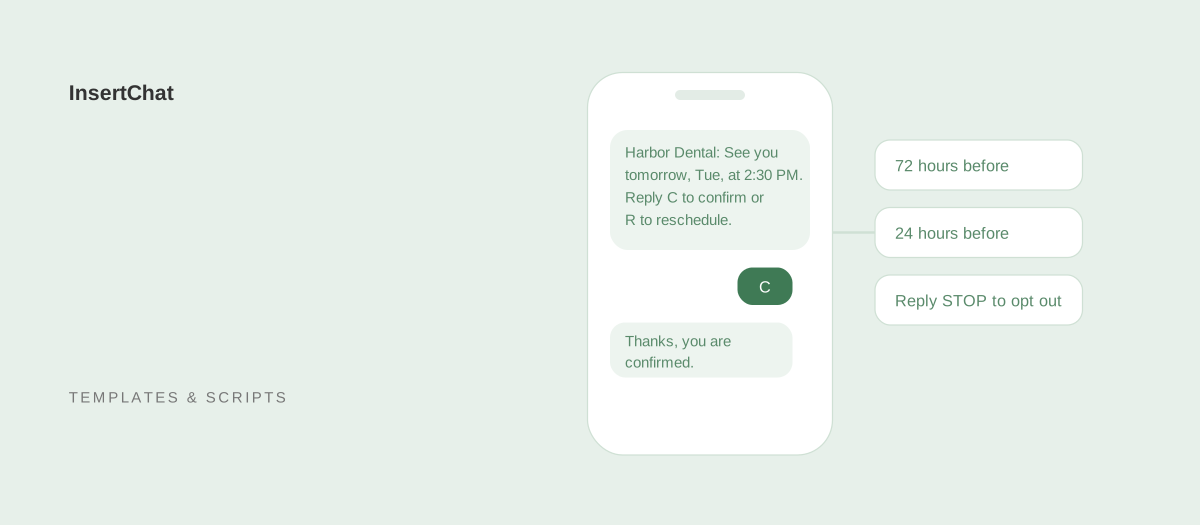
An appointment reminder text should name your business first, give the day, date, and time, say where to go or how to join, and offer one simple way to confirm or reschedule. Send it only to customers who agreed to receive texts, include an opt-out line, and keep it under 160 characters so it arrives as a single message.
Below are 34 copy-ready templates: opt-in and opt-out messages, booking confirmations, reminders for three days, one day, and two hours before, policy reminders, 12 industry versions, and follow-ups for no-shows and open slots. They’re written without apostrophes or emoji, which keeps most of them to one text. Replace anything in brackets and paste them without the surrounding quotation marks.
What should an appointment reminder text include?
An appointment reminder text should include your business name, the appointment day, date, and time, the location or video link, and how to confirm or change it. Everything else is optional. Customers read reminders in a second or two, so the date and time should be easy to find.
- Business name first: customers decide whether to open a text from the first few words.
- Day, date, and time: “Tue Oct 20 at 2:30 PM” avoids confusion between this Tuesday and next.
- Where: an address, a suite number, or a video link for virtual visits.
- One action: reply C to confirm, reply R to reschedule, or call a number.
- Opt-out line: “Reply STOP to opt out” in the first text and periodically after that.
- Only the details needed: leave out the reason for the visit, prices, and account details.
What rules apply to appointment reminder texts?
Text only customers who gave you permission, identify your business, honor opt-out requests, and keep sensitive details out. In the US, the FCC’s rules also list the reply words that revoke consent, and one of them is a word many reminder templates ask customers to use. This is general information, not legal advice.
- Get and record consent. Ask customers whether you can text them about their appointments when they book, and keep a record of how and when they agreed. Promotional texts generally need stronger written consent, so keep offers out of reminders.
- Honor opt-outs in any reasonable form. Under 47 CFR 64.1200(a)(10), a text reply of “stop,” “quit,” “end,” “revoke,” “opt out,” “cancel,” or “unsubscribe” revokes consent, and requests must be honored within a reasonable time, not exceeding ten business days.
- Never ask customers to reply CANCEL to cancel an appointment. That reply can opt them out of every text you send, including the reminder for their next visit. Use “Reply R to reschedule” or “Call [Phone] to cancel.”
- Identify yourself. Start every message with your business name, because customers may not have your number saved.
- Keep sensitive details out. Leave out diagnoses, treatment names, balances, and account numbers.
- Send at reasonable hours. Schedule reminders for daytime hours in the customer’s time zone.
Message length matters too. A standard text holds 160 characters. Emoji and typographic characters, such as curly apostrophes and quotation marks, switch the message to an encoding that holds 70 characters per segment, so a 120-character reminder with one emoji can arrive as two texts.
When should you send appointment reminders?
Send a confirmation when the appointment is booked, a reminder a few days before, and another the day before. Add a short same-day reminder for appointments that are easy to forget. More reminders than that tend to annoy customers more than they help.
| When | Purpose | Template |
|---|---|---|
| At booking | Confirms the details while the customer still remembers booking | 4 to 6 |
| About 72 hours before | Leaves time to reschedule and refill the slot | 7 |
| 24 hours before | The main reminder, with a confirm option | 8 and 10 |
| 2 hours before | Same-day nudge for short or early appointments | 9 |
| After a missed visit | Invites a rebooking the same day | 31 |
The evidence behind reminders is solid. A Cochrane review of randomized trials found that text reminders increased attendance at healthcare appointments compared with no reminders, with attendance of 78.6% in the text reminder groups and 67.8% with no reminders, and worked about as well as phone call reminders. The reviewers rated the evidence low to moderate quality.
Opt-in and opt-out templates
Send these at the start and end of the texting relationship. The first text sets expectations, and the replies to HELP and STOP keep you on the right side of the rules.
- Opt-in confirmation: “[Business Name]: You are signed up for appointment texts. Msg frequency varies. Msg and data rates may apply. Reply HELP for help, STOP to opt out.”
- Reply to HELP: “[Business Name] appointment texts. For help, call [Phone] or email [Email]. Reply STOP to opt out.”
- Reply to STOP: “[Business Name]: You will no longer receive texts from us. Reply START to sign up again.”
Booking confirmation templates
A confirmation right after booking catches wrong dates and wrong numbers early, while the customer still remembers the conversation.
- Standard: “[Business Name]: You are booked for [Service] on [Day Date] at [Time]. Reply R to reschedule. Reply STOP to opt out.”
- With address: “[Business Name]: See you [Day Date] at [Time] at [Address]. Need to change it? Call [Phone].”
- With a calendar link: “[Business Name]: Your appointment is confirmed for [Day Date] at [Time]. Add it to your calendar: [Link]”
Standard reminder templates
These cover the reminders most businesses send. Pick one for each step of your schedule.
- Three days before: “[Business Name]: Reminder of your appointment on [Day Date] at [Time]. Need a different time? Reply R or call [Phone].”
- One day before: “[Business Name]: See you tomorrow, [Day], at [Time]. Reply C to confirm or R to reschedule.”
- Two hours before: “[Business Name]: See you today at [Time]. We are at [Address].”
- Confirmation request: “[Business Name]: Please confirm your appointment on [Day Date] at [Time]. Reply C to confirm or R to reschedule.”
- Video appointment: “[Business Name]: Your video appointment is [Day Date] at [Time]. Join here: [Link]. Reply R to reschedule.”
- Parking and arrival: “[Business Name]: See you [Day] at [Time]. Park at [Parking Info] and check in at the front desk 10 minutes early.”
Reminder templates with your policies
Policy reminders work best when they state the policy once, plainly, and early enough for the customer to act on it.
- Cancellation policy: “[Business Name]: Reminder of your visit on [Day Date] at [Time]. Changes need [Hours] hours notice to avoid a [Fee] fee. Reply R to reschedule.”
- Deposit due: “[Business Name]: Your appointment on [Day Date] is held with a deposit. Please complete it here by [Deadline]: [Link]”
- Stating the cost of a missed slot: “[Business Name]: We are expecting you on [Day Date] at [Time]. A missed appointment costs us about [Amount]. Call [Phone] to change it.”
The third template is based on research. In a randomized trial at a London hospital, reminders that stated the specific cost of a missed appointment produced a missed-appointment rate of 8.4%, compared with 11.1% for the hospital’s existing message. The hospital was stating its cost to the public health service, so test the wording with your own customers before adopting it.
Appointment reminder templates by industry
Industry reminders add the one detail that makes the visit go smoothly, such as what to bring, an arrival window, or a document checklist. See how InsertChat books appointments for dental offices, salons, and home services.
- Dental office: “[Practice Name]: Reminder of your dental visit on [Day Date] at [Time]. Please bring your insurance card. Reply C to confirm or R to reschedule.”
- Medical clinic: “[Practice Name]: You have an appointment on [Day Date] at [Time]. Please arrive 15 minutes early. Call [Phone] with questions.”
- Therapy or counseling: “Reminder: your appointment is [Day Date] at [Time]. Reply R to reschedule.” Leave out the practice type if the name reveals it.
- Hair salon: “[Salon Name]: See you [Day] at [Time] with [Stylist]. Running late or need to move it? Reply R or call [Phone].”
- Spa or med spa: “[Spa Name]: Your [Service] is [Day Date] at [Time]. Please arrive 10 minutes early to check in. Reply R to reschedule.”
- Auto repair: “[Shop Name]: Reminder to drop off your [Vehicle] on [Day] at [Time]. Plan for about [Hours] hours. Reply R to reschedule.”
- Home services: “[Business Name]: Your technician arrives [Day] between [Start Time] and [End Time]. Please make sure someone 18 or older is home. Reply R to reschedule.”
- Law firm consultation: “[Firm Name]: Your consultation is [Day Date] at [Time]. Please bring any documents about your matter. Call [Phone] to reschedule.”
- Accounting or tax preparer: “[Firm Name]: Your tax appointment is [Day Date] at [Time]. Bring your W-2s, 1099s, and your return from last year. Reply R to reschedule.”
- Fitness or personal training: “[Gym Name]: Your session with [Trainer] is [Day] at [Time]. Bring water and a towel. Reply R to reschedule.”
- Veterinary clinic: “[Clinic Name]: [Pet Name] has an appointment on [Day Date] at [Time]. Please bring any medications [Pet Name] takes. Reply R to reschedule.”
- Real estate showing: “[Agent Name], [Brokerage]: Confirming our showing at [Address] on [Day] at [Time]. Reply C to confirm.”
Follow-up templates for missed and open appointments
Follow-ups recover the visits that reminders didn’t save. Send them the same day, while the customer still remembers the appointment.
- Waitlist slot open: “[Business Name]: A spot just opened on [Day Date] at [Time]. Want it? Reply YES and we will book you.”
- Earlier time available: “[Business Name]: We can see you sooner, on [Day] at [Time]. Reply YES to move your appointment or ignore this text to keep it.”
- Rebooking after a cancellation: “[Business Name]: Sorry we will miss you this week. Reply R and we will find you a new time.”
- Missed appointment: “[Business Name]: We missed you today at [Time]. We hope everything is okay. Reply R to book a new time.”
- Next visit due: “[Business Name]: It is time for your next [Service]. Reply R to book, or call [Phone].” Check that this counts as a reminder for your business, since some follow-ups read as promotions.
Replies when customers text back
Customers reply in their own words, so prepare short answers for the common ones.
- When they want a new time: “[Business Name]: No problem. We have [Day] at [Time] or [Day] at [Time]. Which works better?”
- When they confirm: “[Business Name]: Thanks, you are confirmed for [Day] at [Time]. See you then.”
If a customer replies with an opt-out word such as STOP or CANCEL, treat it as an opt-out and stop texting them. If they meant to cancel an appointment, they can call you.
How InsertChat sends reminders and handles replies
InsertChat sends reminders by text or email 72 and 24 hours before the appointments its AI receptionist books. Each text starts with your business name and points customers back to your number, where the AI receptionist can move or cancel the appointments it booked, at any hour, within your scheduling rules.
Texts to your InsertChat number get two-way replies from the same assistant, and STOP and START keywords are honored. Every reply lands in the shared inbox on the customer’s contact record, next to their calls and chats. See SMS for setup and the channel costs on the pricing page for messaging charges. For healthcare, protected health information requires the Enterprise plan with a signed Business Associate Agreement.
The guide to reducing no-shows covers the rest of the system: booking rules, deposits, waitlists, and how to measure your no-show rate.
Let InsertChat book the appointment and send the reminders
Reminders work best when booking is easy to begin with. InsertChat’s AI receptionist answers calls, website chat, and texts, offers open times from your connected calendar (built-in, Google Calendar, Outlook, Calendly, or Cal.com), books after the customer confirms, and then sends the reminders for you.
Plans start at $98 per month with one phone number and 5,000 monthly credits, and new customers can try Pro free for 7 days with 500 credits (a card is required). Start your free trial, or explore the demo to see bookings and reminders in a sample workspace.