TL;DR
- Freeze one shopper job with a clear entry point, expected result, exclusions, and handoff trigger.
- Approve the sources the chatbot may use, then assign a freshness owner and update trigger to each one.
- Verify the Shopify authentication method, minimum permissions, accessible data, customer checks, failure behavior, and revocation process.
- Record observed results for the successful path, expected failures, sensitive requests, and human handoff.
- Launch only when operational owners approve all critical evidence. Revise a fixable gap; pause when a core dependency remains unknown or unowned.
Your team has chosen order tracking as its first shopper job. The next question is not whether a vendor lists Shopify as an integration; it is whether this particular workflow can use the right information, expose only what it should, fail clearly, and reach a person when necessary. This checklist turns those requirements into a pass, revise, or pause decision.
Key Takeaways
- A policy answer drawn from approved content is not the same capability as a live order lookup.
- Minimum access must be confirmed from current documentation or a controlled test, not inferred from an integration logo.
- Expected failures deserve the same attention as the successful lookup.
- A refusal or human handoff can be the correct result when the request exceeds the workflow boundary.
- There is no useful universal benchmark for this launch. Record your store’s starting performance and improve from observed conversations.
Use the five-gate go-live decision
A gate is a condition that requires evidence before the workflow moves forward. The five gates cover the shopper job, approved sources, Shopify access, test results, and operational ownership. Keep them in one readiness record so reviewers can see the evidence and unresolved decisions together.
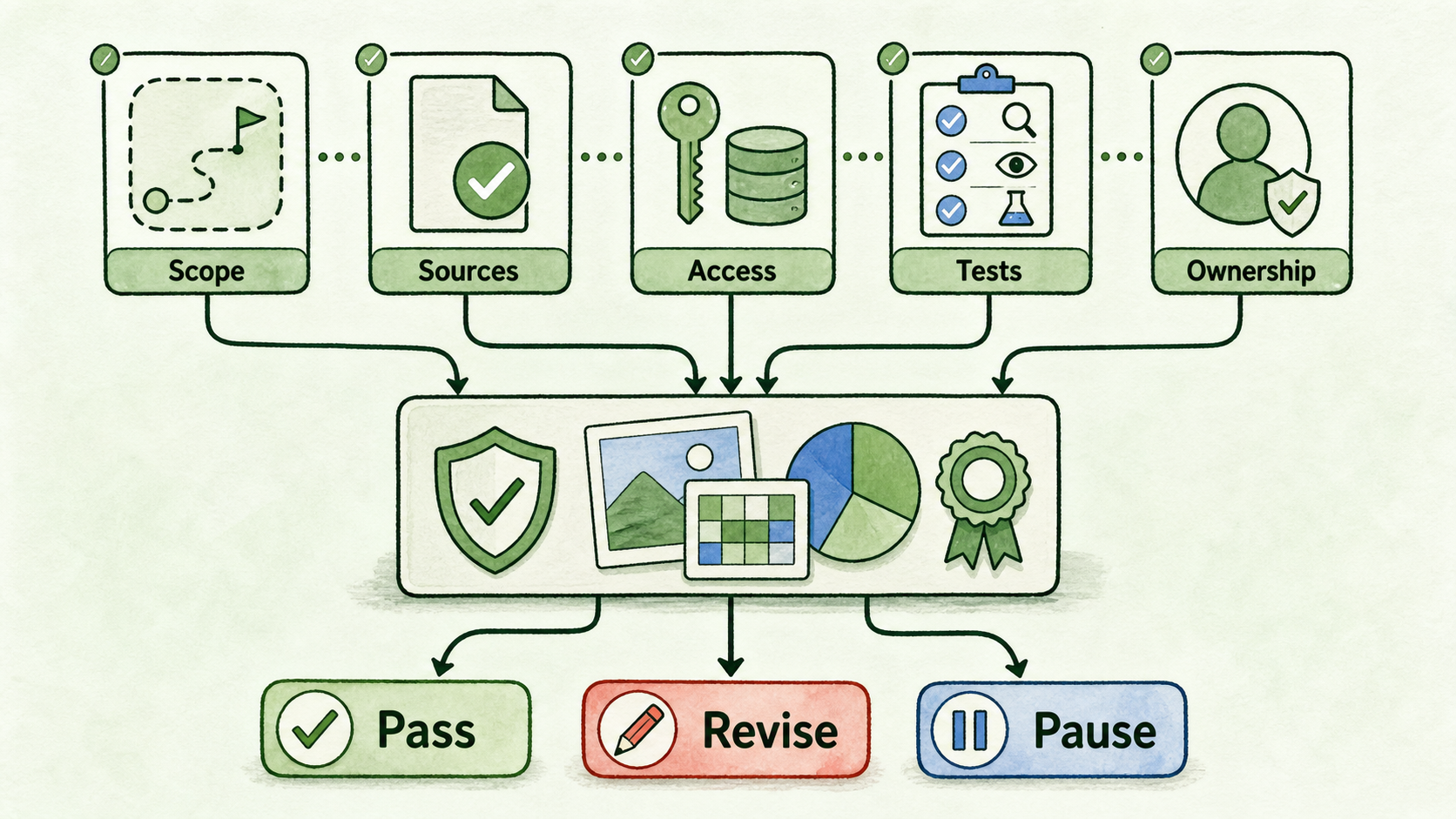
For example, create one row named “authenticated order-status lookup on the order-help page.” Add a column for each gate, link or refer to the relevant source approval and test log, name the owner, and finish with one of three decisions:
- Pass: Every launch-critical condition has been observed, documented, and approved for a controlled release.
- Revise: The gap has a bounded fix, such as narrowing the output, improving a fallback, or adding an approved source before retesting.
- Pause: Authentication, necessary access, customer verification, privacy handling, a core lookup, or ownership remains unverified.
InsertChat describes Shopify support for product questions, order status, and common ecommerce queries. That establishes a capability worth evaluating, but it does not establish the authentication flow, exact permissions, accessible fields, verification method, commercial requirements, or behavior for your store. Those details still need current documentation or observed test evidence before launch (InsertChat tools).
Gate 1: Freeze one shopper job
Write a short workflow contract before connecting store data. If the use case is still broad, first map shopper questions and choose a focused first use case. Then return with one job that can be tested end to end.
For an order-tracking workflow, record:
- Entry point: Where the shopper encounters the assistant, such as an order-help page.
- Intent: The shopper wants the current status of one existing order.
- Expected output: The limited status information the store has approved for display, or a clear fallback.
- Required data: The minimum order and verification data needed to complete the lookup, to be confirmed during Gate 3.
- Exclusions: Refund decisions, order changes, cancellations, policy exceptions, product recommendations, and cart recovery unless separately approved.
- Handoff trigger: A mismatch, repeated lookup failure, sensitive request, disputed status, or request outside the defined job.
- Owner: One person accountable for the workflow boundary and approval record.
The exclusions matter because a conversation can shift quickly. “Where is my order?” may become “Change its address” or “Refund it now.” The assistant should not silently cross from a lookup into an action or human-owned decision.
Gate 2: Approve sources and freshness owners
Static guidance still affects a live order-tracking conversation. A shopper may ask what a status means, when shipping normally occurs, or what to do when a parcel appears delayed. Each answer needs an approved source or a defined fallback.
Use this source inventory with your store’s real product records, policy pages, support procedures, approval dates, and owners:
| Information | Approved location | Last reviewed | Freshness owner | Update trigger | Behavior if absent |
|---|---|---|---|---|---|
| Product details | Product change | Do not improvise | |||
| Variants | Catalog change | Clarify or hand off | |||
| Sizing guidance | Guide revision | Link to approved help or hand off | |||
| Availability guidance | Inventory-policy change | Do not present static guidance as live stock | |||
| Shipping policy | Carrier or service change | Hand off policy-specific questions | |||
| Returns policy | Policy change | Avoid granting exceptions | |||
| Support guidance | Workflow or staffing change | Use the current contact path | |||
| Privacy and sensitive-data guidance | Privacy review | Refuse unnecessary data and hand off |
Approval and freshness are separate decisions. A valid shipping page can still be stale after a carrier change. Assign a person who knows when the underlying business rule changes, not merely someone who can upload a document.
Also distinguish availability guidance from live inventory. A policy such as “limited items may sell out” can come from approved content. A claim that a particular variant is currently available requires a verified live lookup or another current system of record.
Gate 3: Separate answers from Shopify access
Classify every expected behavior before deciding what the integration may access. This prevents a source-backed answer from being mistaken for a live lookup—or a lookup from quietly becoming an account-changing action.
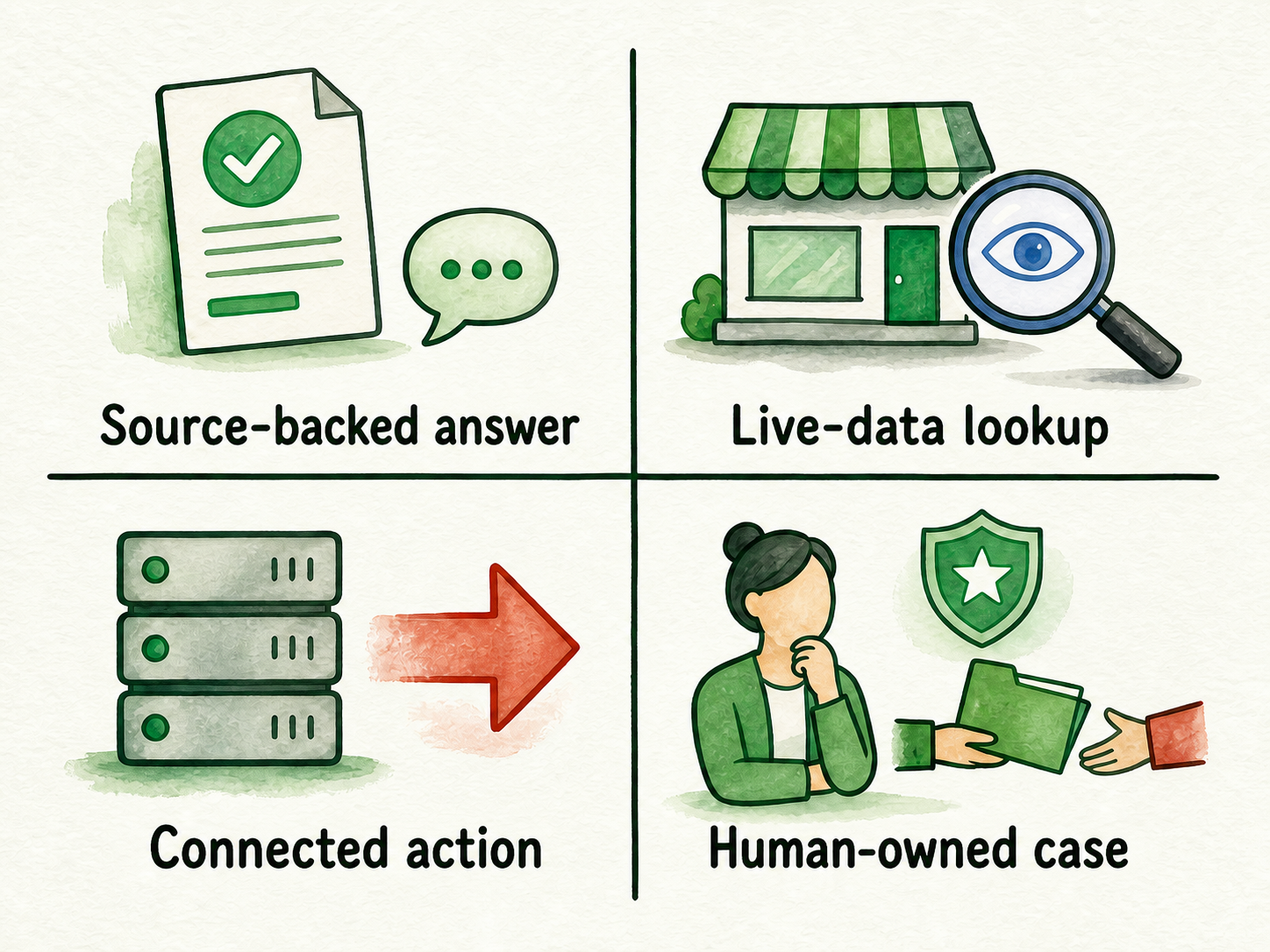
| Class | What it does | Example | Evidence required before launch |
|---|---|---|---|
| Source-backed answer | Responds from approved business content | Explain the published shipping policy | Approved source, current review date, fallback behavior |
| Live-data lookup | Reads current store data without changing it | Retrieve an approved order-status view | Confirmed access, customer verification, allowed fields, observed tests |
| Connected action | Changes data or starts another system process | Request a cancellation | Explicit capability, authorization rules, confirmation step, audit and failure path |
| Human-owned case | Requires judgment, authority, or sensitive handling | Decide a policy exception | Named queue or person, preserved context, response expectation |
For the Shopify connection, obtain written answers or controlled-test evidence for all of the following:
- How is the store authenticated, and who may authorize the connection?
- What are the minimum permissions for this workflow? Which requested permissions are unnecessary?
- Which order, customer, product, fulfillment, and status fields can the assistant access?
- How is the shopper verified before order information is shown?
- Which data is allowed in the answer, logs, handoff context, and model context? Which data is blocked?
- What does the shopper see when authentication fails, the order is missing, Shopify is unavailable, or the lookup times out?
- Is data retrieved live, cached, or synchronized? When can it become stale?
- Does the lookup affect plan eligibility, usage credits, charges, rate limits, or expected capacity?
- How is access revoked? How are credentials rotated after a staff, agency, or security change?
Treat every unanswered item as verify before launch. Enable only the access and tools required for the frozen shopper job. Broader access creates more review work without improving a narrow order-status lookup.
Gate 4: Prove order tracking with observed tests
A polished demo is not a test record. Run controlled scenarios with approved, non-sensitive test data where possible, and record what the system actually did.
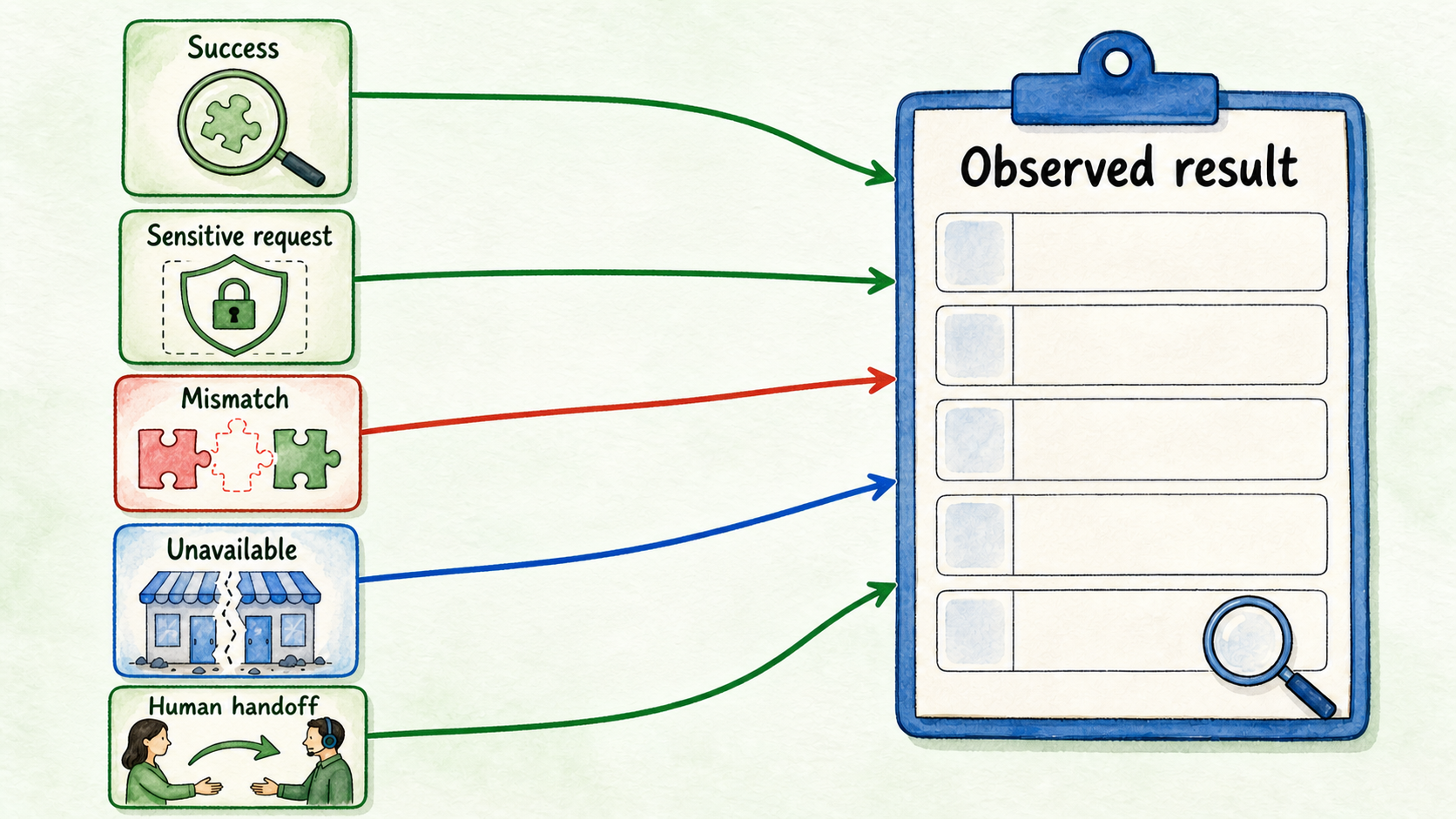
For each case, capture the test ID, preconditions, shopper prompt, expected allowed behavior, actual result, data exposed, pass or fail, failure owner, fix route, and retest result. Do not complete the result fields until someone observes the behavior.
Use this hypothetical test set as the minimum starting point:
- Successful lookup: A properly verified shopper supplies valid matching details. Confirm that the approved status is returned and no unnecessary fields appear.
- Missing or mismatched order: The order identifier is absent, invalid, or does not match the verification data. Confirm that no order details leak and the shopper receives a useful next step.
- Integration unavailable: The store connection is disconnected, unauthorized, slow, or unavailable. Confirm that the response does not invent a status or disguise the failure as “order not found.”
- Sensitive-information request: The shopper offers or requests information outside the workflow’s approved data boundary. Confirm that the assistant avoids collecting or exposing it and follows the approved privacy response.
- Human handoff: The lookup fails repeatedly, the shopper disputes the result, or the request becomes a change or exception. Confirm that it reaches the named destination with enough context for a person to continue.
Test similar-looking failures separately. An unmatched order and an unavailable integration may both prevent completion, but they require different shopper messages, owners, and fixes.
Gate 5: Assign owners, decide, and measure
A workflow is not ready because somebody can make the happy path work. It needs people who will maintain its sources, connection, failure paths, and review process after launch.
Name these roles in the readiness record:
- Source and freshness owner
- Integration and credential owner
- Support or handoff owner
- Privacy or security reviewer, where required
- Final launch approver
Then apply the decision consistently. Pass when all critical evidence exists and the controlled workflow behaves as approved. Revise when a specific change—such as a clearer mismatch response or narrower data output—can close the gap. Pause when access, verification, sensitive-data handling, the core lookup, or operational ownership remains unresolved.
For a controlled launch, choose one page or limited visitor surface and establish a baseline from real use:
- Answer quality: Reviewed responses that are correct, supported, complete enough for the job, and within scope.
- Lookup completion: Attempts that return the approved result after required verification.
- Handoffs: Transfers by reason, including expected escalations and avoidable failures.
- Unanswered questions: Requests receiving no supported answer or usable next step.
- Content gaps: Repeated questions that reveal missing, unclear, or stale approved guidance.
Record counts and review notes before setting targets. Do not borrow a generic completion, containment, savings, or conversion benchmark. Your starting values depend on the store’s traffic, data quality, policies, verification design, and workflow boundary.
Expand only after this first job is stable, measurable, and owned. If the missing connection details can be verified with non-sensitive test data, start a controlled InsertChat trial and complete the five-gate record before placing the workflow in front of broader traffic.
FAQ
Can source-backed product answers launch without live order lookup?
Yes, if they form a separately bounded workflow with current approved sources, tested fallbacks, and clear wording that does not imply access to live inventory or order data. Do not present a static answer as a successful Shopify connection.
What should happen when an order cannot be matched?
Reveal no order details. Give the shopper an approved retry or support path, record the failure reason, and distinguish a genuine mismatch from an unavailable integration. Escalate when the shopper cannot resolve the issue through the permitted verification flow.
Which Shopify permissions does InsertChat require?
The available evidence does not establish the exact permissions for this deployment. Obtain current official documentation or confirm them in a controlled test, then record the minimum required permissions, accessible fields, verification behavior, and revocation process before enabling the live lookup.
When should the team revise instead of pause?
Revise when the dependency is understood, owned, and fixable within the frozen workflow—for example, correcting a fallback or restricting an exposed field. Pause when a core dependency such as authentication, customer verification, necessary access, privacy handling, or operational ownership remains unknown.
Who should approve go-live, and what should they review?
The named launch approver should review evidence from the workflow, source, integration, support, and privacy owners. Approval should cover all five gates, the unresolved-risk record, the controlled launch surface, and the plan for reviewing early conversations.
Which metrics should be recorded first?
Start with reviewed answer quality, lookup attempts and completions, handoffs by reason, unanswered questions, and content gaps. These measures show whether the bounded workflow works and why it fails without relying on an unsupported industry benchmark.