TL;DR
- A white label chatbot custom domain is ready only when entitlement, domain authority, routing, customer-facing behavior, privacy requirements, monitoring, and rollback have named owners and verified evidence.
- Domain ownership should follow the governing client or organization agreement. No single ownership arrangement fits every deployment, but an authorized DNS owner must approve and execute the change.
- Test the complete visitor workflow through a staged or controlled branded route before changing public routing.
- Hold, narrow, or escalate the cutover if entitlement, critical behavior, privacy approval, monitoring, or rollback remains unresolved.
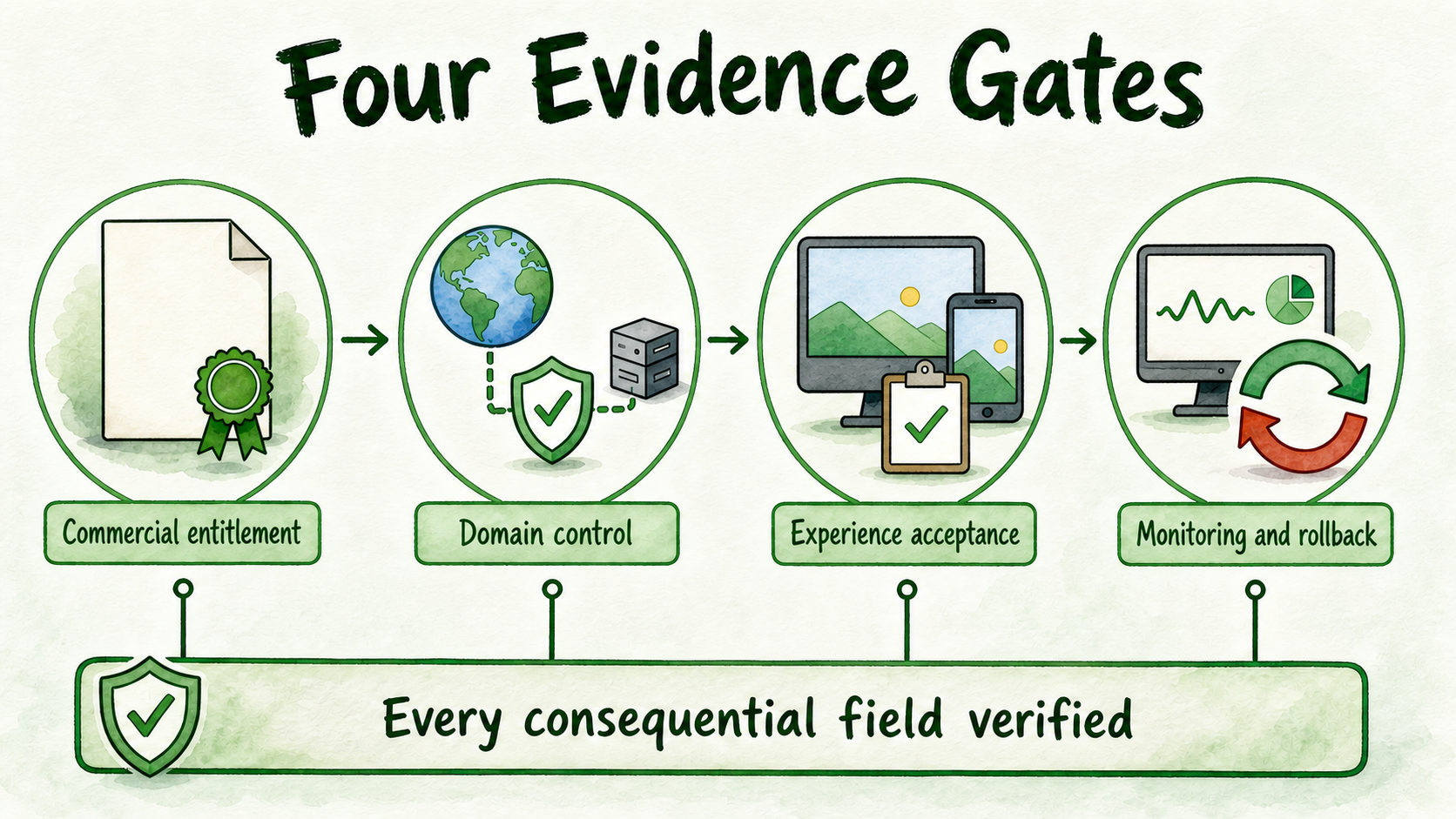
A custom domain is not merely a cosmetic brand setting. It changes the public route visitors use and therefore requires accountable ownership, verified controls, and a recorded decision. The following four gates help agencies and SaaS operators determine whether to approve, fix, narrow, or hold the cutover.
Key Takeaways
- Separate the right to use a custom domain from the technical ability to route one.
- Name the DNS owner, deployment owner, client approver, analytics owner, privacy-notice owner, entitlement owner, monitoring owner, and rollback authority.
- Treat certificate handling and the routing target as fields to verify from current documentation, not mechanisms to assume.
- Require evidence for desktop and mobile behavior, branding, answers, citations, capture, handoff, integrations, analytics, permissions, and failures.
- Do not average away a critical failure. One unresolved blocking condition is enough to hold public routing.
Name the Custom-Domain Decision Owners
Who should own the chatbot domain? There is no universal answer. Ownership should follow the governing client or organization agreement, including its policies and established account structure. Routine work may be delegated, but authority and accountability should remain explicit.
Create an ownership register containing:
- Branded subdomain: the visitor-facing address selected for the assistant.
- DNS owner: the party authorized to approve or make domain changes.
- Deployment owner: the person coordinating the assistant-side release and its evidence.
- Client approver: the person authorized to accept the customer-facing result.
- Certificate handling: a verification field whose actual process must come from current documentation or written confirmation.
- Routing target: the approved destination for public traffic, taken from current deployment instructions.
- Analytics owner: the person who verifies activity in the agreed reporting system.
- Privacy-notice owner: the person who approves visitor-facing notice and collection decisions.
- Custom-domain entitlement owner: the commercial owner who confirms that current terms cover the deployment.
- Monitoring owner: the person responsible for inspecting the agreed cutover evidence.
- Rollback authority: the person or explicit approval chain empowered to reverse or hold the change.
For every item, record the accountable person, approver, evidence location, status, and blocking issue. A department name such as “IT” or “the agency” is not precise enough when a failed cutover requires an immediate decision.
Use the Four-Gate Cutover Worksheet
Use one worksheet as the decision record:
| Gate | Required evidence | Accountable owner | Approver | Status | Blocker | Evidence location |
|---|---|---|---|---|---|---|
| 1. Commercial entitlement | Current terms, order document, or written confirmation | Entitlement owner | Commercial approver | |||
| 2. Technical control | Domain authority, approved target, certificate confirmation, and monitoring ownership | DNS owner | Deployment approver | |||
| 3. Experience acceptance | Test record, privacy approval, and client acceptance | Deployment owner | Client approver | |||
| 4. Rollback readiness | Triggers, fallback route, authority, access, and communication path | Rollback owner | Change approver |
Give each consequential field one of four statuses:
- Verified: the evidence exists and the responsible approver has accepted it.
- Unresolved: required information or approval is missing.
- Failed: the evidence shows that the requirement is not met.
- Not applicable: the team has recorded a written justification showing why the field does not affect this deployment.
Do not calculate a weighted readiness score. Strong results in one area cannot cancel missing domain authority, failed visitor behavior, or an unusable rollback path. Proceed only when every consequential field is verified and every blocking failure is closed.
Gate 1: Verify Commercial Entitlement
Confirm the right to use the custom domain before scheduling a public-routing change. Acceptable evidence may include current plan terms, an order document, or written vendor confirmation.
The record should identify:
- The current plan, order, or contract.
- The account, workspace, assistant, and client arrangement covered.
- Any relevant usage, branding, security, or deployment conditions.
- The person who provided and approved the confirmation.
- The confirmation date and evidence location.
- The person authorized to resolve a failed entitlement check.
Published InsertChat packaging descriptions do not support a settled Agency-versus-Enterprise rule for every deployment. One description presents Agency inclusion, while other published descriptions tell buyers to confirm current domain limits or characterize custom domains as typically associated with enterprise options. Obtain written confirmation for the intended account and arrangement instead of resolving that difference by assumption.
If entitlement is unresolved or fails, keep the existing approved access path in place while the commercial owner verifies the terms. Completed design or technical preparation is not evidence of permission.
Gate 2: Prove Domain and Routing Control
This gate asks whether authorized owners can make, observe, and reverse the intended routing change using current instructions.
Record:
- The branded subdomain in scope.
- Who authorizes and who executes the domain change.
- The routing target approved in current deployment documentation.
- The current documentation or vendor confirmation for certificate handling.
- The deployment owner and monitoring owner.
- The evidence that will show the branded route reaches the intended destination.
- The person authorized to invoke the approved fallback.
Do not guess the DNS record type, record values, validation method, certificate process, propagation timing, routing sequence, or recovery timing. These procedures remain unresolved until current documentation for the actual deployment is available.
Limit access exposure. The DNS owner may execute an approved change without distributing permanent registrar credentials. Client approvers can review evidence without receiving platform-administration rights. Do not expose or transfer registrar, DNS, or platform credentials unnecessarily.
Gate 3: Run the Custom-Domain Acceptance Pass
Test the visitor journey through a staged or otherwise controlled branded route, not only inside the assistant builder. For each applicable check, record the expected result, actual result, evidence, owner, severity, retest status, and client decision.
- Desktop and mobile access: Confirm that representative desktop and mobile paths reach the controlled branded route and allow the visitor to complete the core task.
- Brand presentation: Verify the approved name, logo, colors, disclosure copy, and customer-facing domain.
- Answer grounding: Test in-scope questions against current approved sources. Confirm the accepted clarification, refusal, or escalation behavior when guidance is unavailable.
- Citations: Where the accepted experience requires citations, verify that they are visible and support the nearby answer.
- Lead capture: Test the approved fields, notice or consent language, validation, submission, and destination.
- Human handoff: Confirm that applicable cases reach the named team with the context required to continue.
- Integrations and actions: Test every required workflow and its accepted failure path.
- Analytics: Confirm that the named analytics owner can see the agreed events and distinguish production evidence from internal tests.
- Permissions: Verify that client-scoped users have the access they need without access to unrelated assistants, sources, conversations, billing, or integrations.
- Failure behavior: Test unsupported requests, unavailable integrations, broken actions, and unreachable human owners against the approved next step.
The client approver should record a dated acceptance tied to the tested route, evidence, and known exceptions.
This acceptance pass is specific to the branded route. Use the AI Chatbot Testing Checklist Before Launch for exhaustive prompt coverage, defect classification, retesting, and approval records.
Privacy also needs explicit acceptance evidence. Record what the experience collects, why it is needed, where it goes, who can access it, which visitor-facing notice applies, and who approved those decisions. Hold the cutover if the deploying organization has not completed the privacy review required for the bounded workflow.
Gate 4: Approve Monitoring and Rollback
A cutover is not reversible merely because someone expects to change the route again. Reversibility requires authority, usable access, an approved fallback, observable triggers, and a communication path.
Create a rollback card containing:
- The monitoring owner and the evidence they will inspect.
- Observable conditions that trigger a hold, investigation, or rollback.
- The sole rollback authority or explicit approval chain.
- The person who executes the authorized change.
- The previously approved fallback visitor route.
- The client, support, and technical communication owners.
- The evidence required after reversal.
- The condition that closes the incident or permits another attempt.
Define triggers in terms of observable outcomes. Examples include the branded route not reaching the accepted experience, a critical visitor path becoming unavailable, required analytics no longer appearing, permissions differing from the accepted state, or entitlement being withdrawn or found invalid.
Confirm that the authorized owner can use rollback access without requesting passwords in a group chat or distributing unnecessary credentials. Vendor-specific commands, automation, caching effects, recovery timing, and guarantees remain documentation gaps and should not be assumed.
Run the Cutover With a Minimal Communication Plan
Before the change, send a focused notice to the people who approve, execute, monitor, support, or communicate the result. Include:
- The branded subdomain and exact scope.
- The planned decision time or change window.
- The DNS owner, deployment owner, monitoring owner, client approver, and rollback authority.
- One controlled location for the worksheet, evidence, status, and decisions.
- The approved fallback visitor route.
- The escalation channel and the person responsible for the closure message.
Do not include passwords, tokens, registrar access, recovery codes, or platform secrets. Supply necessary access through the organization’s approved access process, separately from the notice.
Prepare three short messages: a hold message for unresolved entitlement or routing, a rollback message for failed acceptance, and a completion record confirming the accepted public route.
Keep this record focused on one cutover. Agencies managing multiple clients should use the AI Chatbot Governance for Multi-Client Agencies guide for portfolio-wide ownership, permissions, change logs, approvals, and incident practices.
For comparisons among hosted pages, widgets, embeds, custom domains, and other release paths, continue to the deployment-options pillar. Its publication location should be confirmed before adding a link; no unverified URL should be inferred.
Make the Go, Fix, Narrow, or Hold Decision
End the worksheet with one outcome:
- Go: All four gates have verified evidence, the client approver accepts the experience, and the rollback path is ready.
- Fix: A bounded defect has a named owner, a clear correction, and a required retest before approval.
- Narrow: A nonessential path can be removed without undermining the promised visitor job. Update the acceptance scope and retest it.
- Hold: Entitlement, authority, core customer behavior, privacy approval, monitoring, or rollback remains unresolved or failed.
InsertChat offers custom-domain support, but current written confirmation should establish whether the intended account and arrangement are entitled to use it. Start for Free for a bounded, non-sensitive evaluation, or contact the company when commercial entitlement, security, procurement, regional, or custom-deployment requirements require written confirmation.
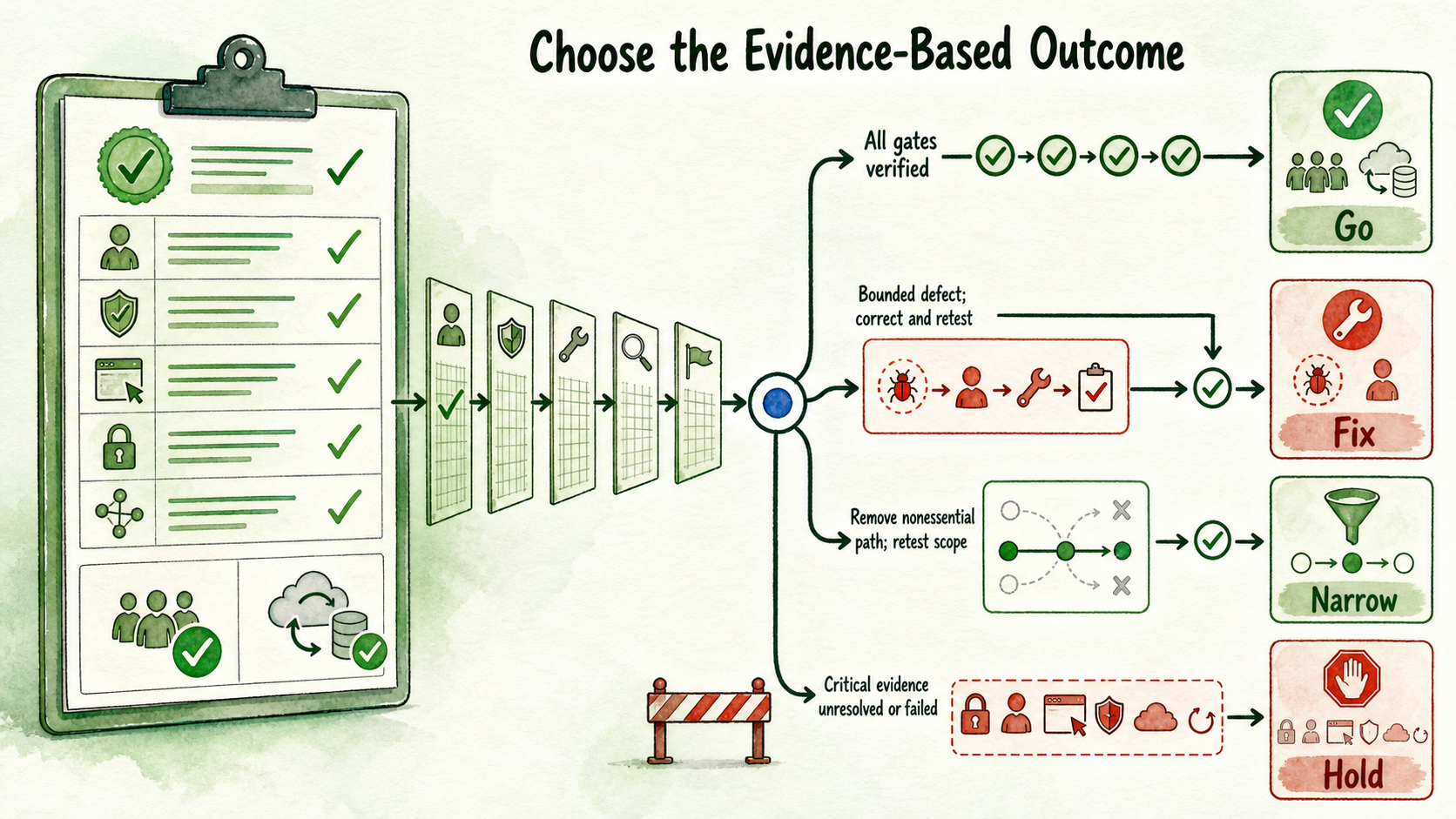
The final approval is not simply “the domain is configured.” It means the organization is entitled to use the route, authorized owners control it, the accepted visitor journey works through it, and the team has an approved way to detect and reverse a failed change without exposing unnecessary access.