TL;DR
- Inventory business workflows, not just AI subscriptions or user accounts.
- Assign every workflow one outcome: migrate now, pilot in parallel, retain as a specialist, or postpone.
- Keep the current tool available while representative work is compared with the proposed workspace.
- Retire a subscription only after output, source, access, integration, review, handoff, usage, data-exit, and contract checks pass.
- Review migrated workflows after 30, 60, and 90 days, then change the classification if new evidence exposes a gap.
A renewal date is approaching, several teams use overlapping AI interfaces, and nobody can show what would stop working if one subscription disappeared. Canceling from a tool list may remove duplicated access, but it can also remove a data connection, reporting process, permission boundary, or human review path. A safer decision starts with the business job behind each tool and asks whether its required operating result can be reproduced.
Key Takeaways
- Workflow parity controls the decision. A shared interface is useful only when it can reproduce the inputs, outputs, actions, controls, review, and handoff required by the business job.
- Retention is a valid consolidation outcome. A specialist dependency should remain when removing it would weaken the operating result.
- Unknowns are blockers, not assumptions. Missing contract terms, baseline examples, owners, or access controls justify a pilot or postponement.
- Model choice is one dependency among many. Access to OpenAI, Anthropic, Google, or alternative provider families does not recreate sources, tools, permissions, analytics, or downstream processes.
- Cancellation follows evidence. It should never be the first step in a migration plan.
What it means to consolidate AI tools at the workflow level
AI workflow consolidation means moving selected business jobs, together with their required context, controls, actions, and review paths, into a shared AI workspace. It does not mean placing several models behind one login and declaring the existing work reproduced.
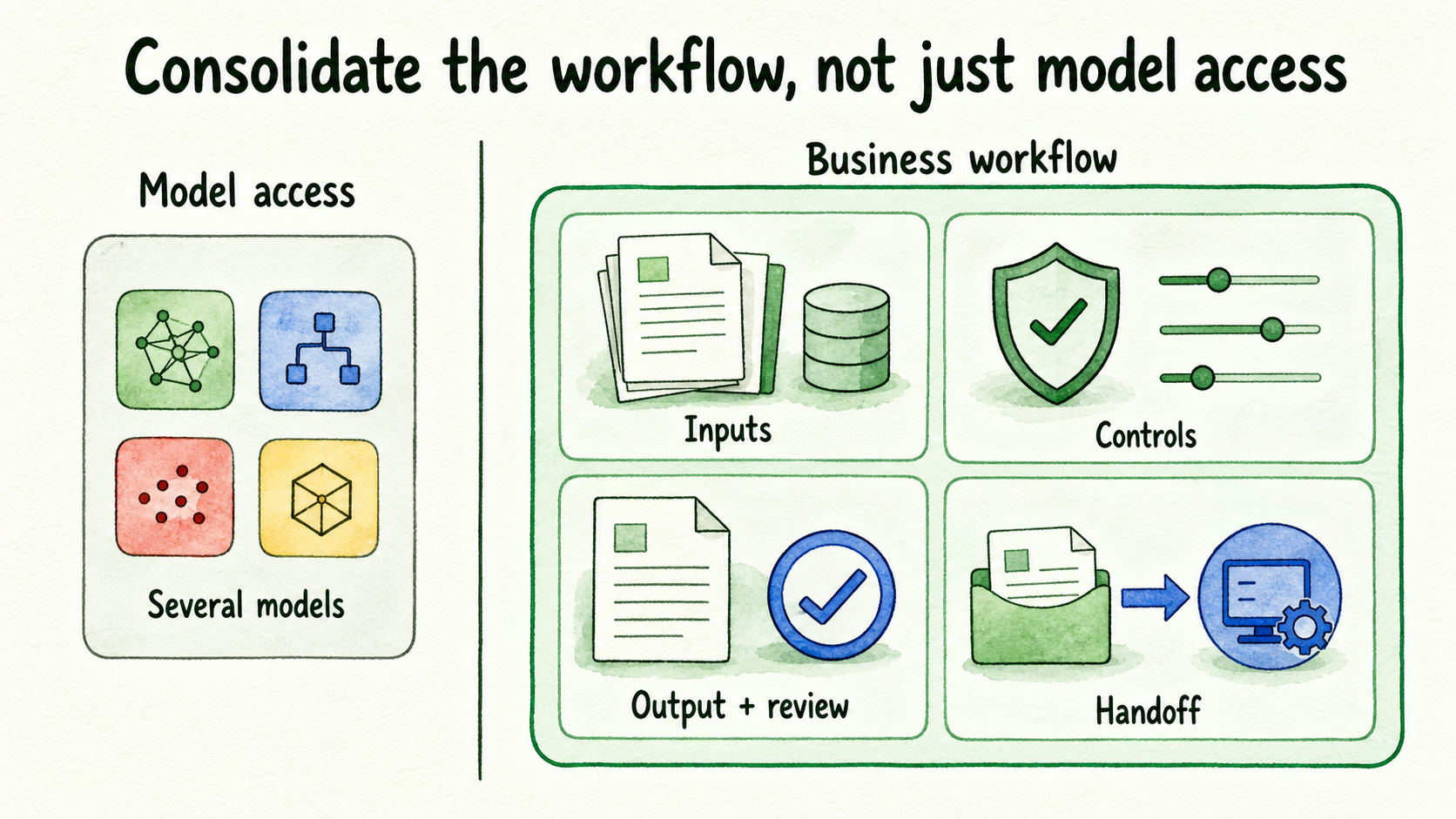
The business workflow is the unit of decision. It is a repeatable job with known users, inputs, output standards, downstream actions, controls, and consequences. The AI workspace is the shared operating environment being considered for that job. A specialist AI tool is an existing product that remains necessary because it performs a function the workspace has not reproduced.
Several other roles and objects need clear ownership:
- A model provider supplies the model family used for part of the work.
- An approved source is business content accepted by an authorized owner for use in answers or context.
- Conversation context is the history and retrieved information carried with a request.
- The workspace owner controls configuration, access, billing, or other higher-risk settings.
- The reviewer decides whether representative outputs meet the accepted standard.
- The handoff path moves work to the person or system responsible for the next step.
- A parallel run keeps the candidate and current workflows available for comparison.
- The parity gate defines the evidence required to accept the migrated result.
- The retirement decision authorizes retention, cancellation, or a longer parallel run.
This distinction prevents a common category error. A workspace may offer access to several provider families and still fail to reproduce the underlying job. InsertChat, for example, documents access to OpenAI, Anthropic, Google, and alternative provider families, as well as model changes that retain conversation history, retrieved context, and enabled handoff paths (Models | InsertChat). Those capabilities can support a migration test. They do not establish parity for a workflow that also depends on proprietary data, a reporting engine, an approval queue, or a required export.
Build a point-in-time business workflow inventory
Create one dated row for every AI-supported business job. Do not merge several jobs into a row simply because they use the same subscription. Routine drafting, customer-answer preparation, analytics reporting, and account research have different inputs and failure consequences even when users access them through one product.
Record these fields:
| Inventory field | What to capture |
|---|---|
| Tool and business job | The current product and the result it helps produce |
| Users | Teams and roles that perform or review the job |
| Required inputs | Documents, records, prompts, live data, and prior context |
| Output standard | The format, accuracy, completeness, and timeliness reviewers accept |
| Integrations or actions | Systems read, updated, notified, or handed work |
| Sensitive context | Customer, prospect, client, employee, or departmental information involved |
| Reviewer | The named person accountable for acceptance |
| Switching effort | Configuration, source preparation, training, process changes, and temporary duplicate work |
| Commercial dependency | Cost owner, renewal date, notice period, cancellation process, and linked commitments |
| Baseline and acceptance criteria | Representative current outputs and the conditions the candidate must meet |
The organization must supply these facts directly. Platform marketing cannot establish who uses a tool, what the team pays, when it renews, which outputs are accepted, or how much switching work is involved.
Contract and plan inputs also need current verification. Review the applicable Terms of Service for account responsibilities and cancellation wording, then check the current Pricing page when plan eligibility, limits, trial information, or subscription dependencies affect timing. Treat both as dated inputs. They do not replace the organization’s own agreement, invoices, purchase records, or renewal notices.
For example, an inventory row for account-brief preparation might name sales operations as the user, CRM notes and approved research as inputs, a structured brief as the output, the sales director as reviewer, prospect information as sensitive context, and a pending annual renewal as the commercial dependency. If the CRM connection or access boundary is unknown, the row is not ready for immediate migration.
Classify each workflow into one of four outcomes
Give every completed inventory row one explicit status. The classification describes the evidence available now, so it can change when a missing dependency is resolved.
| Outcome | Use it when | Next action |
|---|---|---|
| Migrate now | The workflow is bounded, approved inputs are ready, required dependencies are reproducible, and a reviewer can verify the result | Move the workflow under controlled access and monitor it |
| Pilot in parallel | The candidate appears feasible, but representative comparison is still required | Keep the current tool available and collect parity evidence |
| Retain as a specialist | Required data, actions, output standards, permissions, analytics, or review processes are not reproduced | Document the dependency and reassess if capability changes |
| Postpone | A missing source, control, integration, owner, contract answer, or acceptance rule prevents a responsible test | Assign an owner to resolve the blocker before migration |
“Migrate now” should be reserved for work with low ambiguity and complete operating inputs. Even then, migration does not automatically authorize cancellation if the existing subscription supports other workflows.
“Retain as a specialist” is not a failed consolidation. It protects the part of the portfolio where a specialist system still earns its place. Adjacent drafting or research may move while proprietary reporting, workflow automation, or controlled analytics remain in the specialist product.
Run one migration pilot against the current baseline
Use a five-stage sequence across the portfolio:
- Inventory every AI-supported business workflow.
- Classify each row into one of the four outcomes.
- Run one bounded pilot for a workflow marked for parallel validation.
- Compare representative work with the accepted baseline.
- Retain or retire the existing dependency after the parity gate and contract checks.
Choose one already-classified, non-sensitive workflow. Use representative examples from its normal range of work, including material exceptions, and keep the existing route available. This temporary duplication adds cost and review effort, but it protects continuity while the team tests whether the candidate route reproduces the business result.
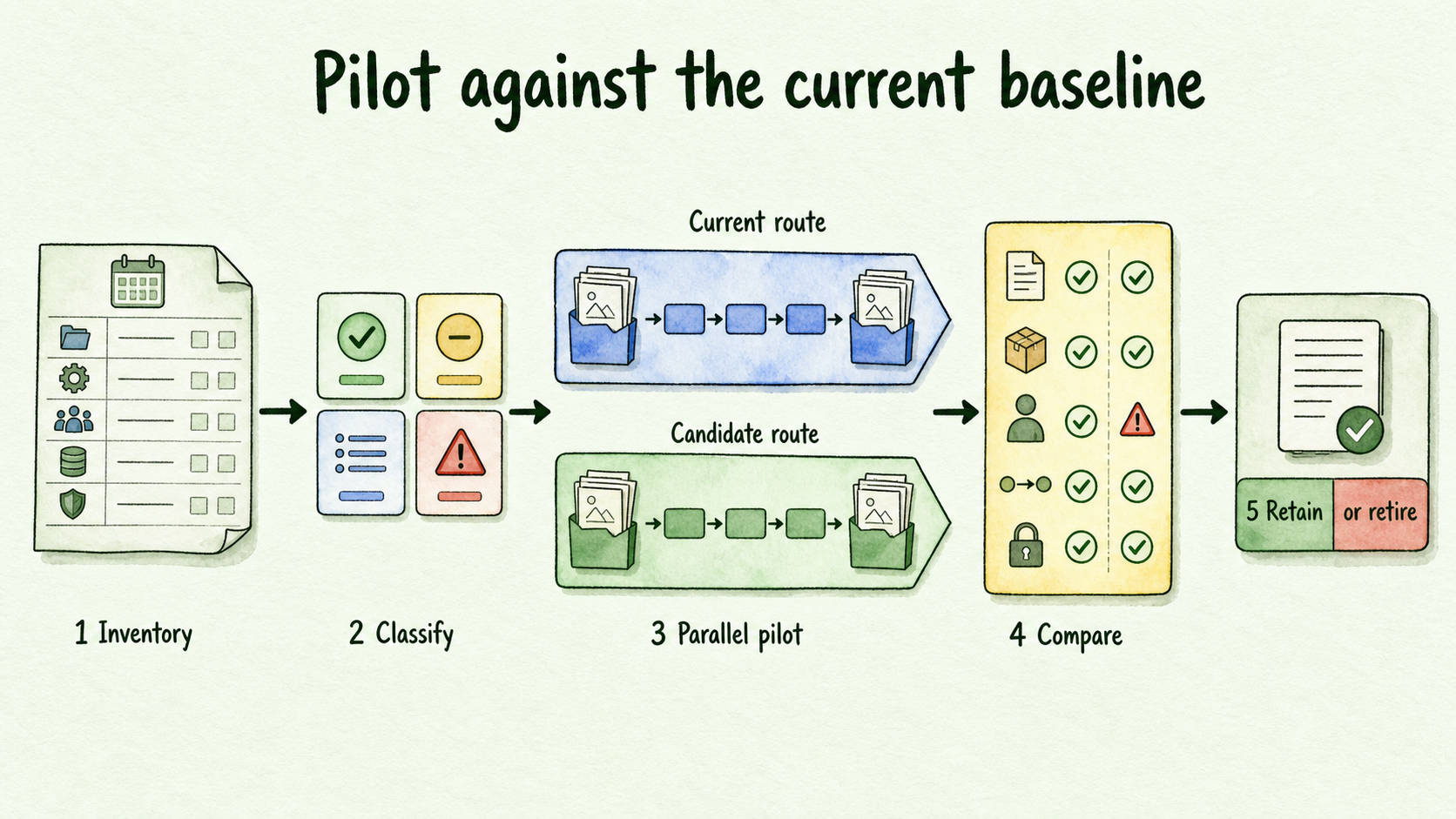
Compare observable outcomes against the recorded baseline: Was every required input available? Did the output meet the acceptance criteria? Did the correct reviewer receive it? Did the required action or handoff complete? Did access remain limited to authorized users? Record failures by workflow dependency, such as a missing source, restricted record, incomplete action, weak output, or broken handoff, so the owner knows what must change before reclassification.
InsertChat documents approved sources, testing with real questions, controlled permissions, and a bounded rollout that starts with one assistant and one visitor job (AI Agent Features: Chat, Voice, Phone & Inbox | InsertChat). Its workspace controls can limit people to assigned assistants, conversations, and client workspaces (Team Workspaces | InsertChat). Its security documentation describes role-based access, workspace boundaries, provider-key choices, encryption, and inspection surfaces (Security | InsertChat). These capabilities can support a pilot, but each one still needs to be checked against the selected workflow and the organization’s requirements.
A parallel run has no universal duration or case count. Continue until the comparison covers representative work, material exceptions, and accountable review. A narrow, frequent workflow may produce enough evidence quickly. An occasional or seasonal job may require a longer comparison.
Three examples show how evidence changes the decision
These scenarios are illustrative. They show how classifications change with evidence, not measured customer results.
Growth: migrate adjacent work, retain specialist analytics. A growth team moves routine drafting and research into the shared workspace because approved inputs, output expectations, and editorial review are clear. Its analytics product remains. The workspace does not reproduce the product’s underlying event data, calculations, reporting process, or accepted dashboards. The analytics workflow is classified as retain, while drafting is classified as migrate. That decision changes only if representative reports, required data, and review behavior can later pass parity.
Revenue operations: pilot account briefs with restricted context. A revenue-operations team wants account-brief preparation in the shared workspace. The job uses prospect notes, approved research, and a fixed brief format. It enters a parallel pilot after access is limited to authorized workspace users and the sales operations reviewer remains accountable. It moves to migrate only if representative briefs meet the baseline and the required context arrives without broader exposure. If a needed CRM action is missing, the workflow remains in pilot or moves to retain.
Support: test approved-source drafts, postpone sensitive cases. A support team compares answer drafts across provider families using approved policies and help content. Sensitive account cases stay under human review. The general drafting workflow may enter a pilot, while the sensitive path is postponed until access, source, and handoff requirements are satisfied. Reusing an assistant across documented launch surfaces can preserve approved sources and answer controls (Launch Channels | InsertChat), but wider channel access should wait until the original workflow is stable.
The same rule governs all three examples: migrate the operating result that can be reproduced, retain the dependency that cannot, and postpone work whose controls remain unresolved.
Use a retirement gate before changing subscription status
A successful interface test is not enough to retire an existing tool. Require all of the following:
- Representative output parity: accepted work covers the normal range and material exceptions.
- Approved-source readiness: required sources are current, owned, and available to the candidate workflow.
- Access boundaries: customer, prospect, client, and departmental context is limited to authorized users.
- Required integrations: every necessary connection, lookup, update, or downstream action works as required. Verify each connection rather than assuming a directory listing proves parity (Integrations | InsertChat).
- Named review ownership: a person is accountable for accepting outputs and responding when quality weakens.
- Handoff behavior: representative cases reach the correct person or system with enough context to continue. This is a parity check, not a redesign of handoff rules.
- Usage evidence: intended users complete the workflow through the candidate route often enough to expose operating gaps.
- Export and retention review: required records, sources, conversations, and reports have an approved disposition.
- Verified cancellation terms: the contract owner confirms timing, notice, renewal, linked services, and the effect of cancellation from current documents.
End with one recorded judgment: retire the tool, retain it for documented workflows, or extend the parallel run. Fewer subscriptions may follow, but savings or productivity improvement should not be assumed.
Review the migration after 30, 60, and 90 days
At 30 days, inspect workflow integrity. Look for missing inputs, rejected outputs, access problems, incomplete actions, and failed handoffs. Correct the route or restore the previous dependency if continuity is at risk.
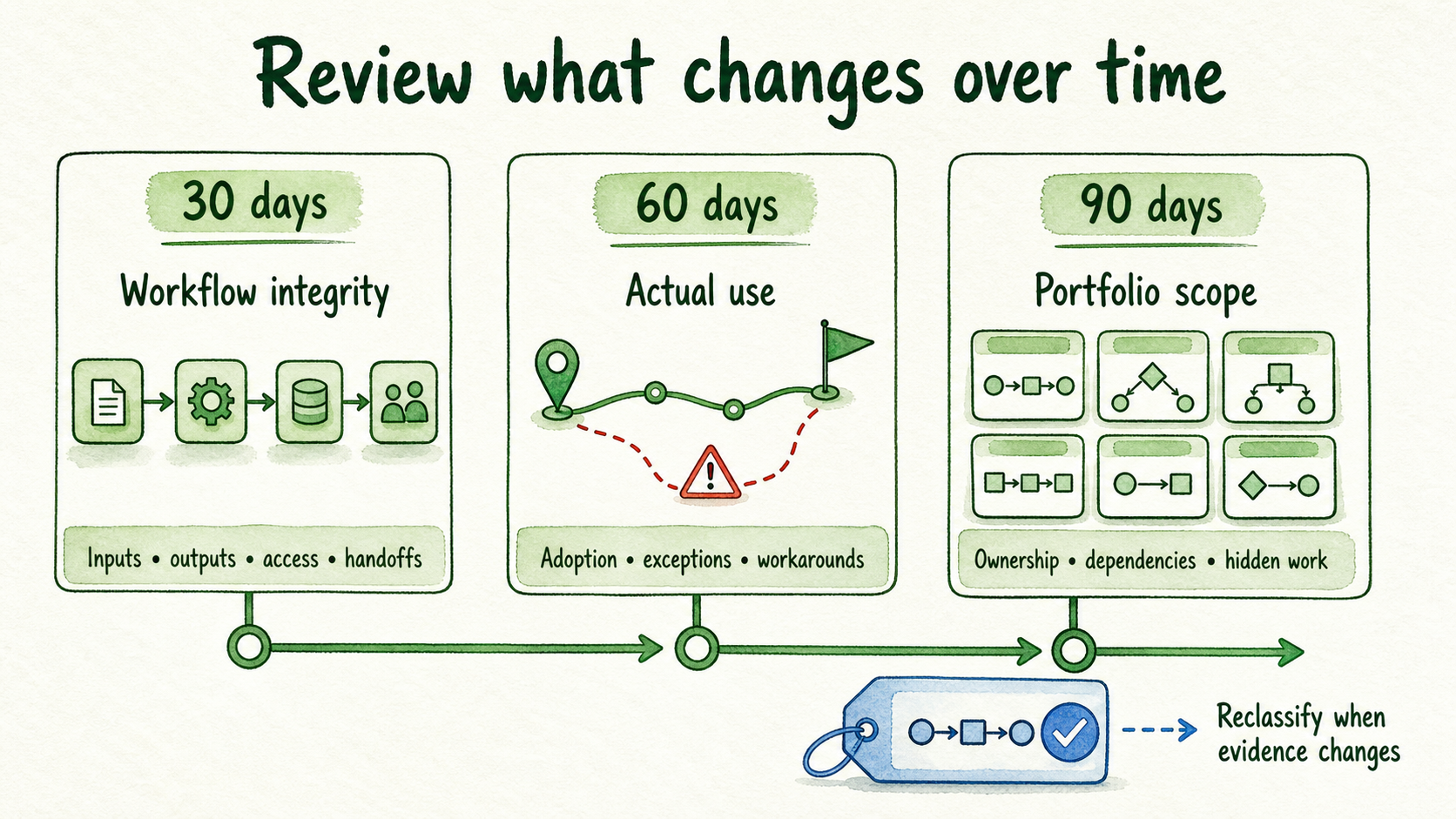
At 60 days, inspect actual use and exception patterns. Confirm that intended users follow the new route and that work is not quietly moving into personal accounts, manual workarounds, or an unrecorded specialist tool.
At 90 days, review portfolio scope. Confirm that ownership still fits, retained dependencies remain justified, and retired capabilities have not reappeared as hidden work. Reclassify any workflow whose evidence has changed.
The next action is concrete: complete the dated inventory, classify every row, and nominate one bounded, non-sensitive workflow for parallel validation. If InsertChat is a plausible workspace for that test, Start for Free with the narrow workflow. For security, procurement, regional deployment, self-hosting, or custom requirements, use the Contact us path before treating the migration as feasible.
FAQ
Does one shared AI workspace replace every specialist tool?
No. It can reduce fragmentation only for workflows that pass the parity and contract gates. Keep a specialist when its required data, actions, permissions, analytics, output standard, or review process cannot be reproduced.
How long should a parallel run last?
There is no defensible universal duration. Run it long enough to cover representative work, material exceptions, and accountable review while keeping the existing route available. Use evidence coverage, not an arbitrary calendar target, to decide when the comparison is complete.
What if renewal is due before the pilot produces enough evidence?
Do not turn the renewal date into proof of parity. Review available renewal or term options with the contract owner, narrow the migration scope, and document what remains unknown. Earlier cancellation is useful only when the continuity and exit risks are already resolved.
Who should authorize retirement?
The workspace owner can coordinate the decision, but authorization should include the business workflow owner, named reviewer, and contract or procurement owner. Security, privacy, legal, or technical reviewers should join when their requirements affect the workflow. The model or platform should never be treated as the approval authority.