TL;DR
- AI chatbot reseller break-even equals fixed monthly operating cost divided by contribution per client, rounded up to the next whole client.
- Contribution per client is the client price minus usage, recurring labor, payment costs, setup recovery, and a defined risk reserve.
- Calculate the quote twice: once from the apparent platform spread, then again with fully loaded delivery costs. The difference is hidden operating exposure.
- Keep launch economics separate from recurring monthly economics. Recover setup work once, over a stated period, or charge for it separately.
- Run base, downside, and usage-spike cases. If any material price, credit, overage, or labor input is unknown, pause the firm quote rather than entering zero.
A $300 monthly client fee can look generous when the only visible expense is a shared platform subscription. The same quote can become fragile after answer review, client changes, usage, payment fees, setup recovery, and exceptions are included. The useful question is therefore not whether subscription revenue exceeds the platform bill. It is whether the proposed quote produces enough fully loaded contribution to cover fixed monthly costs under conditions you can defend.
Key Takeaways
- Platform spread is not contribution margin. It omits the costs of delivering and maintaining the service.
- One-time setup work belongs in launch economics unless a defined portion is deliberately recovered through monthly fees.
- Base, downside, and usage-spike cases turn one optimistic answer into a decision range.
- Every cost needs one—and only one—location in the formula.
- Prices, credits, allowances, trial terms, and plan inclusions are time-sensitive. Recheck them immediately before approving the quote.
- This worksheet audits one proposed quote with one fully loaded contribution formula. Broader capacity, support, operating-model, and offboarding decisions require their own evaluations.
Inventory Every Cost Before You Calculate
Start with a cost inventory, not the formula. A precise calculation built on missing inputs is still misleading.
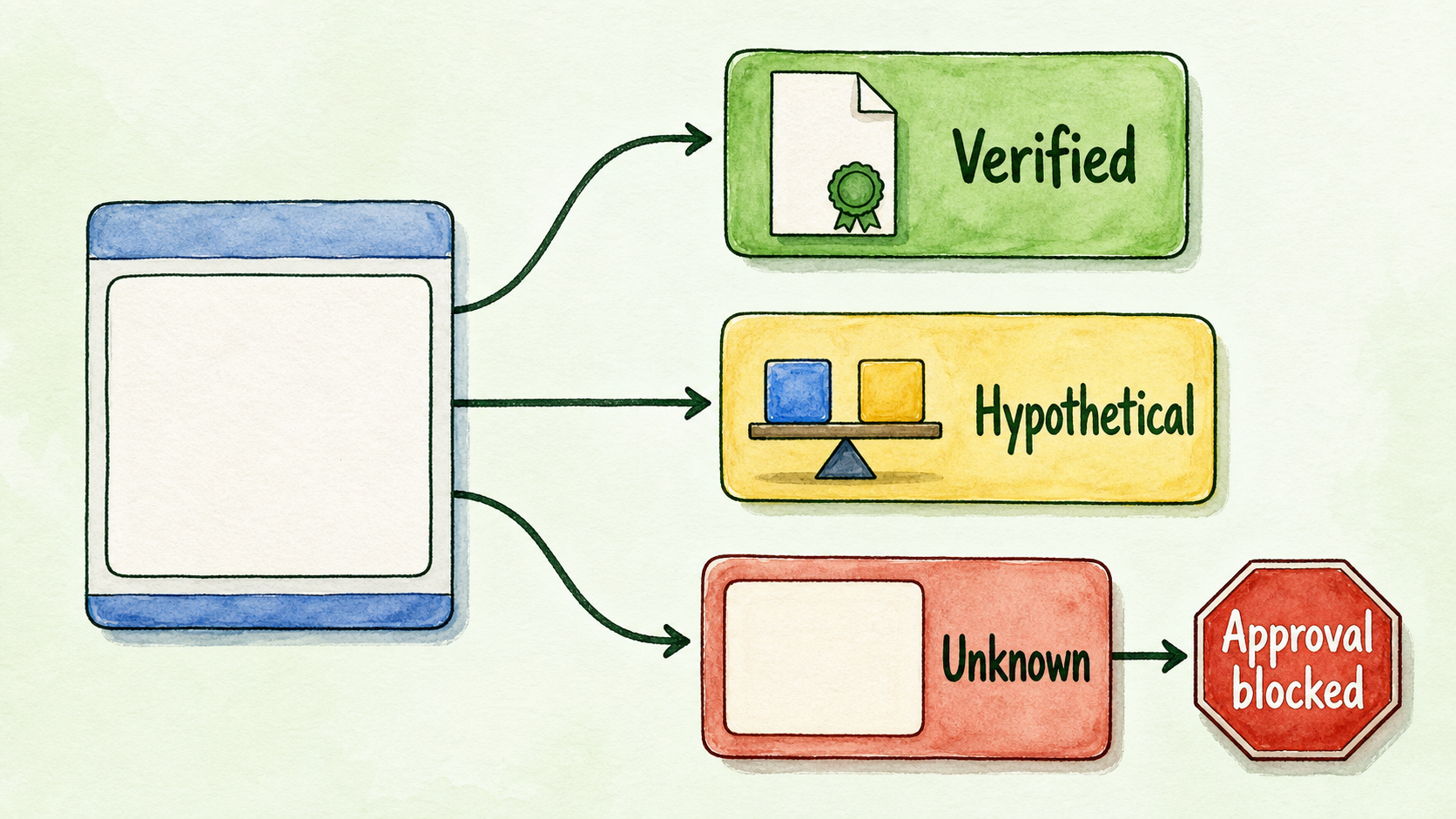
Use three statuses in your worksheet: verified, hypothetical, and unknown. Verified means the value comes from a current invoice, contract, vendor page, processor statement, time record, or tax guidance applicable to your business. Hypothetical values are acceptable for testing a quote, but not for presenting its margin as settled. Unknown values remain blank and block final approval when they could materially change the result.
| Cost category | What belongs here | Monthly input | Status and source |
|---|---|---|---|
| Client price | Recurring amount retained as revenue before delivery costs | ___ | ___ |
| Fixed platform cost | Subscription or committed platform charge that does not change per client within the modeled range | ___ | ___ |
| Other fixed tools | Shared reporting, monitoring, inbox, or administration tools | ___ | ___ |
| Variable usage | Client-attributable credits, model usage, phone, tool, or overage cost | ___ | ___ |
| Payment costs | Processor fees calculated on the same revenue basis as the quote | ___ | ___ |
| Recurring labor | Answer review, content updates, routine changes, reporting, and support time × labor rate | ___ | ___ |
| Setup recovery | The monthly portion of launch work being recovered through the recurring fee | ___ | ___ |
| Refund exposure | Expected client-attributable refunds or credits, if applicable | ___ | ___ |
| Risk reserve | Defined residual exposure not already listed elsewhere | ___ | ___ |
These inputs have distinct jobs:
- Fixed platform cost sits in monthly operating cost because it is payable even if an individual client produces no usage.
- Variable usage cost follows a client or that client’s activity and reduces contribution per client.
- Recurring support labor is monthly delivery time multiplied by the actual loaded labor rate you intend to fund.
- Setup recovery is the portion of launch work assigned to each month of a stated recovery period.
- Risk reserve covers named residual exposure, such as minor exceptions or churn disruption. It must not quietly repeat support, usage, or refunds already itemized.
- Contribution margin is the amount one client leaves after all per-client delivery costs.
- Break-even client count is the whole number of equally priced clients required for their combined contribution to cover fixed monthly operating cost.
Keep launch economics in a separate block:
| Launch input | Amount |
|---|---|
| Discovery and configuration hours × labor rate | ___ |
| Knowledge preparation and testing | ___ |
| Branding, installation, and initial client changes | ___ |
| One-time tools or contractor costs | ___ |
| Setup fee charged to the client | ___ |
| Unrecovered launch cost | ___ |
| Recovery period, if any | ___ months |
If unrecovered launch cost is $720 and you intentionally recover it over six months, the setup-recovery allocation is $120 per month. Do not also expense that same $720 as an immediate loss in the recurring calculation. Choose one treatment and document it.
Record taxes according to advice applicable to your business. Where taxes are collected for an authority rather than retained, do not treat them as reseller revenue. Confirm the actual treatment rather than assuming it.
For a current platform example, the indexed InsertChat pricing page captured on July 20, 2026 displayed an Agency card at $165 per month, while comparison copy on the same page referred to Agency at $198. It listed 25,000 monthly credits and plan inclusions including 20 assistants, 15,000 sources, four seats, full white-label access, custom domain, custom SMTP, Live Inbox, monthly reporting, AI insights, exports, and listed integrations. Because the page contains conflicting price references, verify the applicable price and billing cadence at publication time on the current pricing page.
Calculate the Quote Twice
The direct answer to “How many clients does an AI chatbot reseller need to break even?” is:
Break-even clients = ceiling(fixed monthly operating cost ÷ fully loaded contribution per client)
First define contribution:
Fully loaded contribution per client = client price − variable usage − recurring labor − payment costs − setup recovery − refunds − risk reserve
If contribution is zero or negative, adding more clients does not solve the quote. Each additional client fails to contribute toward fixed cost, so the price or delivery scope must change.
The first calculation is intentionally incomplete. It shows the platform spread—the client revenue remaining after the shared platform subscription—but ignores delivery costs.
InsertChat publishes an illustration of five clients paying $300 per month on a $198 Agency input. Revenue is $1,500, and subtracting $198 leaves $1,302, described as more than $1,300 monthly margin before usage. This is a published illustration, not customer proof or a guaranteed outcome, and the $198 figure should not silently override the conflicting price shown elsewhere on the pricing page. See the original boundary on the models page.
That calculation answers a narrow question: does client revenue exceed the illustrated platform input? It does not account for usage, labor, payment costs, setup recovery, refunds, or reserves. Those omissions form the quote’s hidden operating exposure.
The second calculation supplies the decision-grade answer. Calculate contribution after those costs, total the fixed monthly expenses, divide fixed cost by contribution, and round up. The result is the minimum client count for that specific set of assumptions.
This is a single-formula audit of one quote, not the broader three-threshold framework used for general break-even planning. Take workload ceilings and staffing triggers to a capacity-planning guide; included support, allowances, response boundaries, and escalation rules to support-policy design; ownership and system integration to operating-model planning; and client access, data portability, and offboarding to a platform evaluation.
Run Base, Downside, and Usage-Spike Cases
The following scenario is hypothetical and editable. It is not a market benchmark. Replace its values with your proposed client price, processor statement, time records, setup estimate, current vendor terms, and observed usage.
Assume:
- Client price: $300 per month
- Fixed platform input: $198 per month, used only to remain comparable with the published illustration
- Other fixed tools: $60 per month
- Labor rate: $40 per hour
- Payment cost: $9 per client per month
- Setup recovery: $24 per client per month
In the base case, assume $20 of variable usage, 1.5 hours of recurring work, and a $15 reserve per client.
Recurring labor is 1.5 × $40 = $60. Fully loaded contribution is:
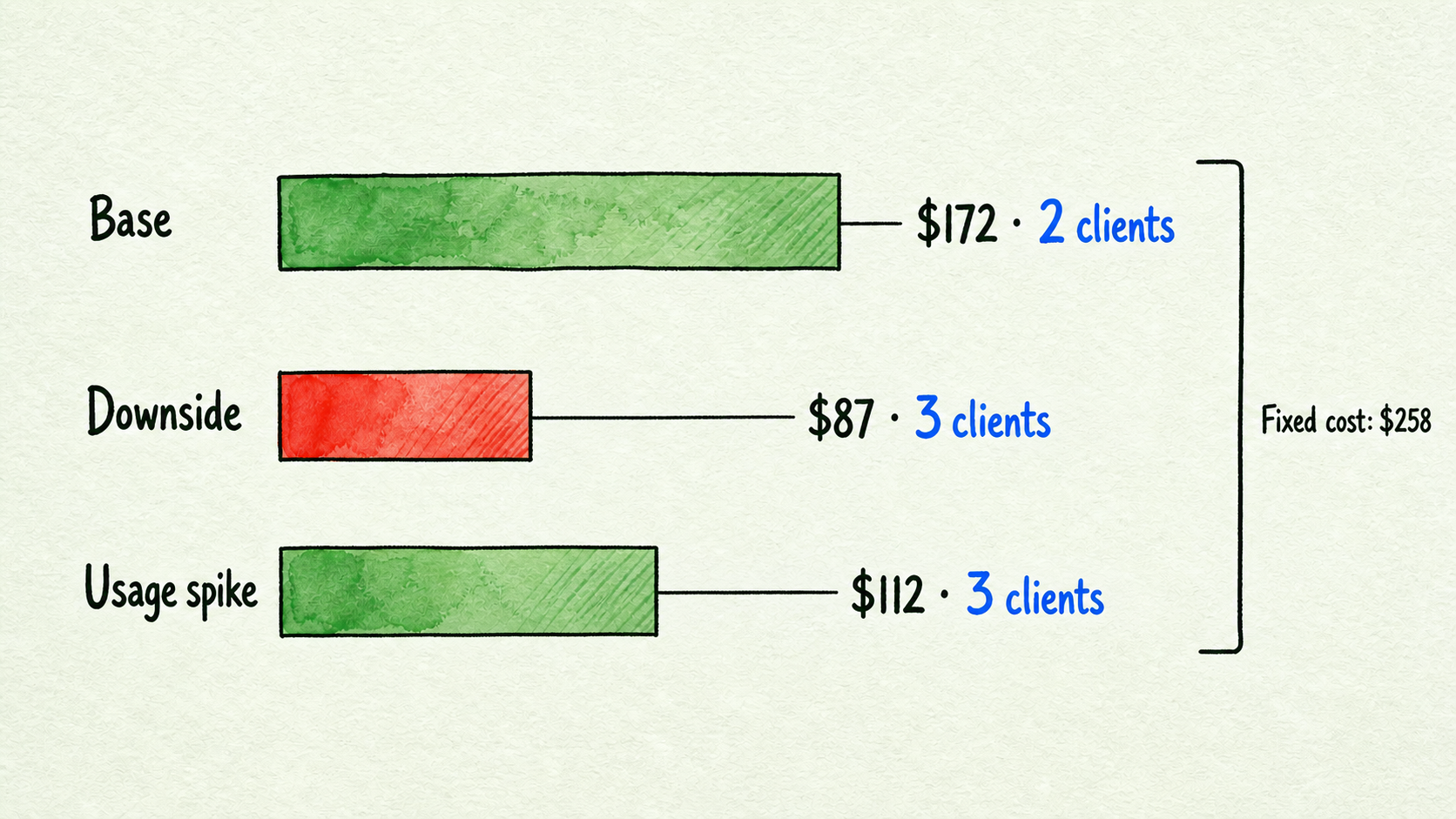
$300 − $20 − $60 − $9 − $24 − $15 = $172 per client
Fixed monthly operating cost is:
$198 + $60 = $258
Break-even is:
Ceiling($258 ÷ $172) = 2 clients
Now test a downside case in which answer review and client-change work raise recurring time to three hours, usage rises to $35, and the defined exception reserve rises to $25.
$300 − $35 − $120 − $9 − $24 − $25 = $87 contribution per client
Ceiling($258 ÷ $87) = 3 clients
The quote still has positive contribution, but the required client count rises from two to three. More importantly, five clients would contribute $435 before fixed costs in this downside case, far below the apparent $1,302 platform spread. The gap is the cost of operating the offer under the stated assumptions.
For a usage-spike case, return labor and reserve to the base values but raise variable usage to $80:
$300 − $80 − $60 − $9 − $24 − $15 = $112 contribution per client
Ceiling($258 ÷ $112) = 3 clients
This is why a simple flat client price is easy to explain but exposes the reseller to variable usage. The worksheet can reveal that exposure, but it does not determine the right usage allowance, review point, or scope boundary. Set those terms through the quote and support-policy design after confirming how usage is measured and charged.
The sensitivity table changes one value at a time from the hypothetical base case:
| Case | Client price | Usage cost | Support time | Contribution per client | Break-even clients |
|---|---|---|---|---|---|
| Base | $300 | $20 | 1.5 hours | $172 | 2 |
| Lower introductory price | $250 | $20 | 1.5 hours | $122 | 3 |
| Higher usage | $300 | $50 | 1.5 hours | $142 | 2 |
| More support time | $300 | $20 | 2.5 hours | $132 | 2 |
| Usage spike | $300 | $80 | 1.5 hours | $112 | 3 |
Lower introductory pricing may reduce sales friction, but it also removes contribution that would fund review and client changes. An aggressive client target can improve fixed-cost recovery, yet a reserve is still needed if exceptions or churn create costs not captured elsewhere. Do not remove the reserve merely to make the target look easier.
Audit the Formula for Double Counting
Before accepting the result, assign every cost to exactly one location.
| Input | Correct location | Audit check |
|---|---|---|
| Platform subscription | Fixed monthly operating cost | Appears in the numerator once; not also divided into per-client cost |
| Shared tools | Fixed monthly operating cost | Include only tools genuinely shared across the modeled clients |
| Client usage or overage | Per-client contribution | Deduct once; do not repeat it in the reserve |
| Recurring support labor | Per-client contribution | Hours × loaded labor rate; exclude the same work from reserve |
| Setup labor | Launch economics or setup-recovery allocation | Charge or recover once, never both |
| Payment fees | Per-client contribution | Use the same client-revenue basis as the quote |
| Refund allowance | Per-client contribution | Keep separate from reserve if explicitly estimated |
| Risk reserve | Per-client contribution | Define the residual risk and exclude all itemized costs |
Then perform four manual checks:
- Normalize every value to the same monthly period. Do not mix annual totals, monthly equivalents billed annually, and monthly charges.
- Confirm that fixed costs appear only in fixed monthly operating cost unless you deliberately replace that treatment with a documented allocation method.
- Change one scenario input at a time. Raising only usage should not also alter labor, setup recovery, or reserve.
- Reconcile the formula to the inventory. Every included cost should appear once, and every formula input should have a corresponding inventory row.
This audit is simple by design. Its job is to prevent an attractive spreadsheet from counting setup twice, hiding support inside a reserve, or treating an unresolved overage as free.
Approve, Narrow, Pilot, or Pause
A quote is ready for approval only when the client price, platform price and cadence, credit allowance, usage measurement, overage treatment, labor rate, recurring time, payment fees, tax treatment, refund exposure, setup recovery, and reserve basis are current enough for the decision.

Use the worksheet to choose one outcome:
- Approve when material inputs are verified, contribution remains positive in the downside case, and the resulting client target is commercially acceptable.
- Narrow when usage or recurring work pushes break-even too high. Reduce the work included in the quote or clarify which changes trigger a separate charge. Finalize the resulting boundaries through support-policy design.
- Pilot when the offer looks viable but usage and review time remain hypothetical. Run one bounded assistant for one defined visitor job, record credits or provider cost, log answer-review and client-change time, and recalculate with observed values.
- Pause when price, billing cadence, credit measurement, overage treatment, labor, fees, taxes, refunds, or another material input is unknown or conflicting. Unknown is not zero.
The indexed pricing page advertised a seven-day free trial and annual billing with two months free. It does not specify the trial’s payment requirement, charge timing, automatic conversion, cancellation deadline, or refund treatment, and its conflicting Agency figures do not establish which price or billing basis applies. Confirm those terms and current plan inclusions immediately before signup or quote approval on the pricing page. A seven-day period may help collect initial usage and review-time evidence, but it may not be sufficient for every use case.
Once the pilot question, page, source set, review owner, and measurement sheet are ready, Start for Free and use real conversations to replace assumptions. Then approve, narrow, or pause the quote on evidence—not on platform spread alone. If the pilot raises questions about workload capacity, support rules, system ownership, client access, or offboarding, resolve them in the corresponding capacity, support-policy, operating-model, or platform evaluation before expanding.