TL;DR
- Inventory content around one bounded visitor job before adding anything to a chatbot.
- Give each consequential question one owner-approved answer; exclude conflicting versions.
- Map FAQs and PAA-style questions to sources to reveal coverage gaps, not to claim search demand.
- Clean the brand voice without changing prices, policies, eligibility, or other facts.
- Turn unsupported topics into explicit answer, clarification, refusal, or routing rules.
- Finish with an approved content-readiness pack and a decision to proceed, narrow, or pause.
A client can have hundreds of pages and still be unready for an AI chatbot. The problem is rarely a lack of words; it is the absence of one approved answer when pages disagree, policies have changed, or important exceptions live only in an employee’s head. A content audit reduces that risk by deciding what the assistant may use, what it must avoid, and who resolves the remaining gaps before configuration begins.
Key Takeaways
- A small, current source set is more useful than a large collection of contradictory material.
- Every material source needs a status, an accountable owner, and a defined next action.
- Question mapping tests whether the content can support real visitor decisions.
- Missing business guidance cannot be repaired with better phrasing or platform settings.
- Format compatibility matters only after the underlying content has been approved.
1. Define “content ready” with a four-status rule
Before reviewing files, define the job the content must support. “Answer questions about the business” is too broad. “Help prospective customers understand the services, service area, and next step” creates a usable boundary.
Name the intended audience as well. A public website visitor, an existing customer, and an internal employee may be allowed to receive different information. Mixing their materials can expose internal notes or produce answers that make no sense in the visitor’s context.
Use a small set of working terms throughout the audit:
- A source is a page, document, FAQ, policy, catalog, transcript, structured record, or other approved knowledge input.
- A canonical answer is the owner-authorized version of a fact or policy when several sources address the same question.
- A gap is a relevant question for which the business has not supplied an approved answer.
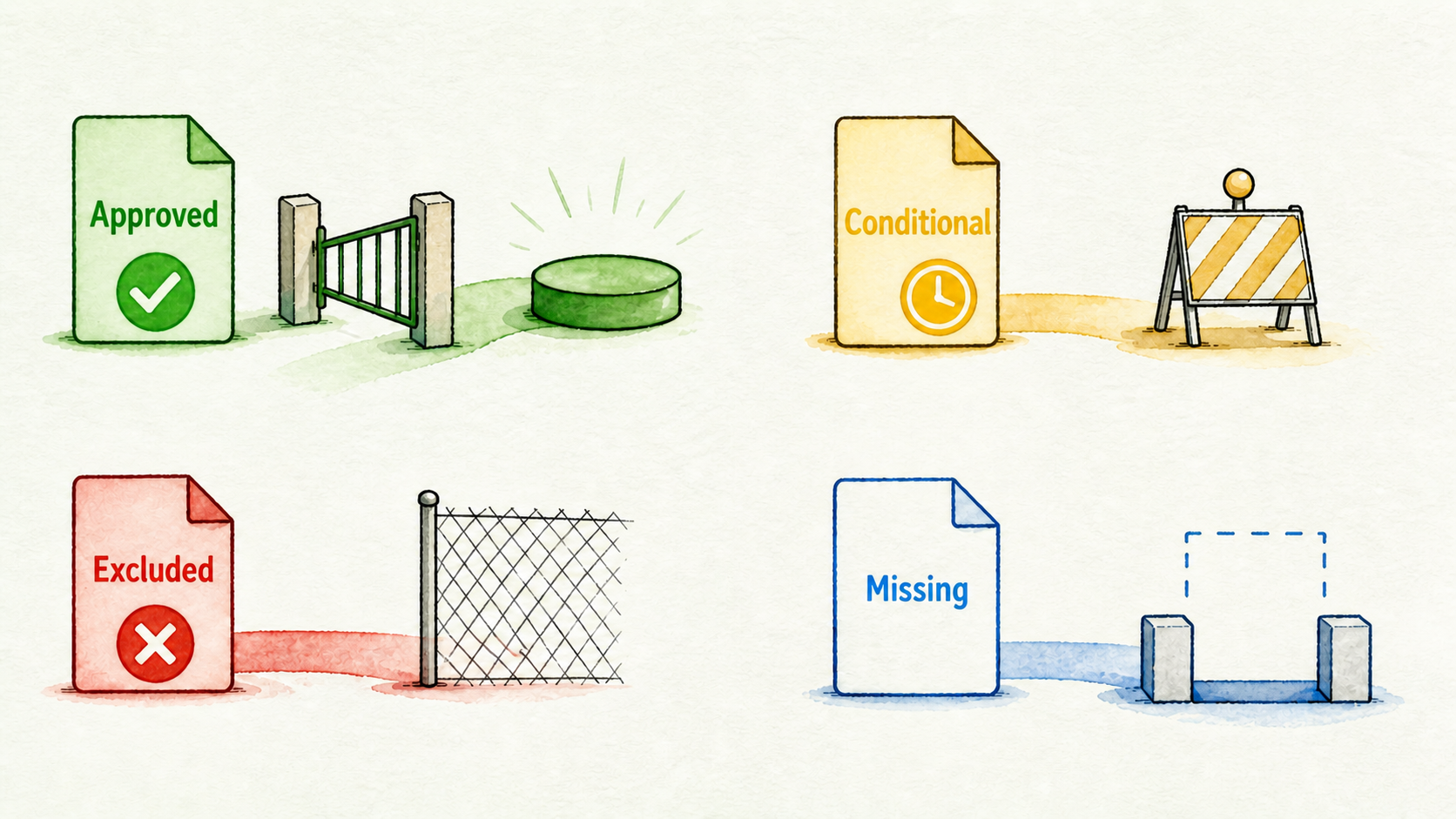
- Approved content can enter the initial source set as it stands.
- Conditional content can enter only after a named edit, decision, or approval.
- Excluded content is irrelevant, obsolete, sensitive, contradictory, or unsuitable for the intended audience.
- Missing means the business needs an answer but has not documented or approved one.
These four statuses prevent “we have a page about that” from being mistaken for readiness. Only approved material belongs in the first source set. Conditional items need a named action and owner; excluded items stay out; missing items go into a gap register.
The governing rule is simple: editing can clarify business truth, but it cannot create it. If the client has not decided which cancellation rule applies, neither the reseller nor the chatbot platform should choose one.
2. Build a source inventory around one visitor job
Start with the places where the client currently gives or records answers. Depending on the chosen visitor job, that may include website pages, service descriptions, FAQs, policy pages, help content, approved documents, catalogs, spreadsheets, video transcripts, text notes, or Q&A records.
Do not gather everything simply because it is available. Separate core sources, which directly answer questions within the chosen job, from supporting sources, which add useful detail. Leave unrelated departments, draft campaigns, internal commentary, and unapproved notes outside the initial set.
For each source, record:
- Source name or URL
- Content type
- Topic and intended audience
- Business owner
- Approval status
- Freshness signal, such as a revision date or current offer reference
- Risk if the answer is wrong
- Required action
A service-question assistant, for example, might need current service pages, service-area guidance, an approved policy page, and a short FAQ. An old sales deck and internal pricing notes may mention the same services, but they should not enter the source set unless the client confirms that they are current and appropriate for visitors.
This inventory is not administrative overhead. It exposes ownerless content, competing versions, and high-risk facts before those problems become customer-facing answers.
3. Resolve stale, duplicate, and conflicting content
Review the inventory by topic rather than one page at a time. Contradictions are easier to spot when every source discussing pricing, eligibility, cancellations, availability, guarantees, or service scope appears together.
Look for signals such as:
- Expired dates, promotions, or event references
- Retired services and discontinued product names
- Duplicate pages with different wording
- Policies that changed without updates elsewhere
- Different terms for the same service or customer group
- Unsupported superlatives, guarantees, or absolute claims
- Documents with no visible owner or revision history
A newer publication date can be useful, but it does not automatically establish authority. A recently edited marketing page may still be less authoritative than an approved policy owned by operations. Ask the responsible owner to select the canonical source or provide a replacement answer.
Consider a hypothetical example: a current service page says cancellations require notice, while an older PDF gives a different deadline. Do not keep both and hope the system chooses correctly. Hold both out of the approved set until the policy owner confirms the rule, then record which source won and why the other was excluded.
The same treatment applies to near-duplicates. Choose the owner-approved version, record superseded material, and prevent it from returning through another folder or URL. If the business cannot decide, mark the topic missing and block it from automated answers.
That exclusion record matters. Without it, a later contributor may see the old PDF, assume it was overlooked, and add the conflict back into the source set.
4. Map FAQs and PAA-style questions to source coverage
Pages organize information by the way a company publishes it. Visitors ask questions according to the decision they are trying to make. A question-to-source map connects those two structures.
Build the question list from the client’s existing FAQs, support questions, sales objections, service conversations, and other approved records. Add PAA-style phrasing—short, natural questions resembling the forms people often use in search—as a writing method for finding variants and assumptions.
PAA-style questions are not evidence that a question currently appears in People Also Ask or has meaningful search volume. Without live search research, use them only to test coverage.
Group questions by:
- Visitor job, such as comparing a service or checking eligibility
- Decision stage, from initial fit to next action
- Wording variant, including informal or ambiguous phrasing
- Risk if the answer is incomplete or wrong
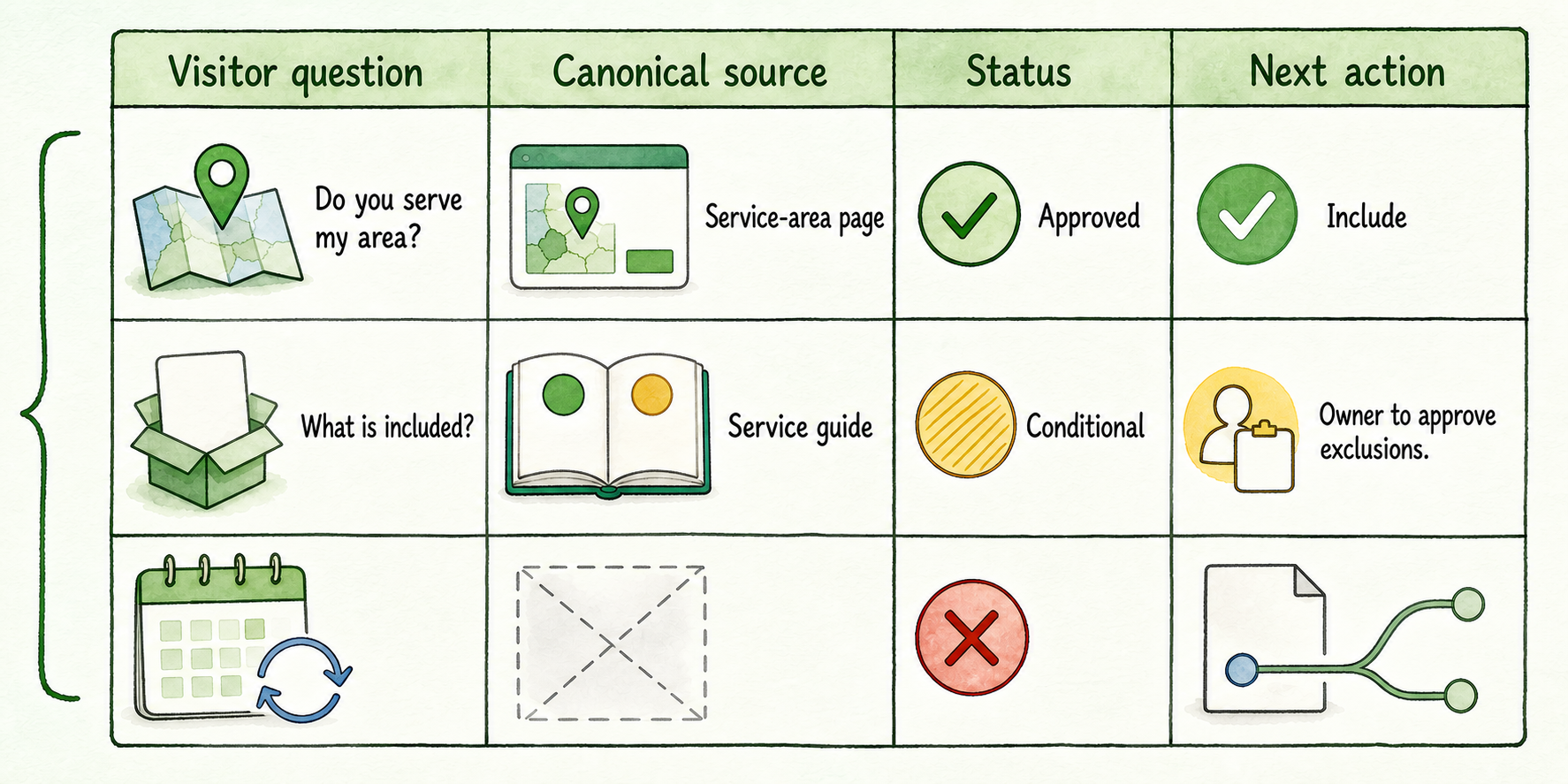
Then map each question to a canonical source, owner, status, and next action. For example:
| Visitor question | Canonical source | Status | Next action |
|---|---|---|---|
| Do you serve my area? | Service-area page | Approved | Include |
| What is included? | Service guide | Conditional | Owner to approve exclusions |
| Can I change a booking? | None | Missing | Document rule or route |
Prioritize questions that affect the bounded visitor job. Do not chase an arbitrary FAQ count. Ten consequential questions with approved answers are more useful than a hundred speculative questions that lead beyond the content’s authority.
This map also reveals false coverage. A page may mention bookings without explaining changes, late arrivals, exceptions, or who can approve a special request. Those are separate questions and may require separate boundaries.
5. Clean the voice without changing the facts
Once the facts are approved, create a compact voice sheet. Keep this separate from the source register: the source determines what the assistant may say, while the voice sheet determines how an approved answer should sound.
A useful minimum voice sheet covers:
- Tone, such as direct, calm, warm, or concise
- Answer order, such as answer first, then qualify, then give one next step
- Preferred terms and client-specific names
- Prohibited phrases, including guarantee language the business cannot support
- Approved wording for uncertainty
- Escalation wording
- Overrides for particular services, audiences, or regions
Replace vague instructions such as “sound friendly” with observable rules. For example: use plain language, answer the question in the first sentence, avoid pressure, state uncertainty clearly, and finish with one useful next step.
Voice editing may shorten a policy explanation or replace internal jargon. It must not alter a price, eligibility condition, deadline, coverage promise, or exception. If making an answer sound smoother changes its meaning, send it back to the content owner.
Also reconcile terminology before handoff. If the website alternates between “consultation,” “assessment,” and “discovery call,” decide whether those terms mean the same thing. Consistent vocabulary helps visitors understand the answer and reduces accidental contradictions.
6. Write unsupported-answer boundaries before configuration
Every excluded, missing, or conditional topic needs a rule. Otherwise, the configuration team receives a list of content problems without knowing what the assistant should do when a visitor finds one.
Common boundary categories include:
- No approved source exists
- Approved sources conflict
- The answer depends on a customer account or live record
- The topic is sensitive or high-stakes
- The request falls outside the selected visitor job
For each category, document four fields:
- Trigger: What kind of question activates the rule?
- Permitted response: May the assistant clarify, give limited general information, state that the answer is unavailable, or direct the visitor elsewhere?
- Prohibited response: What must it not infer, estimate, promise, or disclose?
- Owner or destination: Who is responsible for the next step?
Suppose a visitor asks for a custom price and the approved sources contain only standard service information. A suitable rule might allow the assistant to say that a custom price is not available in its approved information and direct the visitor to the sales owner. It should not calculate, estimate, or imply an exception.
People remain responsible for edge cases and high-stakes requests. This audit only defines the content boundary and destination; detailed staffing, routing, and handoff operations belong in the implementation work that follows.
7. Confirm source-format fit before promising the handoff
Approved content is not automatically usable content. Before telling a client that the source pack is ready, ask how the selected platform handles each actual format in the inventory.
InsertChat is positioned as a source-grounded assistant platform, but the reseller should still confirm the behavior needed for the specific client pack rather than assuming that every file, page, or connection behaves identically.
Ask platform-specific questions such as:
- Is this website page, PDF, document, spreadsheet, catalog, transcript, FAQ, policy, text record, Q&A set, cloud source, or support-content format supported?
- Can the system read the important structure, including headings, tables, labels, and relationships between fields?
- Can an answer cite or identify the supporting source in the required channel?
- How are changed pages or replacement files refreshed?
- What happens when duplicate or contradictory versions are connected?
- Can restricted sources be accessed appropriately, or must approved content be exported another way?
- What upload limits apply to this file and plan?
- How are parsing, access, synchronization, or refresh failures shown to the operator?
Treat any unanswered item as an open platform question. Do not promise automatic recrawling, duplicate resolution, protected-source access, a particular upload limit, or a refresh schedule until the vendor confirms it.
For a video containing a policy explanation, for instance, determine whether its transcript is usable, how the source will be identified, and who replaces it when the policy changes. The content owner still approves the policy; format support merely determines how the approved version can be supplied.
8. Deliver a content-readiness pack with a decision
The audit should end in a handoff artifact, not a folder full of cleaned files. Package the decisions so the client, reseller, and configuration owner can see what is approved and what remains outside scope.
Include:
- Approved source inventory
- Canonical-answer and contradiction register
- Superseded-source and exclusion list
- Question-to-source coverage map
- Minimum voice sheet
- Gap log
- Unsupported-answer rules
- Owner and approval map
- Open source-format questions
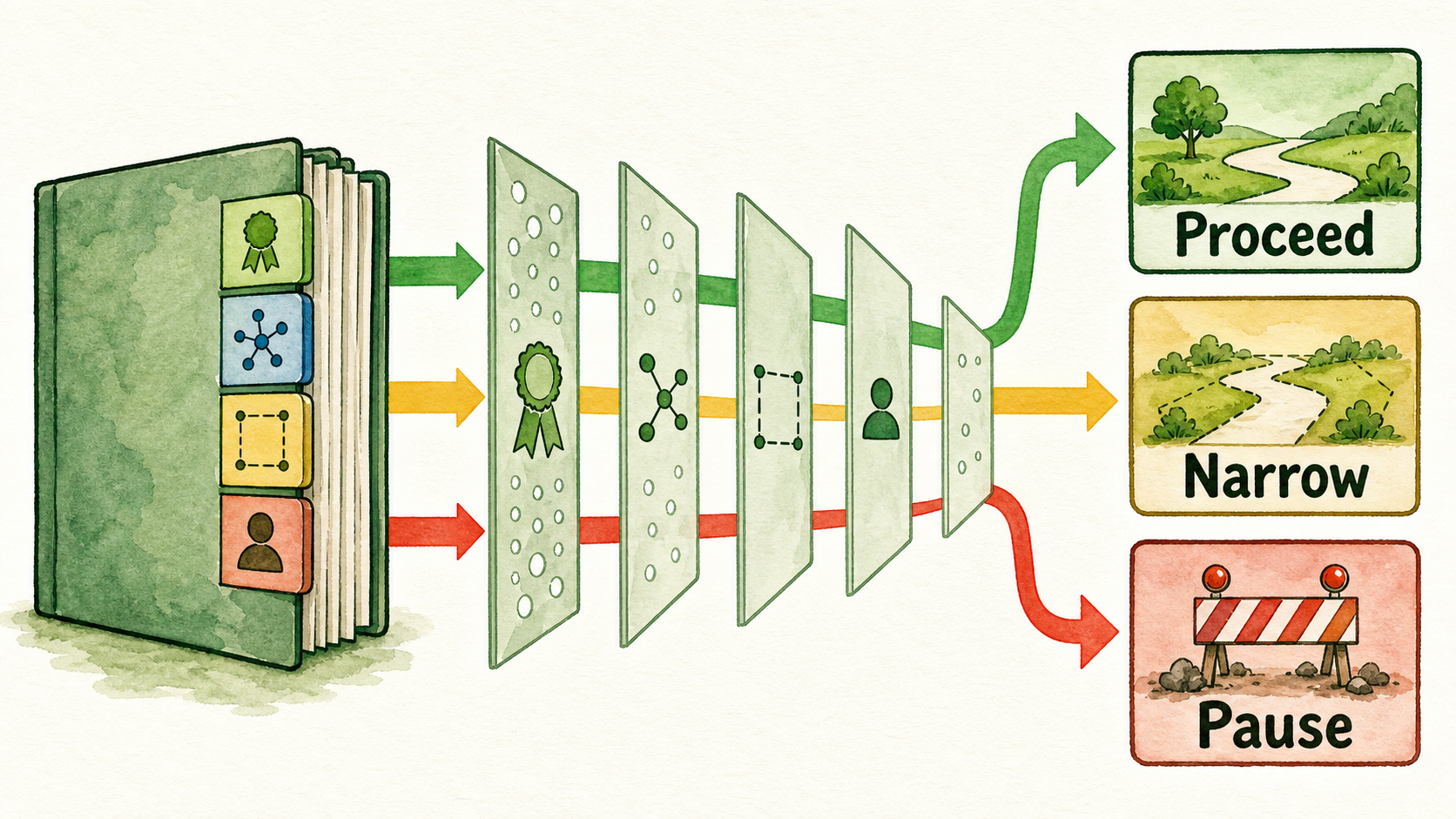
Then make one of three decisions:
- Proceed when the bounded visitor job has current, approved sources, consequential questions have answers or boundaries, and owners are named.
- Narrow when only part of the intended job is ready. Remove unsupported topics and continue with the defensible subset.
- Pause when consequential business truth remains disputed, ownerless, or undocumented.
Do not let a target launch date turn a pause into an approval. A narrower assistant with clear knowledge boundaries is easier to explain and govern than a broad assistant built on unresolved content.
The next action is to apply this audit to one client and one visitor job, secure owner approval for the canonical answers and boundaries, and hand the resulting pack to the configuration owner. Setup begins only after the business has decided what the assistant is allowed to know and say.