TL;DR
- Calculate AI customer service automation cost for one bounded workflow, not for a chatbot in the abstract.
- Add subscription and usage charges to source preparation, configuration, integration, testing, human review, handoff, maintenance, change management, and risk allowance.
- Mark every worksheet field as a verified current fact, your operating estimate, or an unresolved cost item.
- An answer-only FAQ pilot usually has a lighter cost shape than a workflow that creates tickets or transfers conversations to people.
- Approve a trial only when your own support volume, handling time, labor assumptions, operating capacity, and risk-adjusted value support it.
A monthly platform price can fit the budget while the workflow itself remains unaffordable. Source cleanup, testing, escalation staffing, and ongoing review often sit outside the software line item. If you have already selected one candidate workflow, the method below turns those hidden obligations into a dated estimate and a clear decision: trial, narrow, postpone, or reject.
Key Takeaways
- The calculation unit is one bounded workflow. Combining every support request into one estimate hides which sources, systems, and people create the cost.
- Unknown does not mean zero. Leave a field blank when its price, effort, volume, or owner has not been confirmed.
- Scope changes cost in several places at once. Adding topics can increase source preparation, usage, test coverage, review time, and maintenance.
- Human capacity remains a budget item. Automation can change the work people perform, but exceptions, corrections, and handoffs still need owners.
- Break-even must use your records. A market average cannot replace your eligible request volume, handling time, loaded labor rate, or escalation pattern.
What the total cost must include
There is no defensible universal amount for AI customer service automation. For a chosen evaluation period, the real amount is the sum of software, usage, setup labor, operating labor, maintenance, change work, and a risk allowance for one defined workflow.
Use this planning formula:
Total workflow cost = subscription + usage + source preparation + workflow configuration + integration + testing + human review + handoff operations + maintenance + change management + risk allowance
Separate one-time and recurring costs. Otherwise, a low first-month total can hide the work required to keep the workflow useful.
| Cost input | What belongs in it | Typical frequency |
|---|---|---|
| Subscription | Applicable platform plan and required capacity | Recurring |
| Usage | Credits, provider charges, overages, or action-related consumption | Recurring |
| Source preparation | Finding, approving, cleaning, reconciling, and organizing content | Mostly one-time, then repeated when content changes |
| Workflow configuration | Answer rules, permitted behavior, routing, fields, and fallbacks | One-time plus revisions |
| Integration | Connection setup, field mapping, authentication, validation, and technical ownership | One-time plus upkeep |
| Testing | Normal requests, edge cases, failures, routing, and retesting after changes | One-time and recurring |
| Human review | Conversation checks, correction decisions, and quality review | Recurring |
| Handoff operations | Staff time receiving, reading, routing, and resolving escalations | Recurring |
| Maintenance | Source updates, configuration corrections, and operational monitoring | Recurring |
| Change management | Training, documentation, approvals, and workflow changes | One-time and event-based |
| Risk allowance | Budget reserved for uncertain usage, rework, or exception handling | Evaluation-period allowance |
A lower subscription is useful only if it supports the required workflow. A plan that omits a necessary integration, capacity level, or support path can shift cost into manual work or force a later plan change.
Build a dated worksheet without filling unknowns
A useful worksheet tracks two dimensions separately: how often a cost occurs and how well the value is supported. Use these evidence labels:
- Verified current fact: confirmed through an authoritative source, with a capture date and refresh owner.
- Your operating estimate: taken from your support, staffing, content, technical, or finance records.
- Unresolved cost item: important to the decision but not confirmed. Keep the amount blank.
InsertChat says its pricing depends on assistants, sources, usage, seats, white-label needs, and client complexity. It also says that using your own model-provider key does not remove the platform subscription, while provider usage is billed separately. These statements were captured on July 29, 2026, but pricing and packaging should be checked again on the publication or purchase date. The same live page showed conflicting Pro and Agency prices in different sections, so the applicable amounts should remain unresolved until confirmed through the current pricing page.
Use this fill-in worksheet for the selected workflow:
| Field | Status | One-time cost | Recurring cost | Evidence, date, and owner |
|---|---|---|---|---|
| Applicable subscription | Unresolved cost item | Confirm at checkout; pricing owner | ||
| Expected usage and any overage | Unresolved cost item | Request measurement and charge rules; pricing owner | ||
| Separate provider usage, if applicable | Unresolved cost item | Confirm provider and platform billing; technical owner | ||
| Source inventory and cleanup hours | Your operating estimate | Content audit; content owner | ||
| Configuration hours | Your operating estimate | Workflow requirements; operations owner | ||
| Integration systems and effort | Your operating estimate | Technical estimate; engineering owner | ||
| Testing and retesting hours | Your operating estimate | Test estimate; quality owner | ||
| Review time per period | Your operating estimate | Staffing records; support owner | ||
| Handoff volume and handling time | Your operating estimate | Support records; support owner | ||
| Maintenance and source updates | Your operating estimate | Change history; content owner | ||
| Training and process changes | Your operating estimate | Operations estimate; operations owner | ||
| Risk allowance | Your operating estimate | Finance-approved method; finance owner |
Record ticket volume, handling effort, escalation rate, source-cleanup effort, integration needs, expected usage, and maintenance cadence before calculating the business case. A blank cell is a request for evidence, not permission to enter zero.
Why FAQ and ticket workflows have different cost shapes
Consider two illustrative pilots using the same platform category.
The first is an answer-only website FAQ pilot. It uses approved pages, policies, and documents to answer a defined set of public questions. It performs no external action. InsertChat supports approved pages, documents, videos, FAQs, policies, and other sources for source-backed answers, according to its FAQ captured on July 29, 2026.
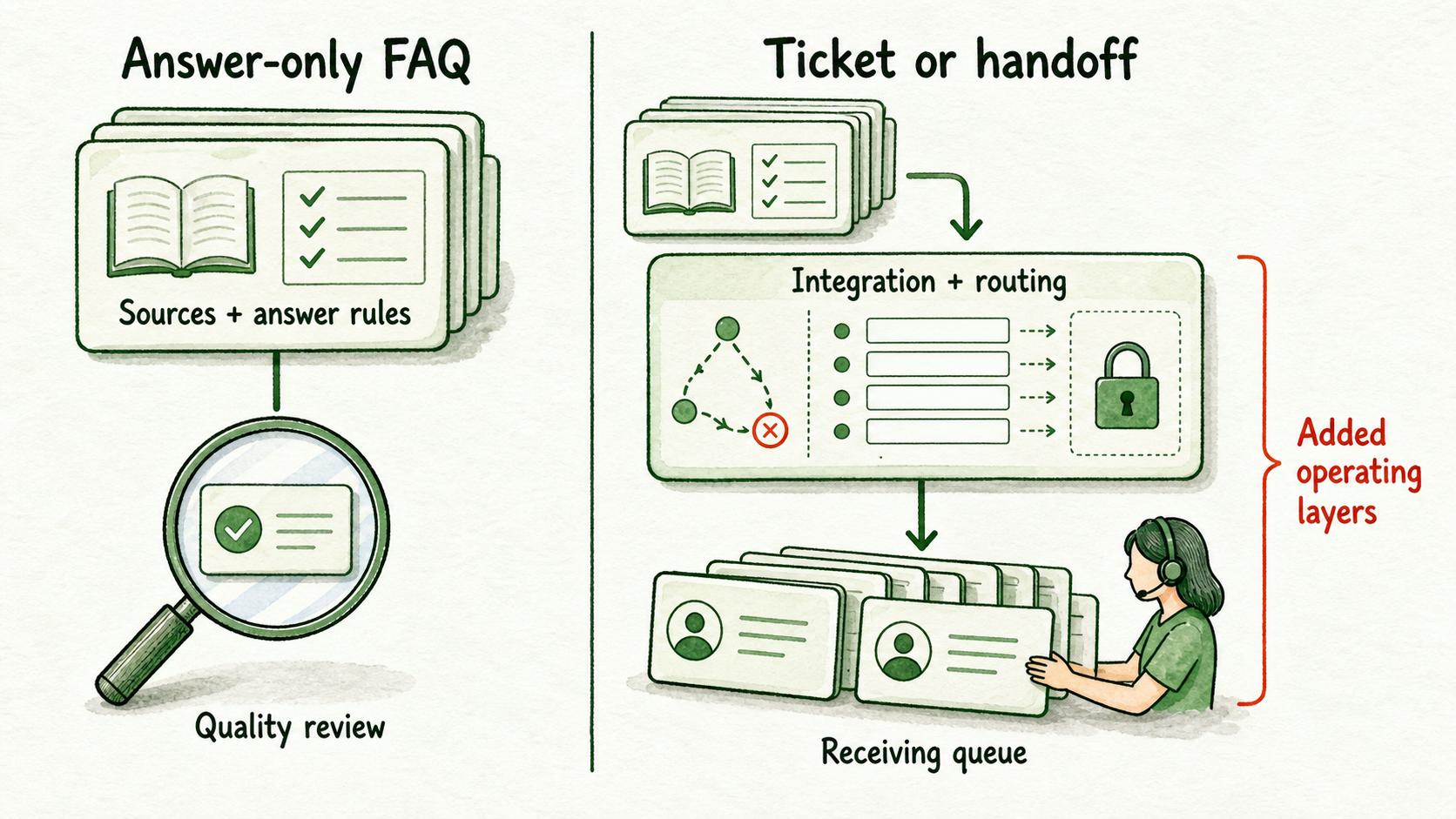
Its main cost inputs are source selection and cleanup, answer configuration, testing, usage, conversation review, and content maintenance. Upfront source preparation may reduce later correction and escalation work, but the size of that effect must come from observed results.
The second pilot creates a support ticket or sends the conversation to a person. It adds a destination system, authentication, field mapping, routing conditions, transcript or metadata transfer, failure handling, and a staffed receiving queue. InsertChat documents tools, integrations, webhooks, ticketing, CRM synchronization, metadata transfer, lookup tools, and human handoff on its workflows page, captured July 29, 2026. Its FAQ also states that Zendesk ticket creation and support handoff are supported.
| Requirement | Answer-only FAQ | Ticket or human-handoff workflow |
|---|---|---|
| Platform | Knowledge and answer capability | Knowledge, workflow, integration, and handoff capability |
| Setup | Sources, answer rules, fallback | FAQ setup plus destination, fields, routing, and permissions |
| Review | Answer quality and source gaps | Answer quality plus ticket accuracy and routing quality |
| Maintenance | Source and answer updates | Source updates plus integration, field, routing, and staffing changes |
Broader coverage raises more than content volume. For example, expanding from a small set of shipping FAQs to product, return, warranty, and account questions can introduce conflicting documents, more test paths, higher usage exposure, additional reviewers, and more escalations. Narrowing the first pilot can lower several costs together without changing the selected business problem.
Calculate break-even with your own support data
Break-even occurs in the first period when risk-adjusted avoided handling cost equals or exceeds total workflow cost for that same period.
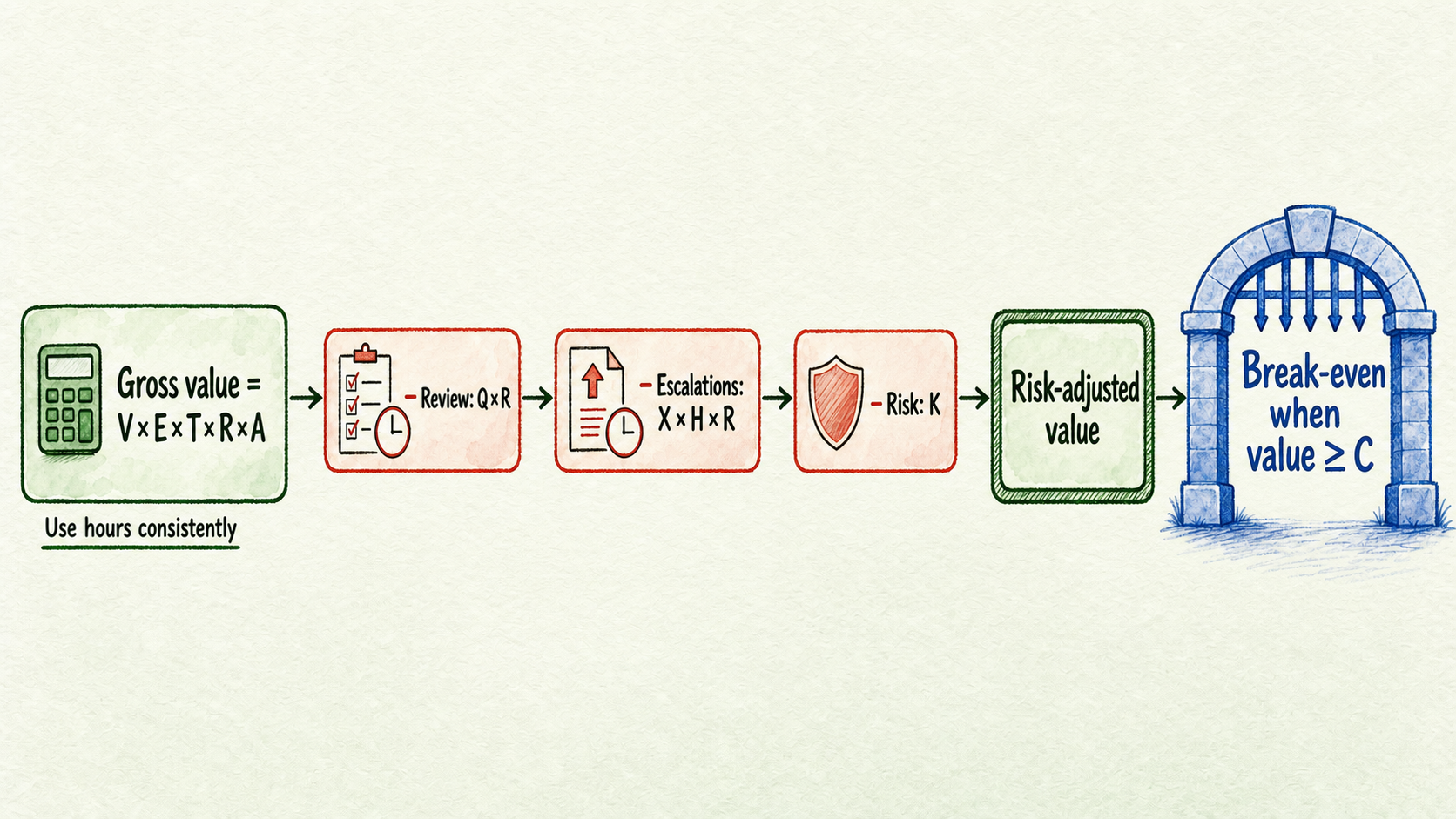
Collect these variables:
- V: total requests during the period
- E: share eligible for the bounded workflow
- T: current handling time per eligible request
- R: loaded labor cost per hour
- A: expected share handled without normal manual processing
- Q: recurring review hours
- X: escalated requests
- H: human time per escalation
- K: risk allowance for uncertainty and rework
- C: total one-time and recurring workflow cost for the period, excluding K if it is shown separately
Calculate the gross handling value:
Gross avoided handling cost = V × E × T × R × A
Use hours consistently. If handling time is recorded in minutes, divide it by 60 before multiplying by the hourly labor rate.
Then calculate the risk-adjusted value:
Risk-adjusted value = gross avoided handling cost − (Q × R) − (X × H × R) − K
The workflow reaches break-even when:
Risk-adjusted value ≥ C
For a concrete application, suppose a support owner selects shipping-policy questions. The owner enters observed request volume, identifies the eligible share from ticket tags, measures current handling time, and obtains the loaded labor rate from finance. During a bounded test, the team measures the handled share, review hours, escalation count, and escalation time. No amount is assumed. If the resulting risk-adjusted value does not cover total workflow cost, the buyer narrows the source set, changes the operating model, postpones the purchase, or rejects the case.
Treat a result based on estimated volume or an untested handled share as provisional. A short test may reveal answer and handoff behavior without producing enough representative demand to support a longer-term savings claim.
Use four budget decisions instead of forcing approval
Choose the decision supported by the weakest consequential field:
- Trial: Use a bounded trial when the required sources and owners exist, the remaining unknowns can be measured safely, and the possible risk-adjusted value could cover the full cost. InsertChat advertised a 7-day free trial on July 29, 2026. Recheck the pricing page and applicable terms before starting because trial and packaging details can change.
- Narrow: Reduce topics, sources, actions, systems, or review paths when optional coverage drives cost above plausible value. A smaller FAQ scope may be testable even when ticket integration is not.
- Postpone: Wait when essential pricing, usage rules, source ownership, integration requirements, representative volume, or handoff staffing remain unknown. Procurement and security work may also make a short trial unsuitable.
- Reject: Stop when verified risk-adjusted value cannot cover total cost, the workflow requires unavailable human capacity, or acceptable operation depends on capabilities or terms that cannot be confirmed.
Complete the worksheet, request every missing internal and vendor fact, and date the estimate. If the trial rule is met, start with non-sensitive approved material and one bounded workflow. If it is not met, narrowing or stopping is a valid budget result.
FAQ
Does a free trial make the pilot free?
No. A free software period does not remove source preparation, configuration, testing, review, integration, handoff, security, procurement, or change-management work. Count the labor even if no subscription charge applies during the test.
Can a lower-priced plan cost more overall?
Yes. If it lacks a required capacity or workflow requirement, your team may absorb more manual work or need to change plans. Compare the plan against the bounded workflow before comparing subscription totals.
Should human review count if most conversations are automated?
Yes. Count the actual time required to inspect conversations, correct sources, manage exceptions, and receive escalations. Automation savings should be calculated after this work, not before it.
When should the estimate be refreshed?
Refresh it when pricing or terms change, the workflow adds sources or actions, support volume shifts, handling time changes, an integration is modified, or review and escalation data becomes available. The pricing or product owner should verify vendor facts, support operations should refresh workload inputs, and finance or procurement should confirm commercial terms.
What purchase terms need attention before committing?
The InsertChat terms captured on July 29, 2026 state that purchases are non-refundable, cancellation is completed through account settings, and cancellation takes effect at the end of the current paid term. Review the current terms for changes and obtain appropriate internal review before purchase.