TL;DR
- Confirm the business goal, first workflow, intended audience, launch surface, and useful visitor action.
- Inventory the client’s content, recording its owner, freshness, authority, and approval status.
- Collect concrete voice rules, prohibited claims, response boundaries, uncertainty language, and escalation instructions.
- Assign owners for content approval, branding, access, human handoffs, configuration, and final launch approval.
- Log unresolved platform questions with the evidence, owner, and deadline needed to answer them.
- Mark each consequential input approved, conditional, or open. Never build factual answer behavior from unapproved material.
A signed project can still reach the builder in an unusable state: files arrive without owners, goals remain broad, and nobody can approve what the chatbot should say. Client onboarding closes that gap. It collects the business decisions and evidence needed for configuration without pretending that missing policies, prices, or service rules can be filled in by the reseller or the AI.
Key Takeaways
- Start with one bounded visitor job rather than combining every possible chatbot use case.
- Give each decision area one accountable client owner, even when several people contribute.
- Record approval separately from collection; possessing a document does not make it suitable for public answers.
- Keep unresolved questions visible instead of burying them in meeting notes or assumptions.
- Begin configuration only where the supporting content, decision owner, and intended route are clear.
Build one onboarding packet, not a folder of loose inputs
A useful AI chatbot client onboarding checklist is more than a questionnaire. It is a shared control document that turns answers, files, decisions, and unknowns into a build-ready handoff.
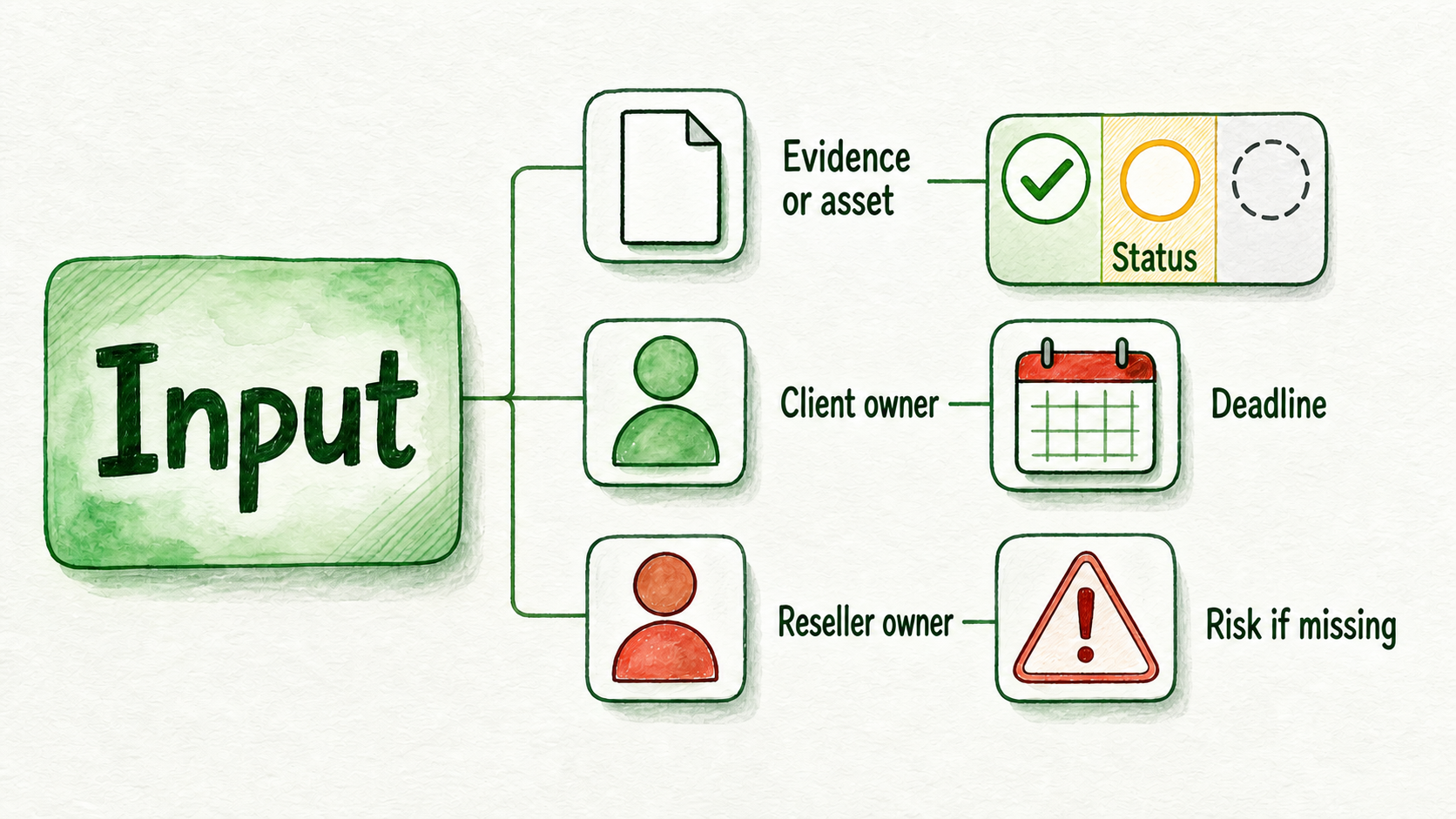
Use one row for each consequential input. The packet can live in a spreadsheet, project board, or client portal, but every row should contain the same fields:
| Field | What to record |
|---|---|
| Input | The decision, requirement, or content item needed |
| Evidence or asset | The page, document, written approval, account detail, or other supporting material |
| Client owner | The person responsible for its business accuracy |
| Reseller owner | The person responsible for collecting or applying it |
| Status | Approved, conditional, or open |
| Deadline | When the item must be resolved |
| Risk if missing | The work that must pause, narrow, or change |
The status field prevents a common mistake: treating everything received from the client as approved. Use approved when the client has confirmed that the input is current and suitable for the intended workflow. Use conditional when work can continue around an unresolved dependency. Use open when a decision or supporting asset is still missing.
For example, a pricing page may be accessible but awaiting confirmation from the commercial director. Record the URL, owner, and deadline, but do not treat the prices as approved answer material. Collection tells you what exists; approval tells you what the assistant may rely on.
1. Confirm the kickoff goal and success criteria
Translate the signed scope into one operational sentence. “Improve customer experience” is too broad to guide a build. “Help prospective customers find the right service and submit an enquiry from the services page” identifies an audience, a job, and a next step.
Collect the following:
- The business problem behind the project
- The first workflow the chatbot will support
- The page or channel where that workflow begins
- The action a visitor should take after receiving a useful answer
- Any existing baseline the client can verify
- A plain-language statement describing useful performance
- The owner responsible for confirming missing baseline information
Success criteria should match the purchased workflow. An enquiry assistant might be reviewed on whether it answers approved service questions and routes suitable prospects to the correct form or person. A support assistant might instead be judged on its handling of recurring, documented requests and its escalation of exceptions.
Do not manufacture a numeric target because the client lacks a baseline. Mark the baseline as open, name the person who can verify it, and use a reviewable qualitative statement in the meantime. Detailed reporting design can follow later; onboarding only needs enough clarity to prevent the team from building toward different outcomes.
2. Record the audience and first use case
A chatbot cannot serve “everyone on the website” with equal precision. The first release needs a primary audience and a limited set of questions that belong inside its remit.
Ask the client to define:
- The primary visitor group
- The questions that matter most for that group
- The use case included in the first release
- Audiences, requests, or situations explicitly excluded
- The entry page or channel
- The intended next step after an answer
- The destination for human handoffs
Consider a service company that receives both prospect enquiries and account-specific billing requests. Its first release could serve new prospects comparing services, while existing-customer questions receive general routing only. That boundary prevents the build from quietly expanding into account support requiring private data, authenticated systems, or different approval rules.
Also record what happens after the answer. Does the visitor open a lead form, book a meeting, contact support, or wait for a person? If nobody owns that destination, the conversational experience ends at the point where the business process should begin.
Keep the initial scope to one assistant and one visitor job. Expansion becomes easier to evaluate once the client can see where real questions fit, where content is missing, and where people still need to intervene.
3. Inventory the client’s source content
The source inventory answers a narrow but critical question: what business material exists, and may the chatbot use it for this workflow?
For every page, document, FAQ, policy, catalog, video, or other proposed source, record:
- Source name and location
- Content type
- Business owner
- The questions or decisions it is authoritative for
- When its accuracy was last checked
- Whether it is approved, conditional, excluded, or missing
- Important questions the source does not answer
Avoid treating the public website as automatically authoritative. A page may be old, written for a different audience, or incomplete on exceptions. Likewise, a sales presentation may explain an offer clearly while containing claims that were never approved for public customer support.
Suppose the client supplies service pages, an FAQ, and a frequently changing pricing page. The service pages and FAQ can move forward if their owners approve them. The pricing page should remain conditional until the pricing owner confirms its accuracy and intended use. Until then, the assistant should not give factual price answers from it.
This inventory is not the place to design a detailed knowledge architecture or repair every content conflict. Its purpose is to expose authority, freshness, approval, and gaps. If the business has no approved answer to an important question, assign someone to create or approve one; do not turn the absence into chatbot guidance.
4. Collect brand voice and response boundaries
“Friendly and professional” rarely gives a builder enough direction. Collect language choices that reviewers can recognize in an actual answer.
The client should decide:
- Tone and level of formality
- Preferred names for products, services, customers, and teams
- Phrases, promises, and claims the assistant must not use
- Topics it must refuse or route to a person
- How it should express uncertainty
- The wording used when escalating a conversation
- Any required greeting, disclosure, or identity language
- Overrides for particular clients, departments, or use cases
A practical rule set might say: “Professional and plainspoken. Use ‘consultation,’ not ‘demo.’ Do not joke. Never promise same-day availability. Route custom discounts, complaints, and account-specific billing to a person.” That is far more actionable than a list of brand adjectives.
Response boundaries matter most where a plausible answer could still create a bad commitment. The assistant should not infer stock, appointment availability, eligibility, contractual meaning, or exceptions merely because related content exists. Collect the approved uncertainty response and the correct human route for those cases.
Keep people responsible for high-stakes and exceptional decisions. The chatbot can explain approved information and collect useful context, but the client must identify where judgment, authorization, or access to a private record is required.
5. Assign approvals, access, launch, and handoff responsibilities
Unnamed responsibility becomes reseller support work by default. Prevent that drift by recording who supplies, reviews, approves, deploys, and receives each part of the project.
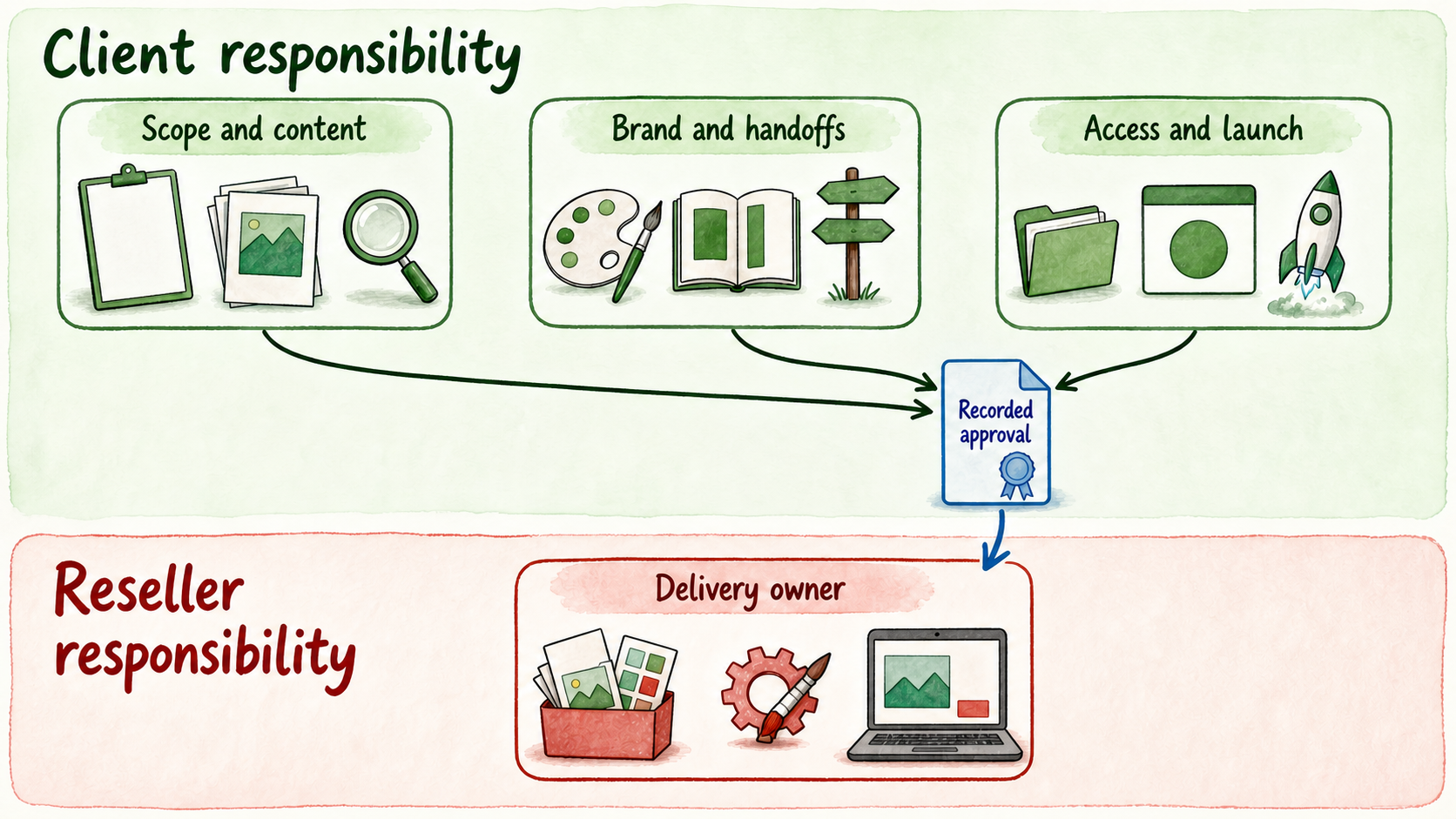
At minimum, assign:
- A client business owner for scope and priorities
- A content approver for factual business material
- A brand reviewer for visitor-facing language
- An owner for each human handoff destination
- A technical or website owner who can provide deployment access
- A reseller delivery owner
- A final launch approver
- A backup approver when one person’s absence could block the project
Record what counts as approval. That might be a comment in the onboarding packet, an email from the named owner, or sign-off in the client’s project system. “Discussed on a call” is weak evidence when several people remember the decision differently.
Separate the owners by function. For example, an operations director may approve the workflow, a sales manager may receive leads, a support manager may own service escalations, and a web contractor may control deployment access. The chief executive does not need to approve every file if the client has delegated authority clearly.
Delayed inputs should have visible consequences. If website access is late, content review may continue while deployment pauses. If the final approver has not accepted the response boundaries, public-facing answer configuration should remain conditional. This keeps a partial delay from stopping unrelated work without hiding the unresolved risk.
Access should follow the same discipline. Give each client or teammate only the assistants, sources, conversations, billing information, or integrations required for their role. Record who requests access, who grants it, and when it is no longer needed.
6. Log open platform setup questions before configuration
Some onboarding questions cannot be answered by the client or reseller alone. They require confirmation from current platform terms, technical documentation, procurement, or an authorized vendor contact.
Create a separate open-question log covering the items that could change feasibility, cost, permissions, or implementation. Depending on the project, that may include:
- Deployment surface: widget, embedded experience, hosted page, phone, or API
- Required integrations and the system receiving each action
- Visitor data fields to collect
- Workspace structure and client access
- Branding, email, or domain requirements
- Model-provider or key-ownership requirements
- Hosting, retention, deletion, or procurement requirements
- Plan limits, file constraints, usage exposure, or feature entitlement
For each question, record the owner, required evidence, decision deadline, and affected work. “Does the client have a custom domain?” is a client input. “Does the intended package currently include the required custom-domain setup?” is a platform confirmation. Keep those questions separate.
Do the same for capacity and file limits. If the project depends on a particular number of assistants, sources, seats, or unusually large uploads, verify the current allowance instead of copying an old figure into the scope. If the answer is not confirmed, mark the dependency open.
Security and procurement questions deserve the same treatment without turning onboarding into a full policy review. Record the reviewer, requested documentation, deadline, and whether configuration may proceed with non-sensitive material. Do not guess at retention, residency, deletion, provider, or contractual requirements.
Turn the completed intake into a build-ready handoff
Use three release decisions across the packet:
- Proceed: The evidence, client owner, approval, and intended route are clear.
- Conditional: Work can continue outside the unresolved dependency, which remains assigned and visible.
- Blocked: Proceeding would require an invented business answer, unauthorized access, or an assumption that could change core feasibility.
Consider this hypothetical service-business project. Use the client’s real website records, policies, approval messages, access details, and workflow owners when applying the method.
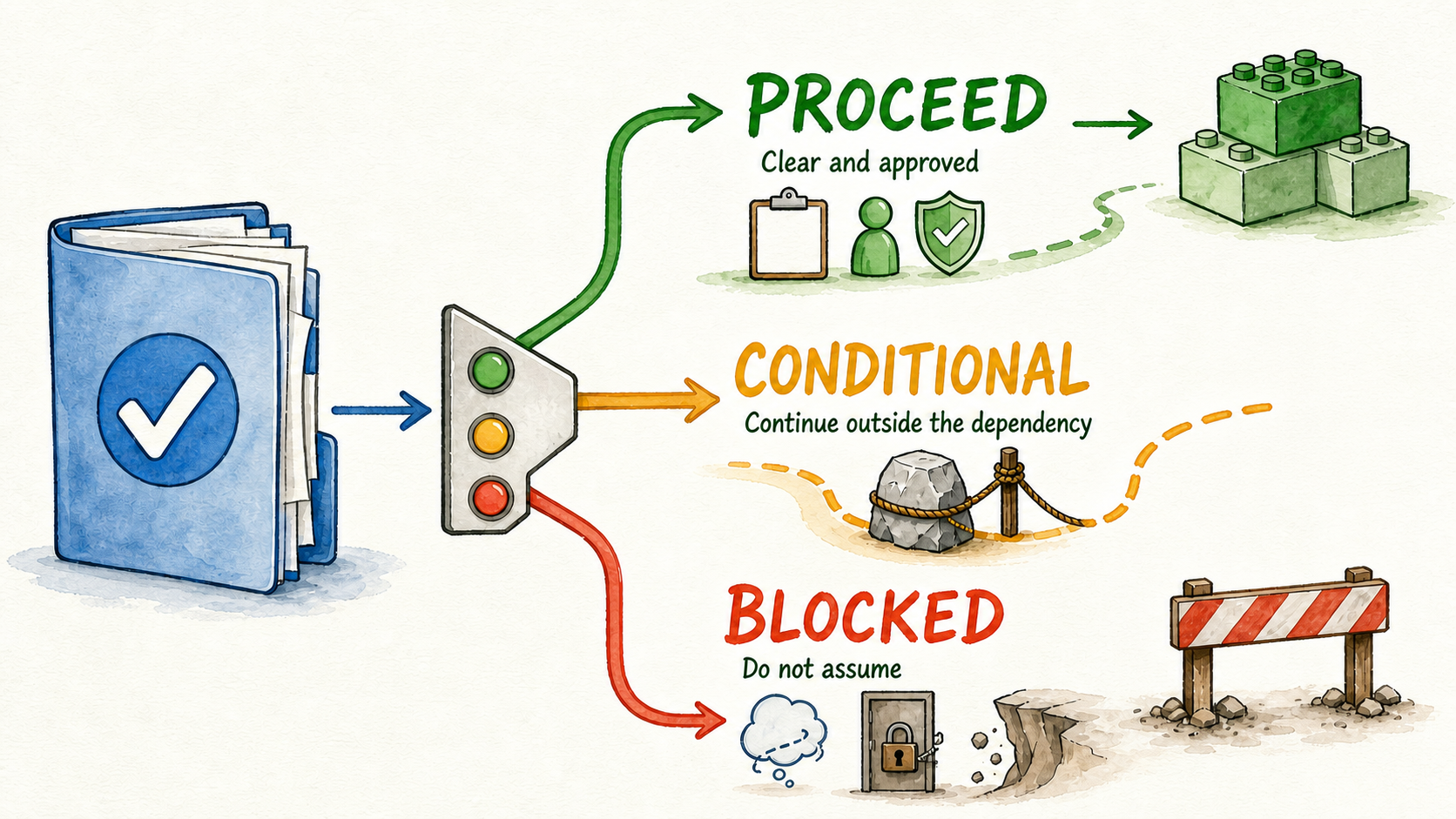
The approved service FAQ and lead-routing instructions can proceed. A changing pricing page remains conditional while its commercial owner reviews it. Account-specific billing answers are blocked because the client has supplied neither approved guidance nor an authorized system and handoff path. The reseller can configure the approved service workflow without pretending the other dependencies are settled.
The final handoff to the builder should contain:
- The approved first workflow and launch surface
- The audience, included questions, exclusions, and intended next step
- The source inventory with approval states
- Voice rules, answer boundaries, and escalation language
- Named client and reseller owners
- Required access and its owner
- The open-question log with deadlines and affected work
If InsertChat is the selected platform, the same packet can guide the initial assistant setup: approved content defines what may support answers, client rules define behavior, and named destinations define where conversations go when a person is needed. Platform capabilities and current packaging still need to be checked against the specific project rather than assumed during intake.
Complete the packet before configuring answer behavior. Resolve blockers, release approved workstreams, and keep conditional items attached to named owners. When the first workflow is genuinely build-ready, Start for Free and configure from decisions the client has actually approved—not from whatever happened to arrive in the shared folder.