
TL;DR
- Count operating events rather than client accounts.
- Track launches separately from recurring reviews, changes, escalations, and meetings.
- Convert each event into workload units using your agency’s observations.
- Reserve exception headroom before deciding that another account fits.
- Set staffing and intake triggers that lead to a named operating action.
Three client assistants can look manageable on a project board until a launch, an unresolved review queue, and two urgent changes collide. AI assistant agency capacity planning makes that load visible before another account is promised. By converting operating events into comparable workload units, an agency can calculate a provisional ceiling based on the work its team must absorb, not the number of client names on a list.
Key Takeaways
- Two portfolios with the same client count can place very different demands on a team.
- Launches create temporary demand. Recurring events determine the account load the agency must sustain.
- Pending queues and exceptions consume capacity even when they are absent from the calendar.
- A workload total is incomplete until it accounts for response headroom, specialist coverage, and timing constraints.
- A capacity threshold becomes useful when crossing it produces a specific decision.
Build a capacity sheet from observable workload units
Start with events the team can count. Avoid assigning each client a broad label such as small, medium, or large. Those labels hide the reason one account requires more attention than another.
Use five workload categories:
- Launches: Temporary work associated with putting a new client assistant into service.
- Scheduled reviews: Recurring review events included in the selected service scope.
- Source or behavior changes: Requests that alter approved information or assistant behavior.
- Escalations: Exceptions that require investigation, coordination, or specialist attention.
- Client meetings: Calls and preparation connected to the account.
A workload unit can represent an hour, a half day, a point, or another measure the team already understands. Time is often the easiest starting point when reliable records exist, but consistency matters more than the label. Record the same fields for each event:
| Capacity-sheet field | What to record | Why it changes the forecast |
|---|---|---|
| Client | Account connected to the work | Reveals uneven account burden |
| Event type | Launch, review, change, escalation, or meeting | Keeps demand sources visible |
| Frequency | Expected events in the forecast period | Converts occasional work into total demand |
| Effort per event | Observed workload units | Prevents equal event counts from implying equal effort |
| Required skill | Generalist or specialist group | Exposes skill bottlenecks |
| Timing constraint | Flexible, scheduled, or urgent | Shows whether work can move within the period |
| Total load | Frequency multiplied by effort | Produces forecast demand |
Use recent operating records to fill the sheet. If dependable observations do not yet exist, begin with assumptions marked as provisional and replace them as work occurs. The first estimates are planning inputs, not industry benchmarks.
Queues belong in the forecast as well. InsertChat's conversation inbox preserves visitor questions, full chat context, sources, and metadata so an agency can count unresolved reviews and escalations instead of guessing from screenshots. Unresolved conversations, pending transcript reviews, metadata checks, delayed decisions, and other exceptions can signal work that has entered the system but has not reached the calendar. Count the resulting review or escalation event. Avoid counting every message as a separate unit unless each message creates distinct work.
Source upkeep is recurring work too. InsertChat's automations can re-crawl connected sources on a daily, weekly, or monthly schedule; include the chosen re-check cadence and any resulting review work in the capacity sheet.
Keep temporary launch load in its own column. Recurring account load should contain only events expected to continue after launch. If the team has 60 recurring units available but two launches require another 30 units this month, the agency may have a temporary scheduling problem rather than a permanent account-capacity problem.
Standardization makes event effort easier to forecast, but it does not make skills interchangeable. A repeatable review may fit several team members, while an integration change may depend on one specialist. Preserve the required-skill field even when most work follows a common pattern.
If selected client services are already documented in an AI assistant service catalog, use their operating-burden assumptions as starting inputs. The capacity sheet measures demand created by those services. It does not redesign the catalog.
Calculate a three-client month and reserve headroom
The following scenario is illustrative. Every frequency, effort value, capacity figure, and buffer is an assumption created to demonstrate the calculation. Replace all of them with your agency’s observations.
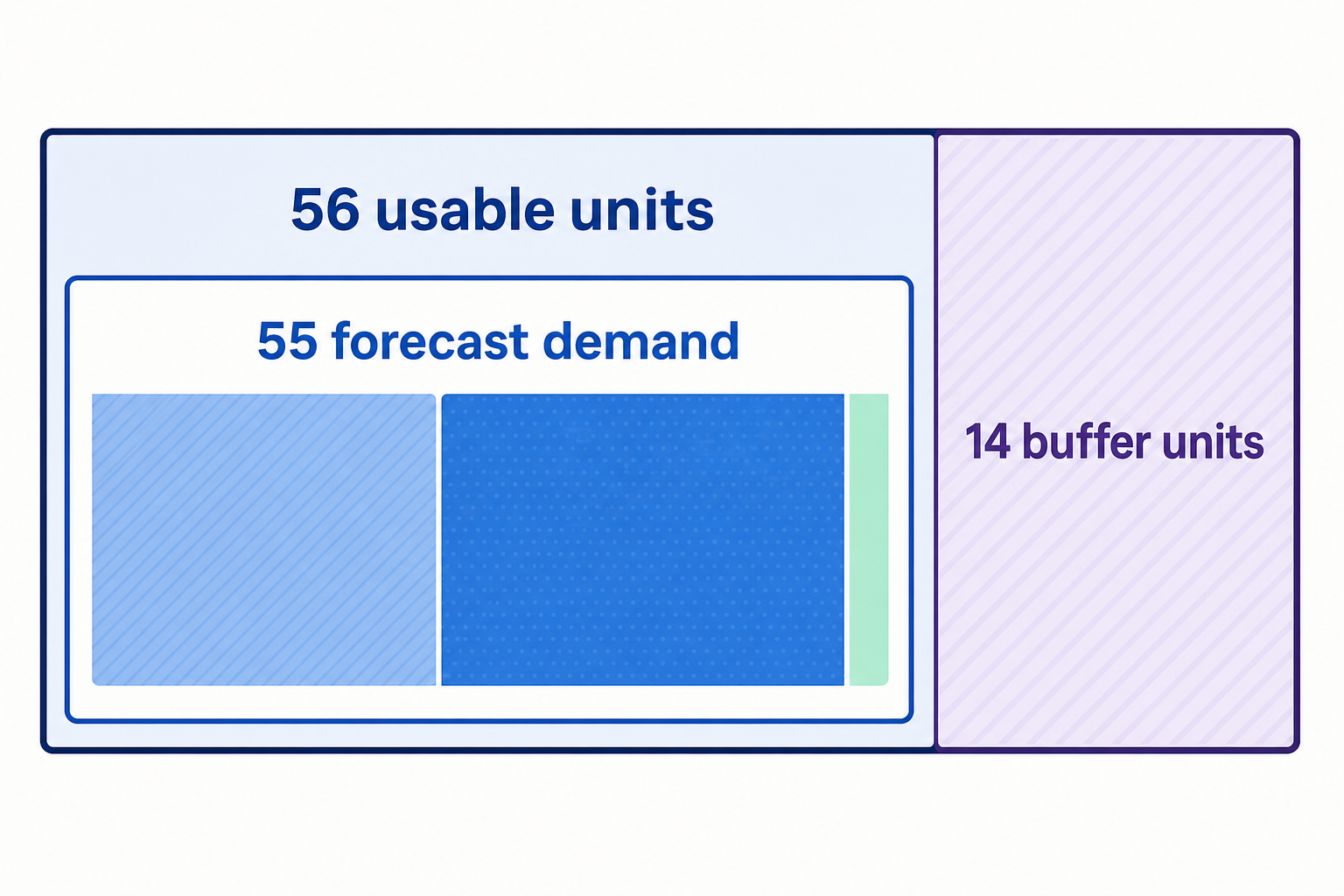
Suppose an agency forecasts three client accounts for one month:
- Client A is launching and will also generate a small amount of recurring work.
- Client B is a stable live account.
- Client C is live but generates more changes and client attention.
For this example only, one workload unit represents one hour.
| Client | Launch units | Reviews | Changes | Escalations | Meetings | Recurring units | Total units |
|---|---|---|---|---|---|---|---|
| Client A | 24 | 2 | 2 | 1 | 2 | 7 | 31 |
| Client B | 0 | 3 | 2 | 1 | 2 | 8 | 8 |
| Client C | 0 | 3 | 6 | 3 | 4 | 16 | 16 |
| Portfolio | 24 | 31 | 55 |
The calculation is:
Forecast demand = launch units + recurring units
55 units = 24 launch units + 31 recurring units
The 31 recurring units are the relevant starting point for a sustainable account ceiling. The additional 24 launch units explain why this particular month is heavier. If Client A’s launch ends as expected, the temporary load falls without removing an account.
Next, compare demand with relevant team capacity. Assume, only for this example, that the people with the required skills have 70 units available during the month. Committing all 70 would leave no room for urgent escalations, clustered changes, delayed inputs that create rework, or several time-sensitive events arriving together.
The agency selects an illustrative exception buffer of 14 units. This is a management choice for the scenario, not a recommended percentage.
Usable planned capacity = available relevant capacity − exception buffer
56 usable units = 70 available units − 14 buffer units
The portfolio requires 55 units, leaving one unit of planned capacity. The project board still shows three clients, but the capacity sheet indicates that the agency should not add another account during this launch month without changing timing, scope, or resources.
This is the tradeoff between utilization and response headroom. Committing more units accommodates more planned work but reduces the team’s ability to absorb exceptions. The appropriate buffer depends on observed variability, response commitments, and the agency’s tolerance for schedule disruption.
Stress-test the forecast with a high-escalation account
Portfolio averages can conceal one demanding account. Test the forecast by changing an uncertain assumption while keeping the client count constant.
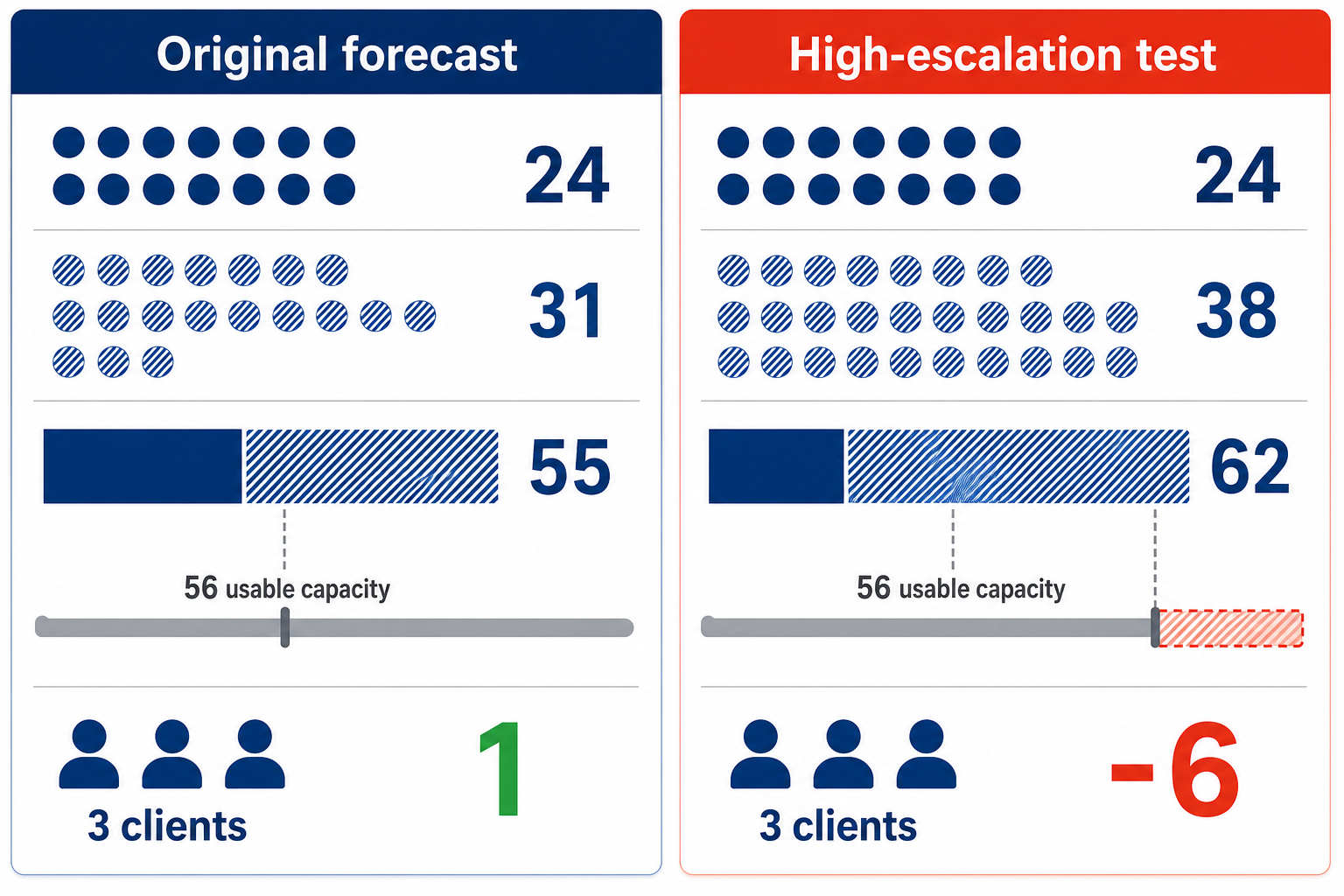
Suppose Client C begins producing more escalations. Instead of three escalation units for the month, its observed pattern now indicates ten. Nothing else changes.
| Portfolio view | Launch units | Recurring units | Total demand | Usable planned capacity | Remaining capacity |
|---|---|---|---|---|---|
| Original illustrative forecast | 24 | 31 | 55 | 56 | 1 |
| High-escalation test | 24 | 38 | 62 | 56 | -6 |
The agency still supports three clients, yet forecast demand is now six units beyond its chosen planned capacity. The number of accounts did not change. The mix of operating events did.
This result does not determine how escalations should be handled or who owns them. It changes the capacity decision. The agency could redistribute eligible work, narrow the affected service scope, delay another launch, or pause intake while it collects better observations.
Apply the same sensitivity test to other uncertain inputs. Increase launch effort, cluster several source changes, or change an event from flexible to urgent. Focus on assumptions that could reverse the decision about the next account.
Turn remaining capacity into staffing and intake triggers
Define decision rules before the next sales or scheduling discussion. Otherwise, a team may acknowledge that capacity is tight and still accept work without changing its commitments.
Tie each trigger to measured demand, the chosen buffer, required skills, and timing constraints:
| Model result | Operating response |
|---|---|
| Forecast fits inside usable capacity and the required skills are available | Accept the account and add its assumptions to the sheet |
| Total capacity fits, but a specialist is overloaded | Redistribute eligible work or change the proposed timing |
| The account fits only by consuming the exception buffer | Narrow scope or pause intake |
| Recurring demand repeatedly exceeds usable capacity | Begin staffing analysis or reduce supported workload |
| A launch overlap creates the excess | Move the launch date or limit simultaneous launches |
| Tracking is too weak to estimate the account | Use a provisional assumption and avoid treating the ceiling as settled |
A staffing trigger should come from the agency’s records, not a universal assistants-per-employee ratio. Useful signals include recurring demand exceeding usable capacity across several forecasts or a required skill remaining overloaded after eligible work has been redistributed.
Check skill capacity separately from total capacity. Ten unused generalist units cannot cover five specialist units if the qualified person is already committed. Timing matters too. Capacity available near the end of the month cannot absorb an urgent event due tomorrow.
It can be useful to maintain two ceilings: a recurring account ceiling and a simultaneous launch ceiling. This prevents a temporary launch bottleneck from being mistaken for a permanent limit while still stopping the team from stacking too many launches into the same period.
Before accepting the next proposed client, add it to the sheet as a scenario. Estimate launch and recurring events separately, apply the current buffer, and confirm that the required skills are available at the required times. Then make one explicit decision: accept, redistribute, narrow, pause, or begin staffing analysis.
Recalibrate when averages stop representing the work
Treat the account ceiling as provisional when the sheet no longer represents how work behaves.
Launches vary widely. One average launch figure will mislead if similar-looking projects generate very different demand. Split launches into a small number of observed patterns, adding a category only when it changes scheduling or intake decisions.
Work depends on scarce specialists. A portfolio may fit within total team units while exceeding the capacity of the person who handles a restricted type of work. Maintain a separate capacity view for that skill instead of averaging it across the team.
Tracking is inconsistent. If meetings are recorded but escalations and waiting-related rework are not, the forecast favors visible calendar work. Use a temporary ceiling, improve event records, and revise assumptions before expanding.
The selected service scope changes materially. A new workflow, channel, or review obligation can increase recurring demand without changing client count. Recalculate the affected event rows instead of carrying the old account estimate forward.
Avoid adding categories merely because they can be measured. A sheet with dozens of event types becomes difficult to maintain and may not improve a decision. Split a category only when its effort, required skill, urgency, or frequency behaves differently enough to affect the account ceiling.
Complete the capacity sheet with recent observations, add the next proposed account, and test whether it fits after exception headroom and skill constraints. Use the result to make one named intake or resourcing decision before the work is promised.
FAQ
How should an agency choose its first workload unit?
Choose the unit the team can record consistently. Hours may work when time records are reliable. Points may suit a team that already shares effort definitions. Keep required skill and urgency as separate fields because one number cannot represent every constraint.
How much history is needed before setting an account ceiling?
There is no universal observation period. Use enough completed work to capture ordinary recurring demand and meaningful exceptions, then label the first ceiling provisional. Extend the observation window when launches are infrequent, work is seasonal, or a few unusual events dominate the total.
Should every client use the same workload assumptions?
No. Use common event categories where possible, but calculate frequency and effort by account when observations differ. The shared structure makes accounts comparable. Account-specific values preserve the differences that determine actual load.
What should the agency do when reliable tracking is unavailable?
Start with a small set of explicit assumptions, preserve additional headroom when uncertainty is material, and avoid making long-term commitments from the first calculation. Record events as they occur, replace assumptions with observations, and test the next account again before accepting it.